

Stunning Managed Recovery is the best fit for Stripe SaaS teams that need someone to own failed-payment recovery. Best for an in-house operator: Stunning Software. Best native starting point: Stripe’s built-in retries and emails. This 2026 guide compares those approaches by who does the work, not by the length of a feature list.
- Choose Stunning Managed Recovery when failed-payment recovery needs an accountable operator, not another unattended tool.
- Choose self-managed dunning software when your team owns Stripe retries, customer messages, follow-up, and reporting.
- Start with Stripe’s built-in retries and emails when you need to assess your existing recovery process first.
- Compare recovered payments from the same failed-payment cohort, not unrelated dashboard totals.
Why this matters
Dunning means following up on overdue or failed payments. For subscription businesses, the work includes retrying payments, asking customers to update payment details, reviewing results, and deciding what happens when recovery fails.
Involuntary churn means losing a subscription because payment fails rather than because the customer deliberately cancels. A retry addresses the payment attempt. A customer message addresses the action the customer needs to take. Neither assigns responsibility for checking whether the process worked.
Stunning offers failed-payment recovery software and managed dunning services. The first decision is whether your team wants to operate recovery or hire someone to run it. Make that decision before comparing settings.
What makes the best dunning software
For a Stripe SaaS business choosing in 2026, these criteria matter more than a generic feature count:
- Clear ownership: Name the person responsible for results, customer messages, and unresolved accounts.
- Retry coordination: Establish which system schedules payment attempts. Check for overlapping automation before enabling another tool.
- Customer action: Make the next step understandable when a payment needs customer attention.
- Useful reporting: Separate failed amounts, recovered amounts, and unresolved amounts within a consistent reporting window.
- Ongoing operation: Identify who reviews performance, changes messages, and handles exceptions after setup.
- Platform fit: Confirm the specific offering’s support for your billing platform, payment flow, and subscription setup.
Ask each provider to explain these mechanics against your current Stripe configuration. A demonstration should show what happens after a failed payment, including cases that remain unresolved.
Dunning options at a glance
These are operating-model recommendations, not a claim that every named product has been tested against the same accounts. Each option fits a different ownership situation.
| Rank and option | Best for | Standout distinction | Key limitation |
|---|---|---|---|
| 1. Managed Recovery | Teams without an internal recovery owner | Hires someone to run recovery rather than only supplying software | Requires agreement on responsibilities, approvals, and escalation |
| 2. Stunning Software | Teams with an internal recovery operator | Keeps recovery operation inside your business | Your team still owns review, message changes, and follow-up |
| 3. Stripe’s built-in retries and emails | Teams assessing their existing setup | Starts with recovery controls in the billing platform | Built-in automation does not assign an internal owner |
The right choice depends on the job you need done. Managed operation, self-managed software, and native billing controls are not interchangeable purchases.
1. Stunning Managed Recovery: best for teams without an owner
Managed Recovery fits a subscription business where failed payments keep accumulating but nobody has responsibility for the recovery process. The service model addresses the operating work, rather than making software installation the endpoint.
The practical question is who reviews results, updates customer messages, and follows up personally. Assign those responsibilities explicitly when agreeing on the service scope. Keep decisions about account access, customer exceptions, and escalation clear as well.
Managed Recovery pros:
- Provides an alternative to assigning recovery operation to an existing employee.
- Makes ongoing review and follow-up part of the buying decision.
- Fits teams that want someone responsible for the process, not another internal software project.
Managed Recovery cons:
- Requires onboarding, access decisions, and agreement on responsibilities.
- Does not remove your responsibility for subscription policies and customer exceptions.
- Is unnecessary if your team already runs recovery consistently and wants to retain that work.
Best for: Stripe subscription businesses with recurring failed-payment work and no accountable internal operator.
Ask who will inspect results each month, who can change customer messages, and which cases receive personal follow-up. Ask how recommendations reach your team when a billing-policy decision is required. Those answers define the service more clearly than a general promise to recover revenue.
Verdict: Buy the managed approach when you need an owner for recovery, not just automation.
2. Stunning Software: best for an internal recovery operator
The software option fits a team that wants to manage failed-payment recovery itself. Your operator remains responsible for reviewing outcomes, maintaining customer communication, and handling cases that automation does not resolve.
That distinction matters even when configuration is straightforward. An installed system cannot decide which customer exception your business should approve or whether an unresolved account needs attention from support.
Software pros:
- Keeps operational decisions with your internal team.
- Fits a business that already has someone responsible for payment recovery.
- Lets your team evaluate recovery software separately from an outsourced operating service.
Software cons:
- Requires internal time for reporting, message maintenance, and exceptions.
- Leaves accountability inside your business rather than transferring the operating work.
- Does not solve an ownership gap simply by being installed.
Best for: Stripe SaaS teams with a named operator and a repeatable review process.
Confirm the offering’s Stripe support and required workflow before choosing it. The company describes support across Stripe, Foxy, and Subbly; confirm platform coverage separately for software and managed services rather than assuming both offerings have identical scope.
Verdict: Buy the software approach when someone on your team will actively run it.
3. Stripe retries and emails: best for assessing your current setup
Stripe’s built-in retries and emails are the starting point for understanding the recovery process already attached to your billing system. Review the settings you use before introducing another layer.
Document what triggers a retry, which messages customers receive, and what happens when attempts end. Then inspect unresolved payments. That gives you a concrete problem to solve instead of a general reason to buy software.
Stripe’s built-in retries and emails pros:
- Gives your team a native starting point for reviewing payment recovery.
- Lets you inspect existing retry and customer-message settings before changing systems.
- Helps establish the current process against which another approach can be assessed.
Stripe’s built-in retries and emails cons:
- Still requires someone to inspect results and maintain settings.
- Does not itself assign responsibility for customer follow-up.
- Does not establish whether your current recovery process meets your business’s needs.
Best for: Teams that have not yet documented or assessed their existing Stripe recovery setup.
Do not judge the native approach only by whether retries are enabled. Check whether customer messages explain the required action and whether someone handles accounts that remain unpaid.
Verdict: Hold off on adding software until you understand the current process and its unresolved work.
How to choose software versus managed recovery
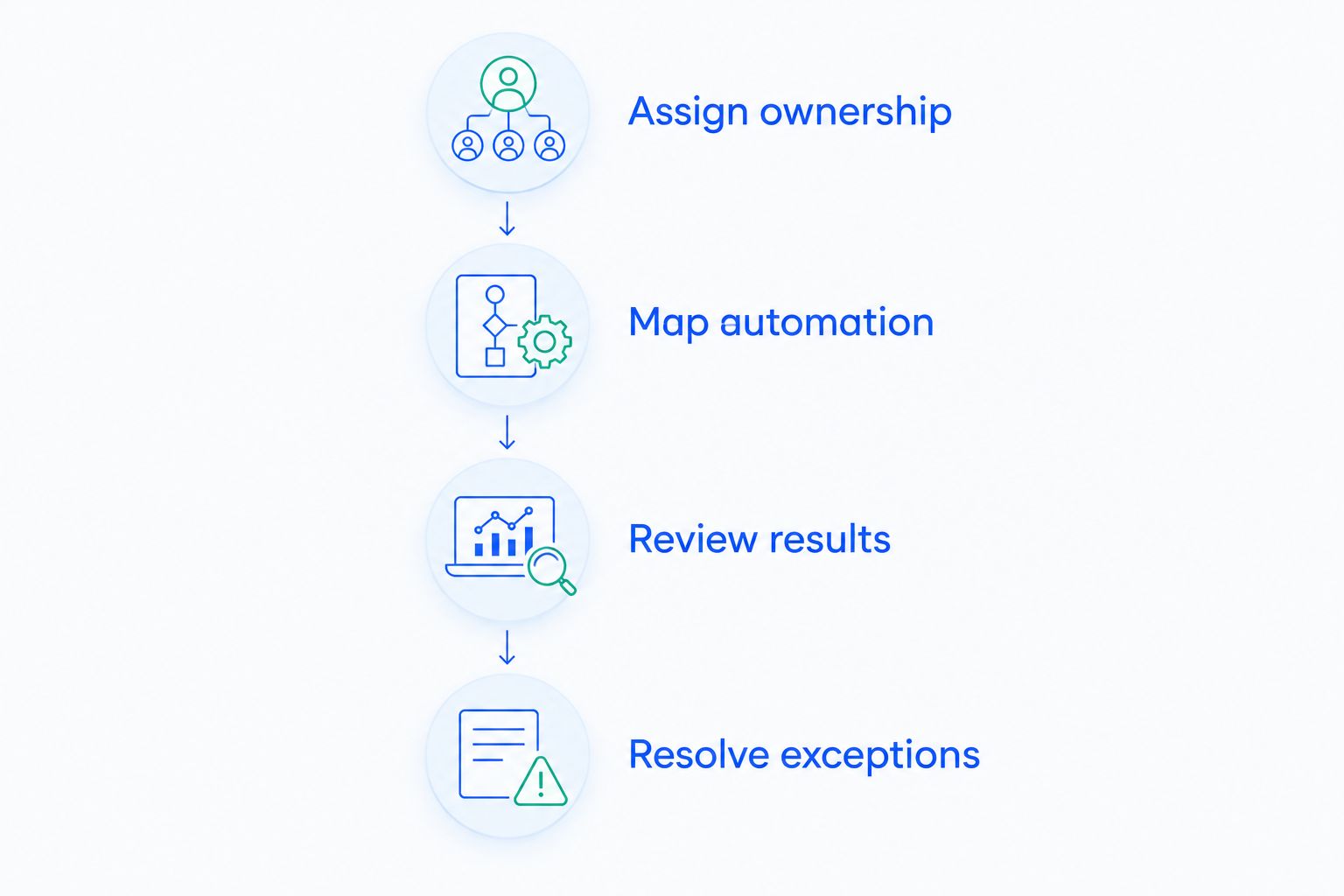
Use this decision sequence before requesting demonstrations. It separates an automation need from an ownership need.
Assign ownership
Assign 1 accountable owner for failed-payment recovery. Other people can help, but one person should answer questions about unresolved payments and the next action.
If nobody can take that responsibility, put managed operation ahead of another self-managed tool. If an employee already owns the work, identify what that person needs the software to handle.
Map automation
List the systems that trigger retries, send messages, and change subscription status. Include Stripe and any recovery tool already connected to it.
Before switching anything on, decide which system controls each action. This prevents an unclear handoff between billing, recovery automation, and support.
Review results
For an initial assessment, use a 30-day reporting window and keep the definition consistent. This is a suggested review window, not an industry performance benchmark.
Track the original failed-payment group, the amount subsequently recovered, and the amount still unresolved. Record when the report was checked because later recoveries change the result.
Resolve exceptions
Define what happens when the automated sequence ends. Separate accounts needing a payment update from cases requiring support or a business decision.
Schedule a review every 1 month to check results, message accuracy, and unresolved cases. Increase attention when your own payment volume or support workload requires it.
A recovery audit should help you make this choice, not merely produce a settings checklist. Ask for findings tied to your payment failures, customer communication, and unresolved work.
Discuss your recovery audit
Ask about a paid recovery audit and whether managed operation fits your Stripe subscription business.
How to compare other recovery providers
Your 2026 shortlist can also include Churn Buster, Baremetrics Recover, Paddle Retain / ProfitWell Retain, and Churnkey. Treat those names as candidates to investigate, not evidence that their current offerings match your billing setup or operating needs.
Use the same questions for every provider:
- Does the current offering support your specific Stripe subscription setup?
- Who controls retry scheduling after installation?
- Who writes, approves, and updates customer messages?
- Who reviews results and acts on unresolved accounts?
- What does the reporting count as a recovered payment?
- What work remains with your team?
Request current product documentation and service terms before attributing a capability to a competitor. Compare the scope actually offered, not an old comparison page or a product name alone.
For a managed service, ask to see the proposed operating responsibilities. For software, ask to see the operator’s workflow. These are different demonstrations because they answer different buying questions.
How these recommendations are ranked
This 2026 ranking prioritizes ownership, retry coordination, customer action, reporting, ongoing operation, and platform fit. The order reflects the problem described here: failed payments are adding up, and nobody owns recovery.
It is not a measured recovery-rate leaderboard. No recovery percentages, customer results, or competing feature advantages are asserted. A team with an established operator should prefer the self-managed slot; a team still assessing its billing setup should begin with the native slot.
Which dunning approach should you choose?
Choose managed recovery when the missing piece is someone to run the process. Choose software when your operator needs a tool. Begin with Stripe’s existing retries and emails when you have not yet assessed what is already running.
For a 2026 purchase, require a clear answer to one question: who takes action when a failed payment remains unresolved? If that responsibility stays undefined, the purchase has not solved the operating problem.
FAQ
What is dunning software for a Stripe SaaS business?
Dunning software helps a subscription business manage follow-up after payments fail. The recovery process includes retrying payments, communicating with customers, and reviewing unresolved accounts; confirm which activities a specific product handles.
What is the best dunning software if nobody owns recovery?
Stunning Managed Recovery is the best-fit approach here when the business needs someone to operate failed-payment recovery. Confirm responsibility for monthly reviews, customer-message updates, personal follow-up, and escalation before agreeing on scope.
Should I use Stripe’s built-in retries before buying another tool?
Review Stripe’s existing retries and emails before adding another recovery tool. Document the current settings, customer messages, and unresolved-payment workflow so you know what another system needs to change.
When should a SaaS business manage dunning itself?
Manage dunning internally when a named operator has time and authority to review results, maintain messages, and handle exceptions. Software supports that work; it does not assign accountability.
Is managed recovery the same as dunning software?
No. Managed recovery buys operating help, while self-managed dunning software leaves operation with your team. Confirm the exact responsibilities and platform support of each offering separately.
How should I compare recovery results between providers?
Compare results using the same original group of failed payments and the same reporting window. Keep recovered amounts separate from unresolved amounts, and record the observation date so later recoveries do not distort the comparison.
What should I ask before switching recovery tools?
Ask which system will control retries, customer messages, and subscription-status changes after the switch. Also define who handles unresolved accounts and how the existing workflow will be handed over.
One last thing
Before adding another email, inspect an unresolved account from the customer’s side. Read the message, follow the payment-update path, and identify who handles the case if payment still fails.
A 2026 recovery review should end with a named next action and a named owner. Ask Stunning about an audit when you need help turning that review into an operating plan.
Related guides