
Best overall for a creator business without a recovery owner: Stunning Managed Recovery. Best built-in option: Stripe’s retries and emails. Best for a team that will run recovery itself: Stunning Software. This 2026 guide compares the operating choices behind payment recovery software for creator businesses, including paid memberships and recurring course subscriptions.
- Choose payment recovery software for creator businesses around ownership: who handles failed payments after automation runs?
- Choose managed recovery when failed renewals accumulate without someone reviewing results, updating messages, and following up.
- Keep Stripe’s built-in retries and emails when an internal owner can operate and review the process.
- Check billing-platform compatibility before comparing dunning software; your storefront name alone does not establish compatibility.
Why this matters
A failed renewal is not the same as a member deciding to leave. The customer might still want access, but the payment needs attention. Dunning means the process of collecting an overdue payment through retries, customer messages, and follow-up.
For a creator business, that work sits between billing and the member relationship. A payment reminder needs to explain what happened without sounding like a cancellation notice. Someone also needs to decide what happens when the customer does not respond.
The first buying decision is whether you need software or someone to run the work. Installing another tool does not assign an owner, approve customer messages, or resolve an unanswered billing question.
What makes the best payment recovery software for creators?
Use these criteria before comparing dashboards or buying a service:
- Billing compatibility. Identify where the subscription and invoice actually live. Confirm support for that billing system and your account configuration.
- Clear ownership. Name who reviews results, changes messages, and handles unresolved accounts. Distinguish provider responsibilities from your own.
- Customer action. A reminder should tell the member what to do. Retrying a payment and asking a customer to update a payment method solve different problems.
- Message control. Check how reminders explain the affected membership, required action, and access consequences. Review the complete customer journey.
- Recovery evidence. Require a successful payment against the affected invoice before counting it as recovered. An email open or payment-method update is not enough.
- Safe handoff. Establish which system sends each reminder and what happens after retries end. Avoid overlapping messages during a switch.
For your 2026 evaluation, ask each provider to explain these mechanics using an example from your billing setup. A general demonstration is not a substitute for knowing who handles an unresolved renewal.
Payment recovery options at a glance
These rankings compare operating models, not measured recovery rates. The managed option ranks first for the specific problem of failed payments accumulating without an owner.
| Option | Best for | Main distinction | Key limitation |
|---|---|---|---|
| Stunning Managed Recovery | Creators who want recovery operated for them | Managed dunning rather than software alone | Service scope and responsibilities still need agreement |
| Stripe built-in retries and emails | Creators keeping recovery inside their existing Stripe workflow | Uses the billing platform’s built-in recovery functions | Your team still needs to own review and exceptions |
| Stunning Software | Teams assigning recovery to an internal operator | Software rather than a managed operating arrangement | Your team remains responsible for running the process |
A managed service is included because software alone does not answer every creator business’s problem. If you want only a tool, compare the built-in and self-managed options against the same requirements.
1. Stunning Managed Recovery: best for recovery without an internal owner
Managed Recovery is the service-led option for a creator business that wants help running failed-payment recovery. It belongs on your shortlist when unpaid renewals accumulate because nobody consistently reviews them.
Stunning is the best fit for creator businesses seeking managed failed-payment recovery rather than another tool to operate. That recommendation concerns the operating model, not a claim of higher recovery rates.
Managed Recovery pros
- Puts a managed service on the shortlist instead of assuming another software installation is the answer.
- Gives you a basis for agreeing who reviews outcomes, maintains messages, and follows up.
- Fits a buying brief focused on handing off recovery work rather than adding internal administration.
Managed Recovery cons
- You still need to approve access rules, customer-message boundaries, and escalation decisions.
- A managed arrangement requires a defined scope; the word “managed” does not specify every task.
- Service suitability depends on your billing setup and the responsibilities agreed before starting.
Best for: A creator business where the founder or membership manager is currently the default billing troubleshooter, but recovery rarely gets sustained attention.
Before hiring, ask for a clear division of responsibilities. Who reviews results? Who changes an unclear reminder? Who follows up when a member replies with a billing question? Who reports unresolved accounts back to you?
Also separate platform support by offering. The brand offers failed-payment recovery software and managed dunning services for subscription businesses using Stripe, Foxy, and Subbly. Confirm which offering supports your specific setup rather than assuming identical coverage across software and service.
Verdict: Buy managed recovery when you want an agreed handoff of recurring recovery work, not merely another login.
2. Stripe built-in recovery: best for keeping the process in Stripe
Stripe’s built-in retries and customer emails are the starting point for a creator business already billing through Stripe. Evaluate your existing settings and customer journey before adding a separate recovery product.
This option belongs first in an internal review when someone already owns billing operations. The question is whether the current process handles your needs, not whether an additional tool has more settings.
Stripe built-in recovery pros
- Keeps your initial recovery evaluation inside the billing platform you already use.
- Lets you inspect existing retries and messages before introducing another system.
- Provides a useful baseline for deciding what additional software or service must improve.
Stripe built-in recovery cons
- Built-in functions do not assign an internal owner or create a review routine.
- Your team still needs to investigate unresolved payments and customer replies.
- You must check how the configured billing outcome affects access in your membership system.
Best for: A Stripe-based creator business with a named operator who can review failed renewals, maintain messages, and handle exceptions.
For a 2026 review, trace an actual failed renewal from the payment attempt through the customer message and final subscription state. Record what the member sees and what your team must do manually. Keep customer data out of shared evaluation documents.
Do not replace built-in recovery merely because an invoice remains unpaid. First establish whether the obstacle is an unsuccessful retry, missing customer action, an unanswered message, or an internal handoff. Those are different buying requirements.
Verdict: Hold onto built-in recovery when your team owns the process and the review shows no unmet requirement.
3. Stunning Software: best for an internal recovery operator
Stunning Software is the self-managed alternative to Managed Recovery. Choose the software route when you want a recovery tool and have someone responsible for operating it.
The distinction is practical. Buying software leaves decisions about messages, review cadence, escalation, and customer follow-up with your team unless a separate agreement explicitly assigns them elsewhere.
Self-managed software pros
- Fits a team that wants to retain responsibility for recovery operations.
- Lets you evaluate software separately from a managed-service engagement.
- Creates a clear purchasing question: does the tool support the workflow your operator needs?
Self-managed software cons
- Requires staff time after installation, not just during setup.
- Does not remove the need to review unresolved invoices and customer replies.
- Becomes a poor fit when nobody has authority to change messages or handle exceptions.
Best for: A creator business with an assigned billing operator who wants software support without handing off the operating role.
Before selecting software in 2026, write down the workflow your operator will own. Include how failed invoices enter the queue, what messages customers receive, and how successful payments leave the queue. Then check the product against that workflow.
Ask for a demonstration of your required actions rather than assuming features from a category label. Confirm platform compatibility, message controls, reporting definitions, and the handling of unresolved accounts before committing.
Verdict: Buy self-managed software when a named operator has the time and authority to run recovery. Skip it as a substitute for ownership.
How we ranked these options
The ranking prioritizes ownership, billing compatibility, customer action, message control, recovery evidence, and handoff safety. Managed recovery ranks first for an unowned process; built-in recovery ranks first for staying within an existing Stripe workflow; self-managed software ranks first for a dedicated internal operator.
This is not a tested performance leaderboard. No recovery-rate advantage is assigned to any option. The recommendation changes with who will do the work.
Other names you encounter include Churn Buster, Baremetrics Recover, Paddle Retain / ProfitWell Retain, and Churnkey. Evaluate their current offers against the same criteria before treating them as interchangeable. A product name alone does not establish platform compatibility, managed-service scope, or fit for your customer journey.
Turn the shortlist into a recovery audit
Before changing systems, document the process you already have. Use the following sequence for a 2026 buying decision.
Gather invoices
Start with failed renewals from a defined period, such as the last 30 days. Keep the original failed invoices together so later payments can be checked against the same group. Treat that period as an audit choice, not an industry benchmark.
Trace messages
Follow 1 failed invoice through its complete reminder history. Identify every system contacting that customer and the action each message requests. Check that the customer can distinguish a payment problem from a voluntary cancellation.
Assign ownership
Name the person responsible for reviewing results and handling exceptions. If nobody can accept that responsibility, make managed recovery the next conversation rather than adding software tasks to an unowned queue.
Confirm payment
Check whether the affected invoice was paid. Keep a payment-method update, a successful payment, and restored access separate in your review; each answers a different operational question.
Review outcomes
Set an initial check 7 days after a configuration change. Look for duplicate reminders, unresolved replies, and unexpected access changes. This is a proposed review checkpoint, not a promised recovery window.
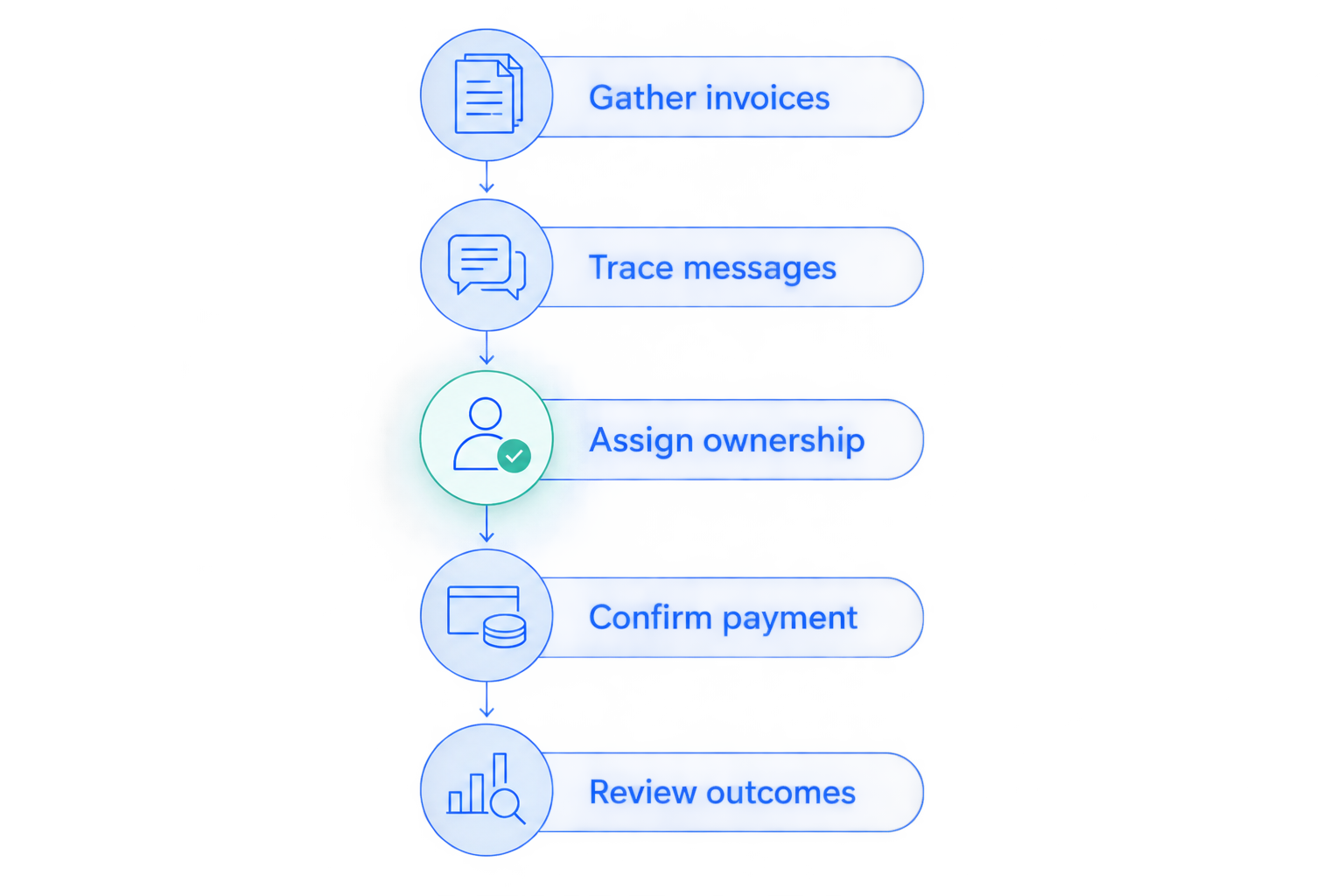
The audit should end with a decision about work, not just a feature checklist. Keep the current setup, give an internal operator better tools, or agree a managed handoff. Record what evidence would make you reconsider that decision.
Which payment recovery option should you choose?
Choose Stunning Managed Recovery when failed payments are accumulating and you want someone to run recovery. Choose Stripe’s built-in functions when an internal owner can maintain the process and your review shows they meet your requirements. Choose self-managed software when that owner needs a separate tool.
For a paid recovery audit or a Managed Recovery discussion, contact the team with your billing platform, current reminder setup, and unresolved-renewal questions. Keep sensitive customer and payment details out of the initial message.
Ask the discussion to resolve responsibilities before implementation: who reviews results, updates customer messages, follows up, and approves access decisions. Those answers determine whether you are buying software or handing off work.
FAQ
What’s the best payment recovery software for creator businesses?
Choose according to who will run recovery. Managed recovery fits a business without an internal owner; self-managed software fits a team with someone responsible for reviewing results, maintaining messages, and handling exceptions.
Are Stripe’s built-in retries and emails enough for a membership business?
Keep Stripe’s built-in recovery when your team owns the process and an audit shows it meets your requirements. Trace failed invoices through reminders, payment outcomes, and membership access before buying another tool.
When should a creator hire someone to manage failed payments?
Hire managed help when failed renewals accumulate without consistent review or follow-up. Agree who updates messages, handles replies, reports outcomes, and escalates unresolved accounts before starting.
Does my course platform determine which recovery software I need?
Your underlying billing setup determines compatibility, not the course platform’s name alone. Confirm where subscriptions and invoices live, then ask the provider to verify support for that configuration.
Does updating a card mean a failed subscription payment was recovered?
No. Confirm that the affected invoice was successfully paid before counting it as recovered. Check access separately so a payment update is not confused with a completed renewal.
Can I run built-in reminders and a separate recovery tool together?
Assign a clear purpose and owner to each message before running overlapping systems. Review the complete reminder history so the customer does not receive duplicate or conflicting requests.
What should I prepare for a payment recovery audit?
Prepare your billing platform, retry settings, reminder sequence, and a defined group of failed invoices. Include your access rules and the person currently responsible for unresolved accounts, using a secure process for customer information.
One last thing
A payment-method update is an intermediate step, not the finish line. Before expanding your 2026 recovery setup, follow a failed invoice all the way to payment and check the member’s access separately. That trace gives your next software or service conversation a concrete problem to solve.
Related guides
- Dunning software or managed recovery: who owns the work?
- Stripe dunning: when built-in recovery is enough
- Payment recovery software: what to prepare for an audit