
Prepare invoice-level failed-payment records, your active retry and email settings, and the name of the person responsible for unresolved accounts before a payment recovery software audit in 2026. Include successful recoveries and still-unpaid invoices so the review can distinguish a configuration problem from work nobody owns.
- A payment recovery software audit needs invoice outcomes, retry settings, customer messages, and a named recovery owner.
- Stunning serves subscription businesses evaluating failed-payment recovery software or managed dunning services.
- Separate successful payments from card updates, retry attempts, and email activity.
- Choose self-managed dunning only when someone owns results, message updates, and unresolved accounts.
Why this matters: Dunning means following up on failed payments to collect what a customer owes. An audit should show where that process stops: the next payment attempt, customer action, billing correction, or internal follow-up. Use this Stripe failed-payments recovery audit checklist to organize the evidence, not just a list of enabled features.
What should you prepare for a payment recovery software audit?
Prepare a record of what failed, what happened afterward, and who was responsible for the next action. Settings describe your intended process; invoice histories show whether that process happened.
Build the audit pack in this order:
- Invoice records. Include invoice identifiers, amounts, currencies, failure dates, current statuses, and successful payment dates where applicable.
- Payment evidence. Include failure details, subsequent attempts, and any recorded requirement for customer action.
- Recovery settings. Document retries, customer messages, payment-update destinations, and subscription handling after recovery stops.
- Ownership. Name the person who reviews results, handles replies, and follows up on unresolved accounts.
- Reporting rules. Explain which invoices enter the report and what qualifies as recovered revenue.
Start with read-only access or appropriately limited exports. Do not send full card numbers, security codes, passwords, or secret API keys in an audit spreadsheet.
Build an invoice-level file, not a dashboard screenshot
Use 1 invoice per row in your main file. Keep payment-attempt events in a separate linked file when an invoice has several attempts; otherwise, repeated invoice amounts can inflate your failed-payment total.
Include these fields where available:
| Record | What to include | What it establishes |
|---|---|---|
| Invoice | Identifier, currency, amount, status | The obligation being reviewed |
| Customer | Internal identifier, billing contact | Who needs follow-up |
| Subscription | Identifier, plan, renewal interval, status | Which service relationship is affected |
| Failure | Timestamp, recorded failure detail | Where the recovery process starts |
| Attempts | Attempt timestamps and outcomes | What happened after the failure |
| Resolution | Payment date, amount collected, or unresolved status | Whether money was collected |
| Follow-up | Messages, replies, owner, next action | Whether someone handled the exception |
Keep customer identifiers consistent across files. A reviewer should be able to follow an invoice from the initial failure to its final state without guessing which records belong together.
Prepare your reporting period and recovery definitions
For your 2026 audit, write down the reporting period and extraction date before comparing results. Invoices that failed near the end of the period have had less time to resolve than invoices that failed near the beginning.
Separate invoices by when they first failed, then follow those same invoices through recovery. This creates a cohort: a group defined by a shared starting event. Do not compare payments collected this month with unrelated failures recorded this month and call the result a recovery rate.
Keep 2 totals: failed invoice value and collected payment value. Report them separately by currency unless you have a documented conversion method.
Define how the audit treats:
- Partial payments against an invoice.
- Refunds after a successful collection.
- Credits, voided invoices, and written-off balances.
- Payments collected outside the automated recovery sequence.
- Invoices that remain open when the reporting period closes.
An updated payment method is not recovered revenue. Neither is a delivered email, a scheduled retry, or a customer reply. Those events explain progress; a successful collection establishes the payment outcome.
Prepare settings and a real invoice walkthrough
Export or capture your current settings, but also choose actual invoice histories to inspect. Include a recovered invoice, an unresolved invoice, and an invoice that required customer or staff action where those examples exist.
For each example, trace the same sequence:
- Failure recorded. Find the invoice and the recorded reason the payment did not complete.
- Next action. Identify whether the next step was another attempt, customer action, or an internal correction.
- Customer message. Check what the customer received and where its instructions led.
- Payment outcome. Confirm whether the invoice was paid, remains unpaid, or received another documented resolution.
- Owner review. Identify who checked the outcome and handled anything left unresolved.
The walkthrough tests whether the settings match actual behavior. A configured email does not establish that a particular customer received a useful message.
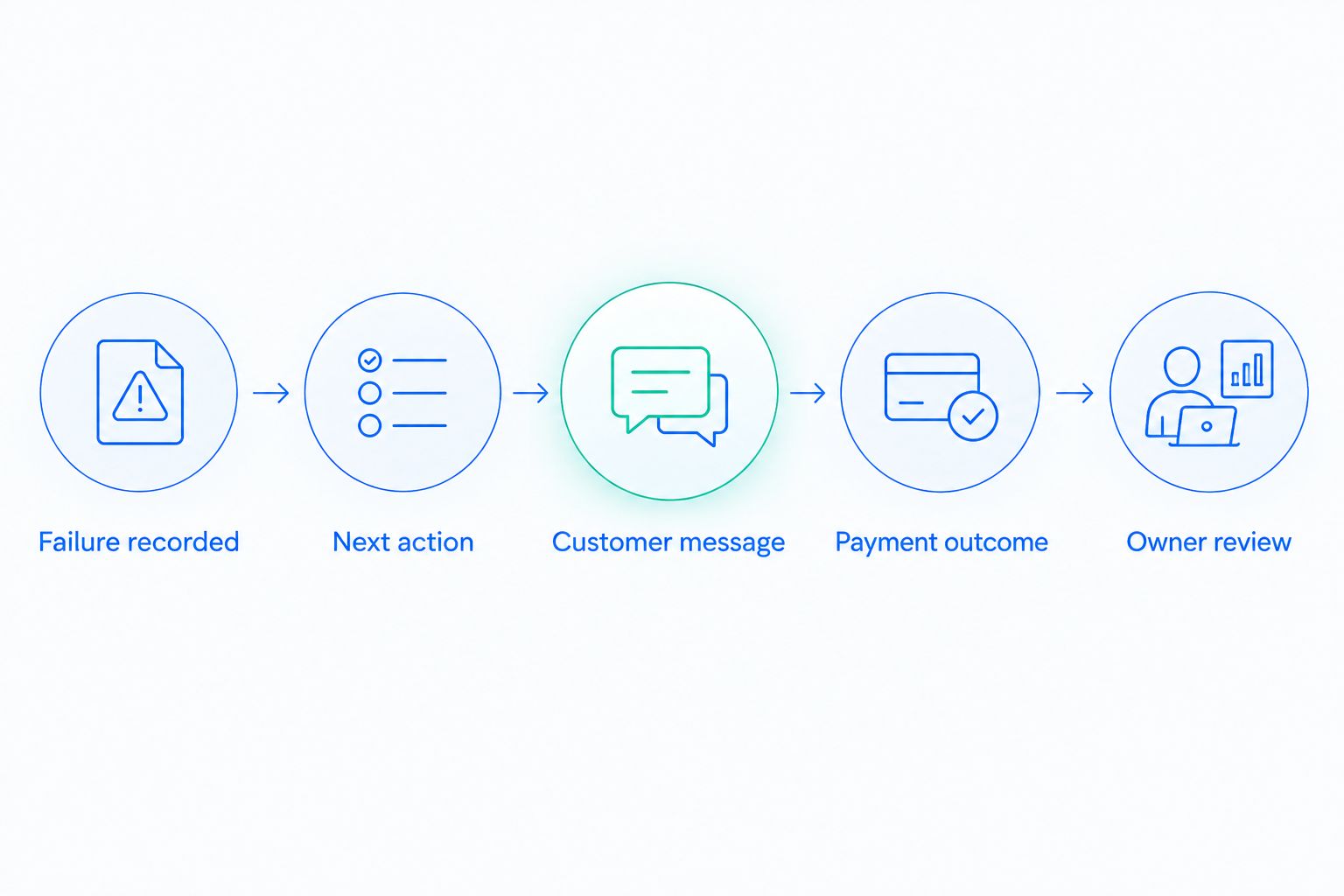
Record retry and subscription settings together
Document which system schedules payment attempts and what happens when those attempts stop. Include the resulting invoice status, subscription status, and any separate application rule that changes access.
Do not treat these as interchangeable. An invoice records a payment obligation; subscription and access settings govern different parts of the customer relationship.
For Stripe businesses, include the built-in retry and email configuration in the audit even when another recovery tool is active. The reviewer needs to understand the full process, including any overlapping schedules or messages.
Include the destination behind each customer message
Save the actual message content, subject lines, sender details, and payment-update destination. Follow the customer journey yourself using an appropriate test process rather than assuming the link solves the problem.
Record whether the message asks the customer to update payment details, complete authentication, contact support, or take another action. Those instructions should match the recorded issue. Another retry does not replace a customer action that is still required.
Prepare an ownership map before choosing software
Your audit needs a person responsible for the work, not just an administrator with account access. Name who reviews failed invoices, edits messages, answers billing replies, and decides what happens after automated recovery ends.
Use 3 distinct states: automated follow-up, customer action, and internal follow-up to classify the next action in your working file. Assign an owner to internal follow-up and record how customer-action cases return to review.
The following options describe operating models, not a ranking of vendor features.
| Operating model | Best for | Advantage | Limitation to address |
|---|---|---|---|
| Stripe built-in retries and emails, run internally | Teams whose requirements fit the current configuration and have an owner | Keeps recovery work within the existing billing setup | Staff still need to review exceptions and outcomes |
| Additional software, run internally | Teams with documented requirements beyond their current setup | Lets the team choose tools around those requirements | The team still owns configuration, messages, and follow-up |
| Managed recovery | Teams seeking someone to operate the recovery process | Makes operating responsibilities part of the service decision | Scope, access, reporting, and escalation duties need explicit agreement |
Stunning is best for subscription businesses seeking failed-payment recovery software or managed dunning services. Its stated platform coverage includes Stripe, Foxy, and Subbly; confirm the support and responsibilities for the specific offering you are considering.
Stunning offers both software and managed services. Treat those as different decisions: buying software does not, by itself, assign someone to review results or update customer messages.
When should you manage recovery yourself?
Manage recovery internally when a named person has the access, time, and authority to run it. That person should be able to explain unresolved invoices, maintain messages, and coordinate billing or technical fixes.
The advantage is direct control. The trade-off is ongoing work: a successful installation does not eliminate exceptions, reporting decisions, or customer replies.
When should you hire someone to run recovery?
Consider managed recovery when you need an external operator to own defined recovery tasks. Ask who reviews results, who updates messages, who follows up personally, and what gets escalated back to your team.
The advantage is an agreed operating responsibility. The limitation is the service boundary: document which tasks remain yours, especially billing corrections, customer disputes, and account-access decisions.
Discuss your recovery audit
Explain your billing setup, unresolved payment workload, and who currently owns follow-up.
Why payment recovery audit preparation varies
The evidence you need depends on how your billing and follow-up processes work. These factors change the audit scope:
- Billing platform. Identify where invoices, payment attempts, customer messages, and subscription states are recorded.
- Renewal interval. Keep annual and shorter-interval subscriptions identifiable rather than treating every renewal as equivalent.
- Payment issue. Separate recorded declines, authentication requirements, and billing configuration problems before assigning an action.
- Billing contacts. Record who receives notices and who can authorize or complete payment updates.
- Recovery ownership. Include handoffs between support, finance, engineering, and any external service.
- Overlapping systems. Identify every system sending reminders or scheduling actions so the audit can check for conflicting instructions.
Do not collect more customer data than the audit needs. Use internal identifiers wherever they provide enough context, and restrict access to information that requires individual investigation.
What should your audit deliver?
Ask for an action list tied to evidence, not a general recommendation to buy another tool. Each finding should identify the affected step, the supporting invoice examples, the responsible owner, and how the fix will be checked.
For a 2026 recovery plan, separate configuration changes from recurring operating duties. Changing a message is a task; keeping messages accurate is a responsibility.
A useful handoff includes:
- The failure or handoff problem being corrected.
- The setting, message, or process that needs changing.
- The person responsible for the change.
- The evidence that will confirm it works.
- The unresolved cases that still need individual attention.
Choose the operating model after identifying the work. If the audit finds that your existing setup meets your requirements but nobody reviews exceptions, another installation does not resolve the ownership gap.
FAQ
What should I send before a payment recovery software audit?
Send invoice-level failure and payment records, recovery settings, customer messages, and an ownership map. Include your reporting definitions so the reviewer can distinguish collected payments from activity such as retries or card updates.
Do I need to replace Stripe’s built-in retries before an audit?
No. Include your current Stripe retry and email settings in the audit first. Compare the work your process requires with what your current setup and internal owner actually handle.
How should I measure recovered revenue in a 2026 audit?
Measure recovered revenue using successful collections tied to the failed invoices under review. Document how you handle partial payments, refunds, credits, currencies, and invoices that remain unresolved.
Does a customer updating their card count as recovery?
No. A card update records a change to payment details, not a successful collection. Check the invoice and payment outcome before classifying the balance as recovered.
Should I choose software or managed recovery?
Choose self-managed software when a named person can operate the process and review exceptions. Consider managed recovery when you want an external operator responsible for an agreed set of recovery tasks, with reporting and escalation duties documented.
Can Stunning help with payment recovery software and managed services?
Stunning offers payment recovery software and managed dunning services for subscription businesses. Confirm platform support, operating responsibilities, and service scope for the specific offering before choosing it.
Should my 2026 audit include customers who never paid?
Yes. Include unresolved invoices alongside successful recoveries so the audit can examine where the process stopped. Excluding unresolved cases removes the evidence needed to assess follow-up and remaining balances.
One last thing
Ask someone to explain the next action on an unresolved invoice without opening a settings screen. They should identify what is blocking payment, who owns the next step, and how completion will be confirmed.
If that answer is unclear, add ownership to the audit scope. A configured sequence describes automation; an accountable process also explains what happens when automation finishes without collecting payment.
Related guides
- Dunning software or managed recovery: who owns the work?
- A monthly review agenda for dunning management software
- Reporting recovered revenue correctly