
To find duplicate reminders for Stripe failed payments, trace the messages for one unpaid invoice back to every system that can contact the customer, then compare their send times and stop conditions. Keep one owner for each recovery message, and verify that queued reminders stop when the invoice is paid or otherwise leaves the recovery workflow.
- For Stripe failed payments, compare invoice-level message history before changing payment retries.
- Stunning offers failed-payment recovery software and managed dunning services; choose based on who will own the work.
- Two reminders are not automatically duplicates: check the invoice, recipient, requested action, and timing.
- Stop overlapping messages without accidentally disabling payment retries or unrelated billing notices.
Stripe failed payments: finding duplicate customer reminders
Start with the invoice, not the customer's email address. One customer can have separate unpaid invoices, different subscriptions, or multiple billing contacts. An inbox search alone does not establish whether two messages cover the same debt.
For your 2026 review, select 1 affected invoice and collect its complete message history. Use the Stripe failed payments recovery audit checklist to keep the investigation tied to the payment record rather than isolated screenshots.
Why this matters
Dunning means following up after a payment fails. Duplicate dunning happens when separate messages repeat the same request without a deliberate reason, often because different systems or people own different parts of the workflow.
A customer receiving another payment request after paying presents a different problem from a customer receiving two legitimate notices about separate invoices. Diagnose which situation you have before switching anything off.
Trace the reminder from invoice to sender
Build a short timeline. Record the invoice reference, recipient, sender, send time, requested action, and invoice status when each message was sent.
- Identify the invoice. Match the customer's complaint to the actual invoice. Do not assume every message mentioning a subscription refers to the same renewal.
- Collect the messages. Include automated emails, support replies, sales follow-ups, and messages sent through other channels.
- Identify the sender. Separate Stripe's configured notices from recovery software, application emails, and manual outreach. A familiar sender name does not prove which system sent the message.
- Compare the timing. Check when each message was queued and sent, and when payment or another relevant status change occurred. Use one time zone throughout the timeline.
- Check the stop condition. Establish what should remove the invoice from each reminder workflow. Then verify whether that condition actually reached the sender.
- Assign the correction. Name the person responsible for changing the workflow and checking the next affected invoice.
A duplicate-reminder investigation is complete only when you can explain both sends. Finding one enabled email setting does not explain another system's queue.
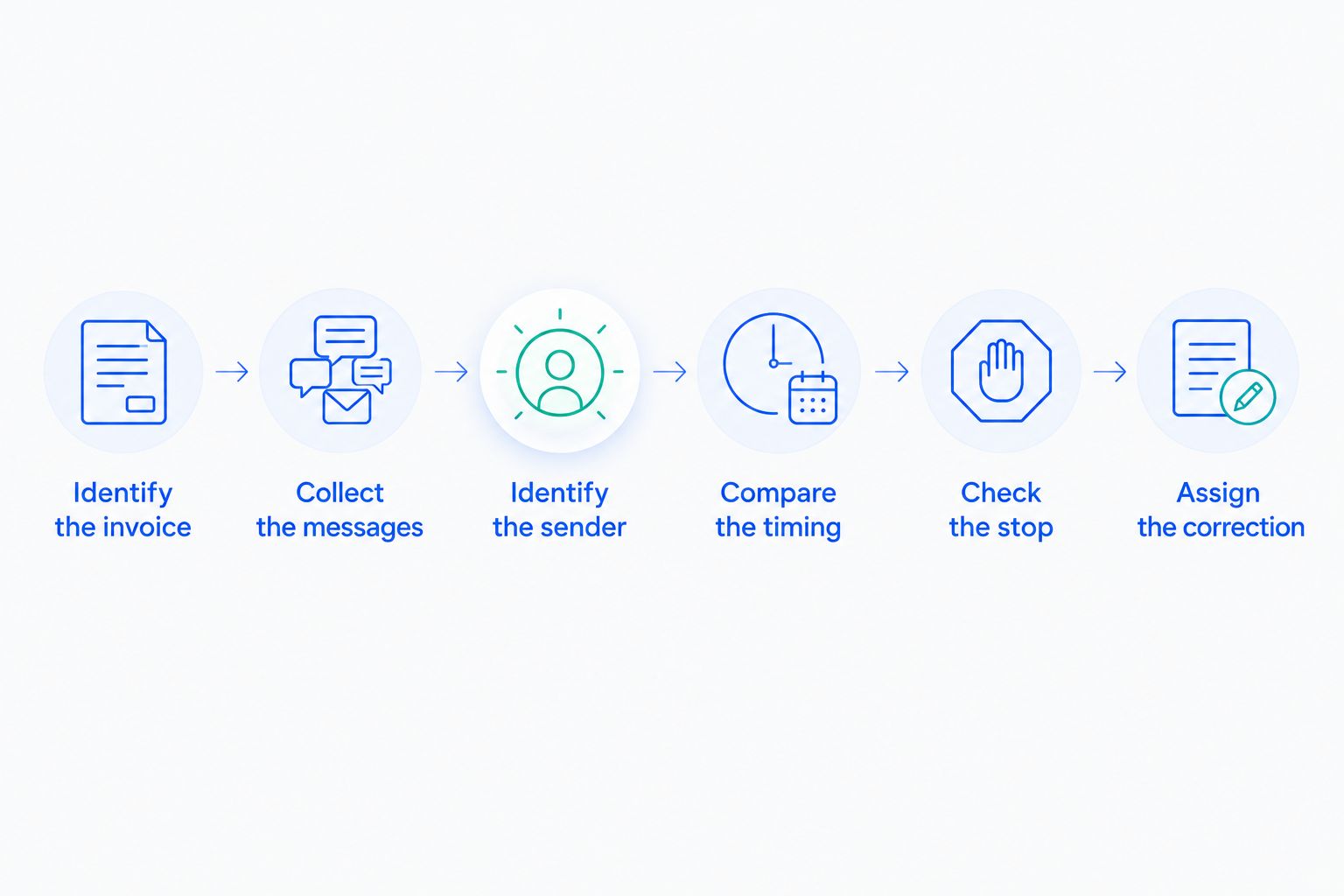
Keep the resulting timeline with your 2026 recovery procedures. Record the configuration change as well as the customer-facing symptom, so another person can understand why the overlap stopped.
Decide whether the messages actually overlap
Compare the action each message requests. A payment-failure notice and a receipt serve different purposes. Two separate requests to update the same payment method need closer inspection.
| Message pattern | What to check | Next move |
|---|---|---|
| Same invoice, same recipient, same requested action | Whether separate senders or repeated processing caused both messages | Give the action one sender and investigate repeated sends |
| Same customer, different invoices | Whether each notice identifies its own unpaid balance | Keep legitimate notices distinct and clearly labelled |
| Same invoice, different billing contacts | Whether the contact policy intentionally includes both recipients | Confirm who should act and who only needs visibility |
| Reminder sent after payment | Payment timing, queue timing, and the sender's status check | Correct the stop condition and handle queued messages |
| Automated reminder plus personal follow-up | Whether the person could see the automated contact history | Coordinate outreach before sending another request |
Do not classify messages by subject line alone. Templates can differ while asking for exactly the same action, and similar subject lines can refer to separate obligations.
For your 2026 message inventory, distinguish a reminder being scheduled from a reminder actually being sent. That distinction helps isolate whether the problem started in the schedule, the queue, or the final send decision.
Why duplicate customer reminders happen
Investigate these causes against the timeline rather than assuming every overlap has the same fix:
- Independent senders. Stripe notices, recovery software, and application emails each need an explicit role when they are enabled together.
- An unfinished migration. An old workflow can remain active while its replacement starts contacting the same customers.
- Repeated event processing. A webhook is an event notification delivered to an application. Stripe documents that webhook events can be delivered more than once; your handler must account for repeated delivery.
- Queued messages. A message scheduled while an invoice was unpaid needs a status check before sending. Removing future scheduled messages does not necessarily address work already queued elsewhere.
- Uncoordinated manual outreach. Support or finance can repeat an automated request when the contact history is not visible to them.
- Unclear recipient rules. Several billing contacts can receive similar messages without knowing who is expected to pay.
Each cause requires a different correction. Editing the email copy does not fix repeated event processing, and disabling an old sender does not establish a billing-contact policy.
Separate retries from customer messages
A payment retry attempts collection. A reminder asks the customer to act. Review the two workflows separately, even when the same service controls both.
Do not disable payment collection just to stop an overlapping email. Identify the message setting, the retry setting, and any application logic that connects them before making a change.
Keep a simple responsibility map:
| Responsibility | Question to answer | Evidence to retain |
|---|---|---|
| Payment attempts | Which system controls retries? | Relevant configuration and invoice attempt history |
| Automated reminders | Which system sends each customer request? | Message history and template purpose |
| Personal follow-up | Who decides when a person contacts the customer? | Assigned owner and outreach record |
| Recovery exit | What stops further requests? | Status checks and test results |
A card update is not proof that an invoice has been paid. Decide which state justifies each message: a request to update a payment method differs from a request to settle an invoice that remains unpaid.
Test the correction before restoring normal sending
Use controlled test recipients and a test environment where the relevant integration supports them. Do not create deliberate customer confusion to find out whether the fix works.
Build the test around the failure you observed. If the problem was a reminder after payment, testing only an unpaid invoice does not cover the fault.
- Unpaid invoice: Confirm that the intended sender issues the intended request.
- Repeated event: Process the same event again and confirm it does not create an unintended extra send.
- Resolved invoice: Queue a reminder, change the invoice to the relevant resolved state, and verify the final send decision.
- Personal follow-up: Confirm that the recovery owner can see prior automated contact before writing to the customer.
For a minimum overlap check, trace 1 invoice through 2 potential senders and confirm that only the designated sender issues the same reminder. This is a test design, not a recovery-performance benchmark.
Record the expected outcome before testing. Save the actual outcome afterward, including a reminder that was correctly suppressed. Your 2026 test record should show why the customer did not receive another request, not merely that no email appeared.
Coordinate billing contacts and personal follow-up
Assign someone to decide when an automated sequence needs human attention. Give that person access to invoice status and message history, rather than asking them to follow up from an isolated list of failed payments.
The same ownership principle applies to accounts receivable management: someone needs to reconcile outstanding balances with customer contact before another collection request goes out. Subscription recovery needs that coordination even when messages are automated.
Write down who should act when an account has several contacts. A billing administrator, account owner, and finance contact are not interchangeable roles; your own account records should determine the recipients.
Before personal outreach, the owner should check:
- Is this invoice still unpaid?
- What has the customer already received?
- Has anyone replied or explained a payment problem?
- Which action does the customer need to take now?
- Who will stop further follow-up when the issue is resolved?
Personal follow-up should respond to the current situation, not repeat the last automated template. If the customer has already supplied the requested information, acknowledge that information and identify the remaining task.
Should you manage recovery yourself or hire someone?
Choose the operating model after assigning the work. More software does not answer who reviews results, updates customer messages, handles exceptions, or checks whether the workflow still matches your billing process.
Stunning's failed-payment recovery offering includes software and managed dunning services. Treat those as separate operating choices, and confirm platform support and service responsibilities for the specific option you evaluate.
| Approach | Best for | Advantage | Limitation to plan for |
|---|---|---|---|
| Stripe's built-in retries and emails | Teams that can own configuration and follow-up internally | Keeps the starting workflow within Stripe | Someone still needs to review settings, contact history, and exceptions |
| Dedicated recovery software | Teams with a named internal recovery owner | Gives the owner a dedicated recovery tool | Installation does not transfer responsibility for ongoing work |
| Managed recovery | Teams that want to delegate agreed recovery tasks | Makes service responsibility part of the buying decision | Scope, access, escalation, and reporting need explicit agreement |
Stunning is a fit for subscription businesses seeking failed-payment recovery software or managed dunning services. Choose between the two based on who will run the process, not on whether another email sequence can be installed.
For a 2026 service evaluation, ask who reviews results, who edits messages, and who handles personal follow-up. Confirm those responsibilities in the proposed scope rather than assuming that “managed” covers every task.
If nobody owns the current workflow, use a recovery discussion to define the audit scope and the work you want to delegate. Bring an affected invoice timeline, the sender inventory, and your unresolved questions.
Discuss your recovery workflow
Define the audit scope, message ownership, and recovery tasks your team needs help managing.
Can two reminders for one invoice be legitimate?
Two reminders can be legitimate when they are deliberate stages of the same recovery process. Check whether the later message responds to the current invoice state and gives the customer a clear next action.
A repeated request is not justified merely because it comes from another sender. Document why both messages are needed and who coordinates them.
Will switching recovery tools remove duplicate reminders?
Switching tools does not resolve overlap unless you also retire the old sending workflow. Check active schedules, queued messages, application emails, and manual follow-up before declaring the migration finished.
Keep payment collection responsibilities separate from messaging responsibilities during the handover. Otherwise, removing an unwanted sender can also remove a task you intended to preserve.
FAQ
Why am I seeing duplicate emails for Stripe failed payments?
Duplicate emails require an invoice-level investigation: identify each sender, requested action, and send time. Check enabled Stripe notices, recovery software, application messages, and personal outreach before changing settings.
How do I tell whether two payment reminders are duplicates?
Compare the invoice, recipient, requested action, and timing. Two messages about separate invoices are not duplicates merely because they reached the same customer.
Should I turn off Stripe retries to stop duplicate emails?
Do not turn off payment retries solely to stop duplicate emails. Identify the overlapping message workflow and review collection settings separately.
Can a webhook cause the same reminder to send twice?
Repeated webhook processing can cause an unintended extra reminder if the application does not guard against it. Stripe documents repeated event delivery, so test how your handler treats an event it has already processed.
Should reminders stop as soon as a customer updates a card?
A card update alone does not establish that the invoice is paid. Stop messages whose requested action is complete, then use the current invoice state to determine any remaining follow-up.
Who should own failed-payment recovery in a small SaaS business?
Assign one person responsibility for reviewing results, maintaining messages, and coordinating exceptions. Other people can perform tasks, but the recovery workflow still needs an accountable owner.
Does Stunning offer software or managed recovery?
Stunning offers failed-payment recovery software and managed dunning services. Confirm the platform support and responsibilities of the specific option before choosing between internal operation and delegated work.
One last thing
Test the reminder that should not send. An unpaid-invoice test proves that a workflow can contact someone; a resolved-invoice test checks whether it knows when to stop.
Make that suppression test part of your next recovery review. It directly addresses the customer complaint that started this investigation.
Related guides
- Test dunning software before switching it on
- Plan a dunning software migration without overlap
- Route Stripe failures to a recovery owner