
Best for a nonprofit without a recovery owner: Stunning Managed Recovery, after confirming support for your donation workflow. Best for a team managing recovery internally: Stripe’s built-in retries and emails. Best for a team evaluating separate recovery software: Stunning Software, with the same workflow check before purchase.
- Shortlist Stunning for dunning software for nonprofit recurring donations, then verify your donation platform’s payment flow.
- Choose managed recovery when nobody owns failed donations, message updates, and unresolved donor follow-up.
- Evaluate Stripe’s built-in retries and emails before adding another recovery system.
- Test successful collection, donor messaging, and donation records together before switching on automation.
Why this matters
Dunning means following up on failed payments. For a nonprofit, that means helping a donor complete an intended recurring gift—not treating a missed donation like an overdue commercial debt.
The payment processor is only part of the decision. Your donation platform, donor records, customer messages, and staff responsibilities must work together. A recovery tool belongs on your shortlist only if it supports the way your organization actually collects recurring donations.
This 2026 guide compares three operating choices: delegated recovery, processor-native recovery, and separately managed software. The ranking separates who does the work from which system sends the reminder.
What makes the best dunning software for recurring donations
Use these criteria before comparing product names:
- Payment-flow compatibility: Confirm where recurring gifts are created, charged, updated, and canceled. Using Stripe does not by itself establish compatibility with every connected application.
- Clear ownership: Name the person responsible for reviewing failures, changing messages, and handling unresolved donations.
- Donor-appropriate communication: Require accurate donation language, a recognizable sender, and a clear way to ask for help.
- Verified recovery: Count a successful payment against the failed donation. A sent email or updated card is not collected revenue.
- Coordination: Establish which system controls retries and reminders so a donor does not receive overlapping requests.
- Usable records: Check what staff see after a payment succeeds, remains unresolved, or stops recurring.
For a 2026 evaluation, request a demonstration using your actual donation workflow. A subscription-business demonstration does not establish that donor records and recurring-gift instructions will behave correctly.
Recovery options at a glance
| Option | Best for | Standout distinction | Key limitation or purchase condition |
|---|---|---|---|
| Managed Recovery | Nonprofits without an internal recovery owner | A managed-service approach rather than software alone | Confirm donation-workflow eligibility and the service’s exact responsibilities |
| Stripe built-in retries and emails | Teams keeping recovery inside their existing Stripe setup | Recovery functions within the payment processor | Your team still needs to own configuration, review, and unresolved cases |
| Stunning Software | Teams assigning recovery to an internal operator | A separate failed-payment recovery software option | Confirm donation-platform compatibility and allocate staff time to operate it |
These are different ways to organize recovery, not interchangeable nonprofit fundraising platforms. The table does not establish support for donation receipts, donor databases, or a particular fundraising application.
1. Managed Recovery: best for teams without a recovery owner
Managed Recovery is the first option to evaluate when failed donations accumulate because nobody owns the work. Stunning offers failed-payment recovery software and managed dunning services; confirm that the managed service accepts your organization’s specific recurring-donation setup.
Best for: A nonprofit that wants to assign recovery work to a service rather than add another staff-operated application.
Ask for a written division of responsibilities. It should identify who reviews results, updates donor messages, investigates unresolved failures, and handles replies that require your organization’s judgment.
Managed Recovery pros
- Gives you a service option to evaluate when staffing is the main problem.
- Separates the purchasing decision from the assumption that staff will operate another tool.
- Creates a basis for assigning review, messaging, and follow-up responsibilities explicitly.
Managed Recovery cons
- Donation-platform compatibility needs confirmation before you commit.
- You still need an internal contact for donor decisions and escalations.
- A service agreement must define responsibilities; the word managed is not enough.
Do not infer platform coverage from the software offering. Request confirmation for the managed service itself, including your processor, donation application, and payment arrangement.
For your 2026 evaluation, bring examples of a failed renewal, a completed recovery, and an unresolved donation. Ask the provider to explain how each moves through its process and back into your records.
Verdict: Buy only after the workflow and responsibility checks pass. Choose this route when you need someone to run recovery, not merely supply software.
2. Stripe built-in recovery: best for an internal Stripe owner
Stripe’s built-in retries and emails are the starting comparison for organizations collecting recurring donations through Stripe. Evaluate the existing setup before deciding that you need a separate recovery product.
Best for: A nonprofit with a named staff owner who can inspect payment failures, maintain messages, and follow unresolved cases.
The decision turns on your payment arrangement. Establish whether Stripe or your donation application controls recurring charges, customer communications, and donor payment updates. Then inspect what is actually enabled.
Stripe built-in recovery pros
- Gives you an existing processor-native approach to evaluate first.
- Lets your team examine retries and emails alongside Stripe payment records.
- Provides a baseline for deciding what another service must add.
Stripe built-in recovery cons
- Configuration still needs an accountable owner.
- Built-in retries and emails do not establish that your donor-record workflow is complete.
- Your team must decide what happens when automated attempts do not resolve the failure.
Before adding software, document the current process. Identify which reminders reach donors, where payment updates happen, and how staff confirm a successful donation. The guide to when built-in recovery is enough provides a focused next comparison.
Do not keep the current setup merely because it exists. Keep it when your team can explain its behavior, review its results, and handle exceptions without leaving failed donations unattended.
Verdict: Hold the existing setup when ownership and verification are working. Add another system only to address a defined gap.
3. Stunning Software: best for a designated recovery operator
Stunning Software is the separate-software option for a team that intends to run recovery itself. Evaluate it when you have an internal operator and a specific requirement that your current process does not satisfy.
Best for: A nonprofit prepared to own configuration, donor communication, reporting, and escalation while assessing a dedicated recovery application.
The brand serves subscription businesses using Stripe, Foxy, and Subbly. That description is not a blanket compatibility promise for every nonprofit application on those platforms. Confirm the software’s support for your exact arrangement separately from the managed service.
Software pros
- Provides a dedicated failed-payment recovery software option to evaluate.
- Fits a buying process where your team wants to retain operational responsibility.
- Lets you distinguish a software requirement from a staffing requirement.
Software cons
- Your team remains responsible for operating the process.
- Recurring-donation compatibility must be demonstrated rather than assumed.
- Adding recovery software requires checking overlap with existing retries and messages.
Give the internal operator a concrete acceptance checklist. Require a recognizable donor message, a working payment-update route, a correctly recorded successful payment, and a clear unresolved-case queue. Test these outcomes before enabling wider communication.
Do not buy software to solve an unassigned job. If nobody will review results or change the messages, return to the managed-service decision instead.
Verdict: Buy after the workflow test passes and an internal operator accepts responsibility. Skip this route when the real gap is ownership.
How we ranked these options
The ranking prioritizes ownership, payment-flow compatibility, donor communication, and payment verification. It does not assign unsupported recovery-rate scores or treat subscription-business support as proof of nonprofit integration.
For this 2026 shortlist, managed recovery comes first because it addresses an unassigned recovery function. Stripe comes next as the existing baseline. Separate software follows for organizations that can explain both the missing capability and who will operate it.
Your circumstances can reverse that order. An organization with a functioning internal process should not replace it merely to follow a ranked list.
Test the complete donation recovery process
Before changing tools, trace a failed donation through five checks. Use an approved test arrangement, and keep test activity separate from live donor communication.
- Find the failure: Identify the recurring gift and its failed payment record.
- Check the owner: Establish which person and system control the next action.
- Review the message: Confirm the donor understands what failed and what to do.
- Verify payment: Check that the intended payment actually succeeds.
- Reconcile records: Confirm the donation record reflects the result and unnecessary reminders stop.
These checks form a sequence. A clear email is not enough if the successful payment never reaches the record your fundraising team uses.
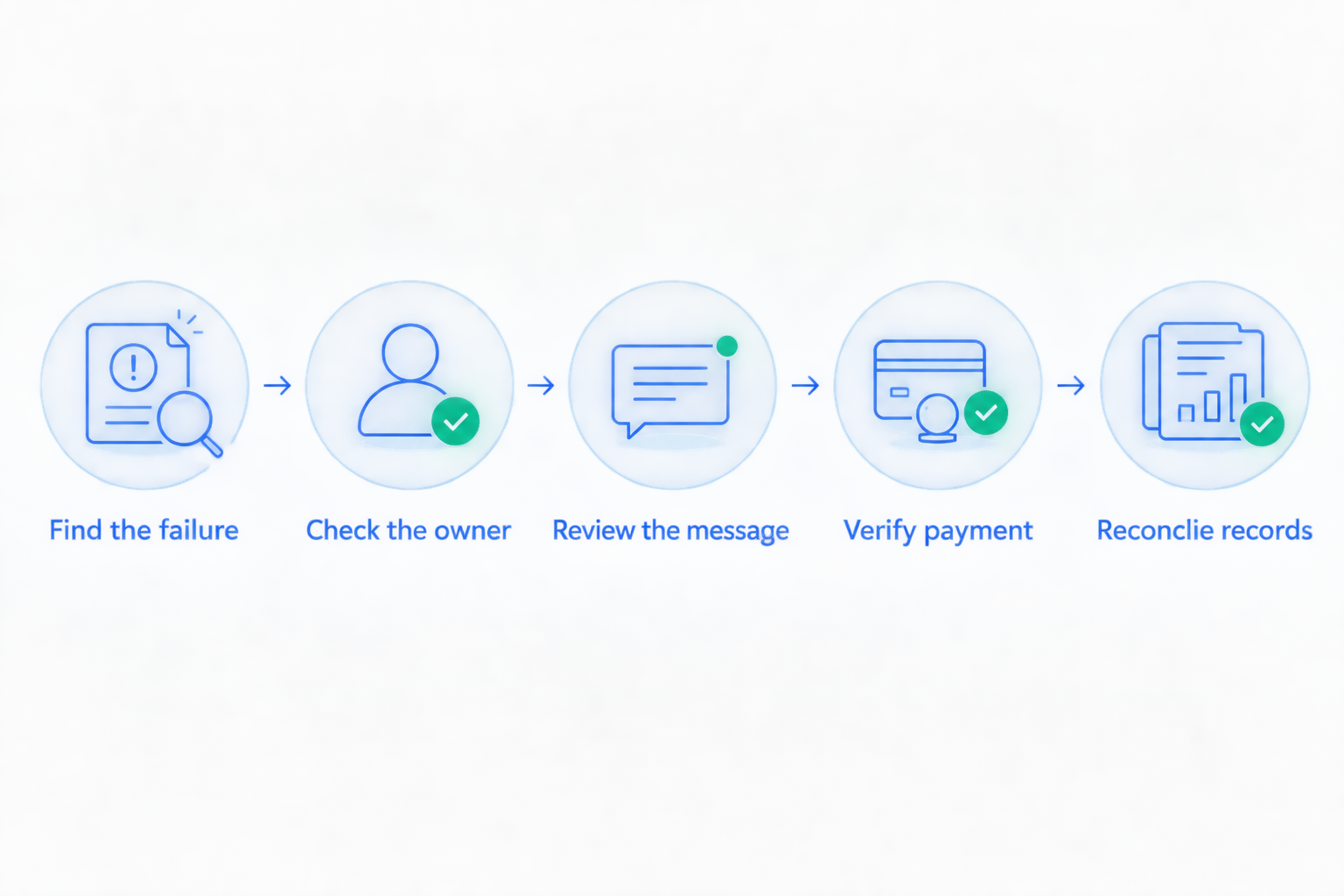
Document the result at each step. The recovery audit checklist is a useful starting point for organizing the payment-side questions before discussing a service or software change.
Give the process an owner and a review window
Assign 1 accountable owner before launch. Other people can help, but one person should know whether failures are being reviewed and unresolved donor cases are moving.
Use an initial 30-day review window as an operating plan, not a promised performance benchmark. Review failures, successful collections, unresolved cases, and donor replies together. Keep the payment population consistent when comparing results.
At each review, make 3 checks explicit: was the payment collected, was the donor record updated, and did further reminders stop? These are process checks, not recovery-rate claims.
Which recovery option should you choose?
Choose Stunning Managed Recovery when you need someone to run failed-payment recovery and the service confirms your donation workflow fits. That is the default recommendation for an organization with accumulating failures and no accountable operator.
Keep Stripe’s built-in approach when a staff owner can demonstrate that it works across payments, messages, and records. Choose separate software when that owner can name the missing capability and commit to running the replacement.
If you are unsure, start with a recovery audit conversation rather than a software installation. Bring the payment flow, current reminders, unresolved cases, and the name of the person responsible for donor records.
Discuss your recovery workflow
Explain your donation platform, failed-payment process, and who currently owns follow-up.
FAQ
What’s the best dunning software for nonprofit recurring donations?
The best choice depends on your donation workflow and who will operate recovery. Evaluate managed recovery when nobody owns the work, Stripe’s built-in recovery for an internally managed baseline, and separate software for a defined capability gap.
Can a nonprofit use Stunning for recurring donation recovery?
Confirm your exact donation workflow with Stunning before choosing either its software or managed service. Its stated focus is failed-payment recovery for subscription businesses, which does not establish compatibility with every nonprofit donation application.
Are Stripe’s built-in retries and emails enough?
Keep Stripe’s built-in approach when your team can verify payments, maintain appropriate messages, and handle unresolved cases. Check how your donation application interacts with Stripe before adding another recovery system.
Should we hire a recovery service or manage software ourselves?
Evaluate a service when the missing resource is an accountable operator. Choose software when someone inside your organization will own configuration, reviews, message updates, and follow-up.
Does a donor updating a card mean the donation was recovered?
No. Confirm that the intended donation payment succeeded and that the result appears correctly in your donation records. A payment-method update alone is not a completed gift.
What should a nonprofit test before changing recovery tools in 2026?
Test failure detection, ownership, donor messaging, successful payment, and record reconciliation. Use an approved test arrangement and check that reminders stop after the issue is resolved.
How do we avoid sending duplicate failed-donation reminders?
Assign responsibility for reminders to a clearly identified system and inspect every active sending source. Check the donation platform, processor, and recovery application before enabling another message sequence.
One last thing
Start with one unresolved recurring gift. Ask your team to show the failed payment, the donor’s latest message, the next action, and the person responsible.
If that trail breaks, fix the handoff before expanding automation. Your first improvement is a complete, accountable recovery process—not another reminder.
Related guides
- Software or managed recovery: who owns the work?
- How to test dunning software before switching it on