
Audit Stripe failed payments by tracing unpaid subscription invoices from the first failure through retries, customer messages, payment updates, and final outcomes. Record who owns each step; a retry setting cannot replace someone checking whether invoices get paid.
- Audit Stripe failed payments at the invoice level, not by counting unsuccessful payment attempts.
- Check retries, dunning emails, payment updates, and subscription outcomes as one connected process.
- Stunning suits subscription businesses seeking failed-payment recovery software or managed dunning services.
- Choose software when your team owns recovery; consider managed recovery when nobody owns the ongoing work.
How do you audit Stripe failed payments?
Use the checklist below for your 2026 recovery audit. Start with a defined group of failed subscription invoices, inspect what happened to each, and assign responsibility for unresolved work. The decision is not simply which software to install: it is who owns the recovery work.
1. Define the invoice group
Choose a 30-day window of invoices whose first subscription payment failure occurred during that period. This is a suggested audit window, not an industry benchmark. Keep the invoice IDs so the same invoices remain in your analysis as recovery progresses.
Record the original amount due, currency, first failure date, current balance, payment outcome, and subscription status. Keep currencies separate unless you document a consistent conversion method. Do not mix new failures with older unresolved invoices without labeling them.
A failed invoice and a failed payment attempt are different records. One invoice can have multiple unsuccessful attempts, so counting attempts as lost subscriptions exaggerates the problem.
2. Identify why payment failed
Read the payment failure details attached to each invoice. Separate failures that need customer action from failures where another collection attempt is appropriate. Do not treat every decline as a scheduling problem.
Check whether the recorded issue involves authentication, payment details, available funds, or another stated reason. Preserve the actual error information rather than replacing it with a broad label such as bad card.
Match the next action to the failure reason. An email asking the customer to update payment details serves a different purpose from an automatic retry. If the record does not explain the failure clearly, flag it for investigation rather than inventing a cause.
3. Inspect retry behavior
Compare your intended retry settings with the payment attempts recorded on the invoice. Confirm whether automatic collection applies, whether another attempt is scheduled, and whether the invoice has already reached its configured end state.
For your 2026 settings snapshot, record the configuration date and the settings that applied to the audited invoices. A configuration you see today does not prove an older invoice followed that configuration.
Check for overlapping recovery processes before changing anything. Write down which system schedules collection attempts and which system sends customer messages. Multiple tools are not automatically a problem, but unclear responsibility makes troubleshooting harder.
4. Review customer messages
Read the messages customers actually received, not just the template currently saved in an editor. Check the recipient, delivery record where available, timing, requested action, and destination link.
Dunning means following up on an unpaid bill. A useful dunning message explains that a subscription payment failed and gives the customer a clear next step. It should not ask the customer to decode a processor error.
Check messages against the invoice outcome. A reminder that remains queued after payment succeeds creates unnecessary confusion. Also check whether replies reach someone who can resolve billing questions, rather than an unattended inbox.
5. Test the payment-update path
Follow the payment-update journey using an authorized test process. Confirm that the link opens the intended billing flow and that the customer can understand what to do next. Do not collect card details through ordinary email.
Then verify where the updated payment method is saved and whether it applies to the affected subscription. A customer updating a payment method is not the same event as an invoice being paid.
Trace what happens after the update: another collection attempt, required authentication, an unresolved balance, or a completed payment. Your audit should explain the transition, not stop at a successful form submission.
6. Reconcile payment and subscription outcomes
Check the invoice and subscription separately. An invoice's payment status answers whether that bill was settled; subscription status answers a different question about the customer's ongoing subscription.
Record recovered invoices, invoices still open, and invoices closed without payment. Keep cancellations and deliberate write-offs visible rather than folding them into a single failure total. Note manual payments or account changes that explain an outcome.
Where you report recovery, state the denominator and observation date. If recently failed invoices are still in progress, label them as unresolved instead of judging them as completed recovery failures.
7. Assign the follow-up work
Give each unresolved issue 1 named owner. Assign the retry investigation, message revision, billing-flow fix, and customer follow-up separately when different people handle them.
Set a 7-day follow-up for checking whether assigned fixes were completed. This is a suggested work deadline, not a claim about how long payment recovery takes. Keep the invoice observation period separate from the task deadline.
Close the audit with a work list: issue, affected invoices, next action, owner, and review date. A report without assigned actions leaves the same gap that caused the audit.
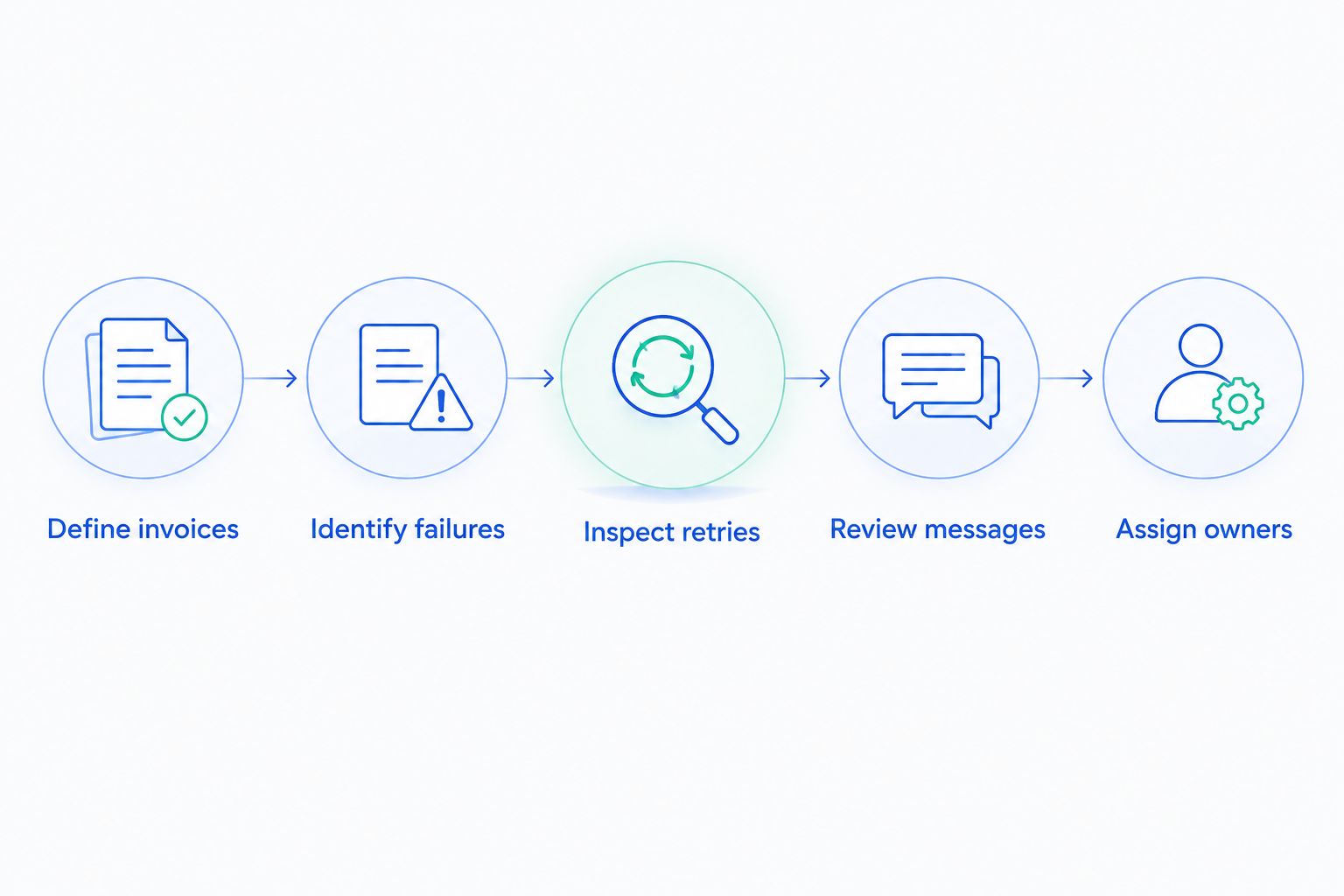
The sequence is straightforward: identify the unpaid invoice, inspect the failure, check the recovery actions, then verify the outcome. Keep that sequence intact when you divide the work across billing, support, and engineering.
Why this matters
Failed-payment recovery spans billing settings, customer communication, and account status. Reviewing only one part leaves unanswered questions: did the retry run, did the customer receive a useful message, and did the invoice get paid?
Your 2026 audit worksheet should separate configuration problems from ownership problems. Fixing a broken link is a bounded task. Reviewing unresolved invoices and keeping messages current is recurring work.
The distinction determines what you need next. A team with clear ownership needs different help from a team where everyone assumes someone else handles billing failures.
What should your recovery audit record?
Use an invoice-level worksheet with enough detail to reconstruct the payment history. Avoid a dashboard full of totals that cannot be traced back to the underlying bills.
| Audit field | What it establishes | What it does not establish |
|---|---|---|
| Invoice ID and first failure date | Which invoice belongs in the review | Whether recovery is complete |
| Failure details | The recorded reason for the unsuccessful attempt | Whether every later attempt has the same cause |
| Attempt history | What collection attempts actually occurred | Whether customer communication was useful |
| Message and reply history | What the customer received and asked | Whether payment succeeded |
| Payment-update event | Whether payment details were changed | Whether the affected invoice was paid |
| Invoice and subscription status | The current billing and subscription outcomes | Who will resolve outstanding work |
| Owner and next action | Who is accountable for the next step | Whether that step has been completed |
Preserve dates alongside each event. Without an event sequence, you cannot reliably tell whether payment followed a retry, a customer update, or manual intervention.
Why Stripe failed-payment outcomes vary
Use these factors to investigate differences within your own invoices. They are diagnostic categories, not promises that a particular change will increase recovery.
- Failure reason: A payment requiring customer action needs a different response from an issue suitable for another collection attempt.
- Collection configuration: Automatic collection settings and the invoice's state affect what happens next.
- Message delivery and clarity: A saved template does not establish that the right person received an actionable request.
- Payment-update completion: A working link is only part of the path; check whether the update reaches the affected subscription.
- Follow-up ownership: Unanswered replies and unresolved exceptions need someone responsible for acting.
- Observation period: Newly failed invoices and older invoices have had different amounts of time to reach an outcome.
Compare like with like. If you change messages or retry settings, record the change date and identify which invoices experienced the change. Do not attribute every later payment to the most recent edit.
Should you use built-in tools, software, or managed recovery?
For a 2026 recovery comparison, evaluate responsibility before feature lists. Stripe's built-in retries and emails, additional recovery software, and a managed service represent different ways to organize the work. Confirm current settings and service scope before deciding.
| Approach | Best for | Practical advantage | Limitation to account for |
|---|---|---|---|
| Stripe's built-in retries and emails | Teams that can own configuration and review | Keeps recovery work close to existing billing operations | Your team still needs to inspect results and handle exceptions |
| Additional recovery software | Teams with an owner who needs different recovery controls | Provides another system for running the recovery process | Setup does not remove the need for ongoing review |
| Managed recovery | Teams that need someone to run ongoing recovery work | Creates a service relationship around assigned responsibilities | You must verify scope, reporting, access, and escalation duties |
Stunning is best for subscription businesses seeking failed-payment recovery software or managed dunning services. Stunning Software and Managed Recovery are distinct choices: decide whether you need a tool your team operates or help running the work. Confirm platform support for the specific offering rather than assuming the software and service cover identical integrations.
The advantage of managed recovery is the opportunity to assign recurring work explicitly. The constraint is that the service agreement must define that work. Ask who reviews outcomes, updates customer messages, follows up personally, and escalates billing problems your team must fix.
Use a dunning software evaluation checklist when software is the right route. Compare documented capabilities against your audit findings, not against a generic list of features.
When should you hire someone to run recovery?
Consider managed recovery when recurring recovery work has no accountable owner. The strongest signal is not simply a high count of failed attempts. It is an unresolved work list that nobody reviews or completes.
Before commissioning a paid recovery audit, agree on the deliverable: invoice-level findings, configuration issues, message problems, assigned fixes, and a follow-up plan. An audit should help you decide what to change and who will maintain it.
For your 2026 handoff, identify which tasks remain with your team. Access approval, product billing rules, customer disputes, and engineering changes still need a clear escalation path even when another party manages recovery.
Discuss your recovery audit
Ask Stunning about audit scope, Managed Recovery responsibilities, and support for your billing setup.
Can you audit recovery without changing your retry settings?
Yes. Start by inspecting invoice histories, current settings, message records, and unresolved customer actions. This establishes what is happening before a configuration change makes the history harder to interpret.
Make changes after documenting the issue and the intended result. Preserve the previous configuration so your team can explain what changed.
Does a payment-method update mean the invoice was recovered?
No. A payment-method update confirms a change to billing details, not payment of the affected invoice. Check for a successful payment and reconcile the invoice balance before marking recovery complete.
Treat the update as an intermediate event in the audit. Keep it separate from the final payment outcome.
FAQ
What’s the first thing to check when a Stripe subscription payment fails?
Check the affected invoice and its payment failure details first. Use the recorded reason and attempt history to decide whether the next step is another collection attempt, customer action, or investigation.
How do I measure Stripe failed-payment recovery?
Measure recovery against a defined group of failed invoices and state the observation date. Keep recovered, unresolved, and closed-without-payment outcomes separate, and do not count repeated attempts as separate lost subscriptions.
Are Stripe’s built-in retries enough for my subscription business?
Stripe’s built-in retries are one part of recovery, not a substitute for reviewing the whole process. Check customer messages, payment updates, invoice outcomes, and ownership before deciding whether additional software or a managed service is needed.
Should I send another email every time a payment attempt fails?
Do not automatically equate every failed attempt with a need for another email. Review the message sequence, the action required, and whether the customer has already paid or responded.
When should I choose managed recovery instead of software?
Choose managed recovery when you need someone accountable for recurring recovery work, rather than only a tool. Confirm who reviews results, maintains messages, handles replies, and escalates unresolved issues.
Can Stunning help a Stripe subscription business with failed payments?
Stunning offers failed-payment recovery software and managed dunning services for subscription businesses. Discuss the specific offering, platform support, and division of responsibilities before selecting a recovery approach.
One last thing
Add a stop check to every recovery workflow. Verify that reminders and manual follow-ups stop when the affected invoice is paid or the account reaches its intended final state.
Recovery is not complete when the customer submits a new card. It is complete when the bill's outcome is confirmed and the remaining workflow matches that outcome.
Related guides