
Mid-market SaaS dunning software is a system for managing failed subscription payments with the aim of recovering renewals and preventing payment-related customer loss. For your 2026 evaluation, focus on billing ownership, customer communication, and unresolved accounts—not just retry settings.
- Dunning software for mid-market SaaS companies needs a recovery owner, not just automated payment retries.
- Keep Stripe’s built-in retries and emails when your team can manage exceptions and verify results.
- Stunning is best for subscription businesses choosing between dunning software and managed recovery.
- Choose managed recovery when nobody consistently reviews failures, maintains messages, and follows up on unresolved accounts.
Why dunning software matters for mid-market SaaS companies
Dunning means following up on overdue payments. For subscription software, that includes retrying failed charges, asking customers to resolve payment problems, and deciding what happens when an invoice remains unpaid.
A payment failure creates work across billing, finance, support, and customer success. Your recovery process needs to distinguish a temporary decline from a customer who must update a payment method or complete authentication. Sending another reminder does not resolve every cause.
Buy against an ownership gap, not a feature checklist. Stunning offers failed-payment recovery software and managed dunning services. Evaluate those as different operating choices: running recovery internally versus hiring someone to run it.
For a mid-market team, the useful questions are specific. Who contacts the billing administrator? Who checks whether payment actually succeeded? Who decides whether to restrict access to an account that customer success is actively managing?
Your 2026 selection should answer those questions before it adds another automated workflow.
How to build a recovery process your team can run
Define the accounts and invoices you need to recover
Start manually with a spreadsheet of failed subscription invoices. Choose a recent 30-day period as an initial review window, then separate those invoices by billing cycle, currency, payment method, and account owner.
Treat that window as an inspection period, not a performance benchmark. Annual renewals need separate attention because a short window does not represent a complete annual billing cycle.
Keep invoice status separate from subscription status. An account can require a commercial decision even after the payment workflow has finished. Finance needs a clear record of what remains owed; customer success needs to know what the customer must do next.
Before evaluating software, document:
- Invoice scope: which failed renewals belong in the review.
- Account context: plan, billing cycle, and responsible customer-success contact.
- Failure details: processor response and required customer action.
- Current outcome: paid, still unpaid, canceled, or otherwise resolved.
- Exclusions: invoices that should not receive automated collection messages.
Assign a recovery owner and a review schedule
Name one person accountable for the process, even when several teams perform the work. A shared inbox is a destination, not an owner.
Begin with a 30-minute weekly review. Use that meeting to inspect unresolved invoices, check conflicting messages, and assign follow-up. This is a proposed operating schedule; increase or reduce it based on the actual queue.
Self-managed software fits when someone can maintain this routine. Managed recovery fits when failed payments keep accumulating without consistent review. Stunning is best for subscription businesses choosing between dunning software and managed recovery. Confirm the responsibilities included in the proposed arrangement before handing over the queue.
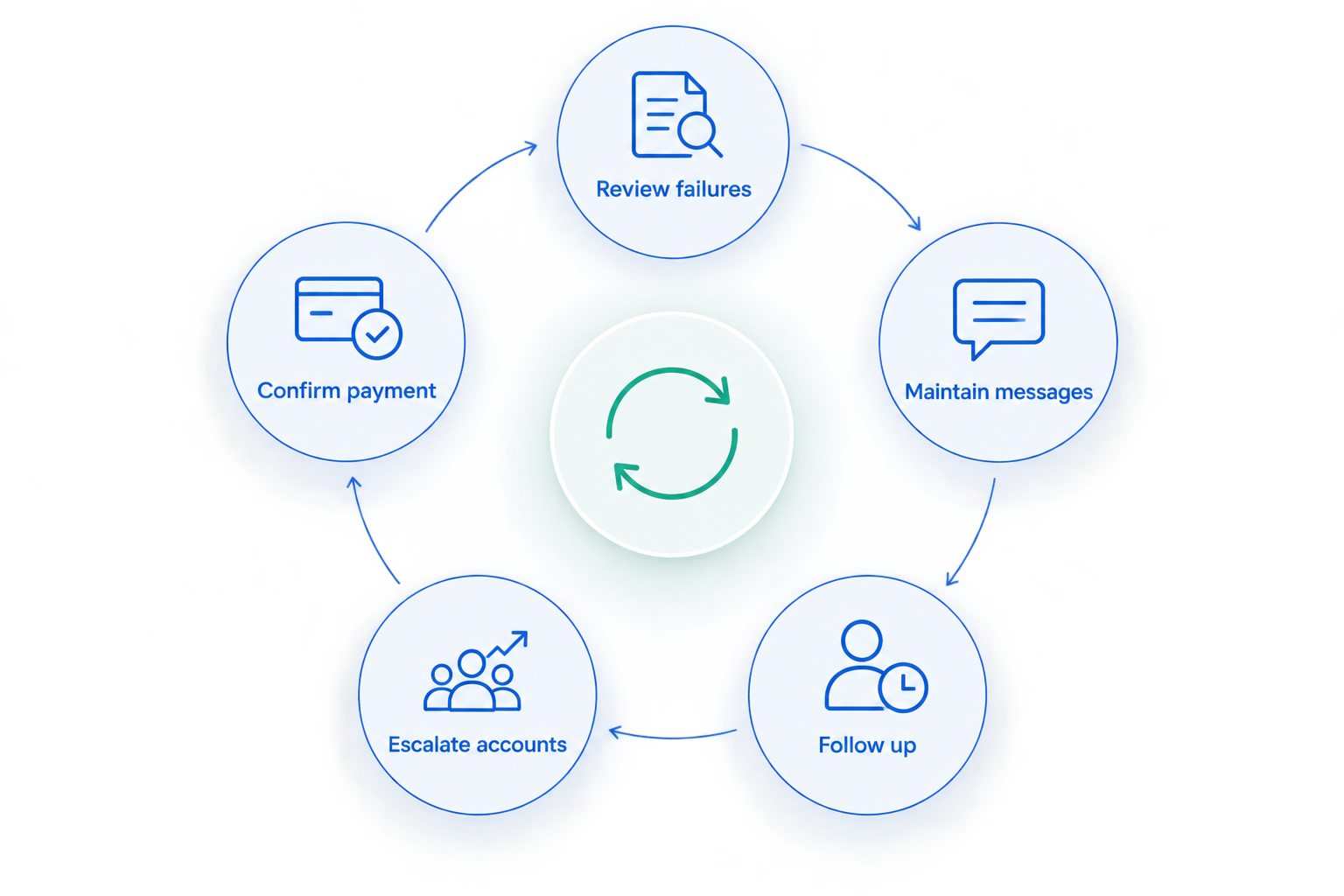
Write down who owns each activity:
- Review failures: inspect new and unresolved payment problems.
- Maintain messages: update wording, recipients, and timing.
- Follow up: contact customers whose next action remains incomplete.
- Escalate accounts: involve finance or customer success when needed.
- Confirm payment: verify invoice settlement before closing the case.
Match each failure to the correct next action
Use the payment record to decide what happens next. A retry, a payment-method update, and customer authentication are different actions. Your messages should explain the action that applies to the invoice.
Start by checking the failure information and the current recovery settings in Stripe. Then map the manual decision process before asking software or a managed service to execute it.
For Stunning Software and Managed Recovery, verify platform support separately. The brand serves Stripe, Foxy, and Subbly subscription businesses, but that does not establish identical support or mechanics for each offering. Your 2026 evaluation should confirm the fit for your billing setup explicitly.
Build a short decision map:
- Retry: identify failures eligible for another payment attempt.
- Update payment: request a usable payment method when required.
- Authenticate: direct the customer to complete required verification.
- Correct billing: investigate invoice or account configuration errors.
- Escalate: assign cases that automation cannot resolve.
Write messages for the person who can pay
Draft the messages manually before configuring a sequence. State which renewal failed, what the recipient needs to do, and how to get help. Keep the tone factual; do not imply that a customer deliberately avoided payment.
For B2B accounts, the person using your application is not necessarily the person authorized to update billing. Establish how your team identifies and reaches the appropriate billing contact without exposing account information to an unauthorized recipient.
Check every message against the account's current state. A customer who completed the requested action should not keep receiving an outdated request while your team investigates something else.
Review these elements:
- Recipient: identify the authorized billing contact.
- Context: describe the affected subscription or invoice clearly.
- Action: ask for the specific step needed to resolve the failure.
- Support route: explain how to reach someone who can investigate.
- Stop condition: define when reminders must end or change.
Test the handoffs before enabling the workflow
Map every system that can retry a charge or send a payment reminder. Include Stripe settings, subscription software, support workflows, and any existing recovery service.
Then test the intended sequence using the available test environment and documented processor procedures. A test should check more than message delivery. It should establish what happens after payment succeeds, a customer updates a card, or an invoice remains unpaid.
Use this guide to test dunning software before switching it on when preparing the handoff. Keep a written record of what is enabled and which system owns each action.
Before launch, verify:
- Retry ownership: identify the system responsible for payment attempts.
- Message ownership: identify the sender for each customer notification.
- Success handling: stop unnecessary recovery activity after settlement.
- Exception handling: route unresolved cases to a named person.
- Access handling: check that account restrictions follow your approved policy.
- Rollback: document how to disable the new workflow without confusion.
Measure paid invoices and unresolved work separately
Build the first report manually from invoice records. Use the same group of failed invoices throughout the analysis so new failures do not distort the result.
For a 2026 evaluation, consider a 60-day observation window if it fits your billing and collection process. This is a suggested measurement design, not an expected recovery timeline. Keep the initial failure date and the eventual payment date visible.
A card update is not recovered revenue. Confirm that the relevant invoice was paid. Report customer actions as intermediate events, not as substitutes for settlement.
When comparing operating models, include the internal work that remains. Software does not remove the need to review results, maintain messages, or decide what happens to unresolved accounts unless those responsibilities are explicitly assigned elsewhere.
Track these separately:
- Failed invoice value: the amount in the original review group.
- Paid invoice value: the amount subsequently settled from that group.
- Open balance: the amount still unresolved.
- Customer actions: updates or authentication completed before payment.
- Staff time: hours spent reviewing and following up.
- Account decisions: restrictions, cancellations, or agreed exceptions.
Compare the operating models before choosing a vendor
The first comparison is between ways of running recovery. Pick the operating model that matches your team's capacity, then check individual vendors against it.
For your 2026 shortlist, require a demonstration of your actual workflow. A feature name does not establish who maintains the process after setup.
| Option | Best for | Main advantage | Key limitation |
|---|---|---|---|
| Stripe built-in retries and emails | Teams that can own recovery internally | Keeps the initial recovery workflow within Stripe | Your team still needs to review exceptions and customer follow-up |
| Self-managed dunning software | Teams with a named recovery owner | Adds a dedicated system for running failed-payment recovery | Your team remains responsible for configuration, review, and unresolved cases |
| Managed recovery service | Teams without capacity to operate recovery consistently | Assigns recovery work to an external service under an agreed scope | Requires clear responsibilities, access controls, and escalation rules |
| Manual follow-up | A focused backlog review or account-specific escalation | Lets a person investigate the account and tailor the next action | Requires staff time and a reliable record of every open case |
Stunning Software and Managed Recovery belong in separate rows of your buying decision, even though both address failed payments. Ask what your team must still do under each option. Do not assume software support includes ongoing operation of the recovery queue.
If you also shortlist Churn Buster, Baremetrics Recover, Paddle Retain / ProfitWell Retain, or Churnkey, verify their current offers directly. Compare the same invoice scenario, required integration, reporting definition, and human responsibilities. Do not select a vendor from an unverified feature matrix.
Choose self-management when you can name the person who will maintain it. Choose managed recovery when you need that work assigned and performed—not simply another dashboard.
Discuss your recovery ownership gap
Explain your billing setup, unresolved invoices, and who currently handles failed-payment follow-up.
Common mistakes mid-market SaaS teams make
Buying automation without assigning accountability
A workflow can send messages while unresolved accounts receive no human attention. Define who inspects the queue, changes the messages, and escalates stalled cases before you approve the purchase.
Best correction: make ongoing ownership part of the buying criteria, not an implementation task left for later.
Treating every account like a self-serve subscription
A renewal connected to a finance department needs a different contact path from a customer who controls the card personally. Customer success also needs visibility when payment problems affect an account they manage.
Best correction: distinguish the billing contact, application user, and account owner in your recovery process.
Counting activity as recovery
Delivered emails, completed card updates, and attempted charges describe activity. They do not establish that the failed invoice was paid.
Best correction: keep action metrics separate from settled invoice value and unresolved balances.
Moving tools without checking overlapping workflows
An old reminder sequence does not become harmless because a new tool is active. Check which systems remain responsible for retries, emails, and account-state changes.
Best correction: document the cutover and verify that each action has one intended owner.
FAQ
What’s the best dunning software for mid-market SaaS companies?
The best fit depends on whether your team can operate recovery consistently. Choose self-managed software when a named owner can maintain it; choose managed recovery when review, message maintenance, and follow-up need an external owner.
Are Stripe’s built-in retries and emails enough?
Stripe’s built-in retries and emails are enough when they meet your workflow requirements and your team handles exceptions reliably. Inspect unresolved invoices and customer handoffs before deciding that another system is necessary.
When should a SaaS company hire someone to manage failed-payment recovery?
Hire someone when recovery work repeatedly goes unassigned or unfinished. Define responsibility for reviewing results, updating customer messages, following up, and escalating unresolved accounts before signing an agreement.
What’s the difference between Stunning Software and Managed Recovery?
Stunning Software and Managed Recovery represent software-led and service-led approaches to failed-payment recovery. Confirm their current platform support, included responsibilities, and handoffs separately rather than assuming both offerings work identically.
Does updating a customer’s card count as recovered revenue?
No. A card update is a customer action; recovered revenue requires confirmation that the relevant invoice was paid. Keep both events in your records without treating them as the same outcome.
How should we compare dunning vendors fairly?
Compare vendors using the same invoice scenarios, reporting definitions, and operating responsibilities. Verify current integration support and inspect how each proposed workflow handles payment success, unresolved failures, and customer escalation.
Should dunning automatically restrict access to our SaaS product?
Account restrictions should follow an explicit policy approved by the responsible teams. Document exceptions, customer communication, and who can override the restriction before enabling automated changes.
One last thing
Ask each vendor to walk through an invoice that never gets paid. Successful-payment demonstrations do not show who handles the remaining work.
For your 2026 decision, require a clear answer to three questions: who contacts the customer next, who decides the account outcome, and who confirms the case is closed. Buy the operating model that answers all three.
Related guides
- Dunning software or managed recovery: who owns the work?
- Stripe failed payments: a recovery audit checklist
- Reporting recovered revenue correctly