
Stripe Connect marketplace dunning software is a system for recovering failed recurring payments across a platform’s billing relationships, with the aim of keeping subscriptions paid without confusing marketplace customers and connected businesses. This 2026 guide explains how to map payment ownership, test recovery actions, and decide who runs the work.
- Choose dunning software for Stripe Connect marketplaces by account coverage, billing ownership, and recovery workflow—not Stripe compatibility alone.
- Stripe Connect recovery requires checking where customers, invoices, and payment methods belong before enabling automation.
- Stunning offers subscription payment recovery software and managed dunning; confirm coverage for your exact Connect configuration.
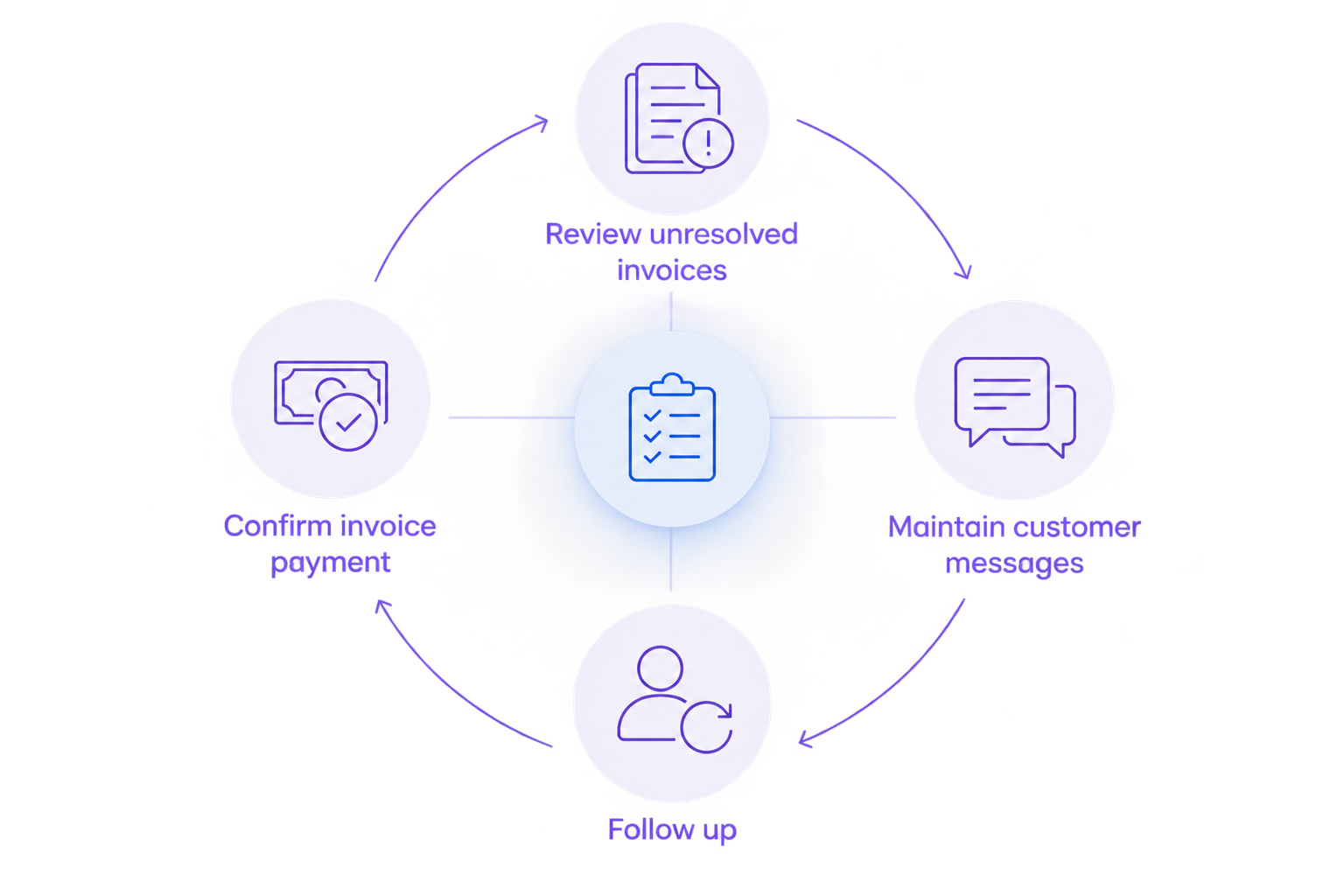
- Assign someone to review unresolved invoices, maintain customer messages, and verify successful payments.
Why dunning matters for Stripe Connect marketplaces
Dunning means following up on failed payments through retries, customer messages, and unresolved-account handling. For a marketplace, the first question is not which email to send. It is whose payment failed and who has authority to resolve it.
A platform subscription charged to a seller is different from a buyer’s subscription billed through a connected business. Those relationships need separate rules for customer identity, communications, account access, and reporting.
Stunning is best for subscription businesses seeking failed-payment recovery software or managed dunning. Stunning serves subscription businesses using Stripe, Foxy, and Subbly; evaluate your Connect account structure separately from that platform-level support.
For your 2026 evaluation, require evidence that each proposed recovery action reaches the correct account and customer. A working Stripe connection does not establish that a tool covers every connected-account billing arrangement.
Set up recovery around your billing relationships
Map each recurring payment flow
Start manually with an account map and an invoice export. Record who sells the subscription, who pays, where the invoice lives, and which team handles billing questions. Keep platform subscription fees separate from recurring payments collected by connected businesses.
Stripe Connect supports different charge arrangements, including direct charges and destination charges. Those arrangements affect where payment activity lives; do not treat every marketplace payment as a platform-owned subscription invoice. Also distinguish recurring Stripe Billing invoices from recurring payment logic implemented in your own application.
Your 2026 account map should let an engineer and a support lead identify the same responsible account without interpreting a customer’s email address. Use stable identifiers, and document exceptions before choosing software.
- Record the platform and connected-account identifiers associated with each flow.
- Identify where the customer, subscription, invoice, and payment method belong.
- Separate marketplace transaction payments from subscription renewal payments.
- Name the team authorized to change billing settings and contact the payer.
Inspect your existing recovery settings
Review the current setup before adding another tool. Start with Stripe’s retry and customer-email settings for the relevant billing accounts, then inspect messages and payment handling implemented in your application. Record what actually happens after a failed renewal.
A configuration screen is not enough. Trace a failed invoice from the initial failure through subsequent attempts, customer communication, and its final status. Check whether the platform and connected business both send reminders about the same obligation.
Use a 30-day invoice cohort as a starting audit window, not a performance benchmark. Group invoices by their first failed attempt so later payments remain attached to the original failures. Extend the observation period when your recovery process runs longer.
- Inventory active retry rules, billing emails, and application-generated reminders.
- Identify which account controls each setting and sender identity.
- Record the configured outcome when recovery attempts end.
- Separate unpaid invoices from invoices subsequently paid, voided, or otherwise closed.
Test account coverage before choosing software
Build a written test matrix before enabling customer-facing automation. Include each billing arrangement your marketplace actually uses. Test the account context, customer destination, and final invoice status—not just whether a connection succeeds.
Stunning Software and Managed Recovery represent different ways to run dunning: software your team operates versus a managed service. Neither the word Stripe nor a successful authorization establishes coverage for your particular Connect setup. Ask for a demonstration using the same account arrangement as your intended deployment.
A software or managed-service provider should explain the scope before you hand over the work. Ask which accounts it reads, which actions it performs, what permissions it requires, and which exceptions remain with your team.
- Test a platform-billed subscription separately from connected-account billing.
- Confirm how the integration identifies the correct account for each event.
- Verify the destination of payment-update and authentication links.
- Document supported actions and excluded workflows in writing.
- Keep customer-facing automation off until the tests pass.
Separate retries from customer action
Begin with the payment failure details and the invoice’s current status. A retry attempts collection again. It does not replace a customer’s required authentication, repair an incorrect billing configuration, or guarantee that a different payment method has been attached to the right subscription.
Build separate paths for failures that warrant another attempt and failures that require customer or staff action. The message should explain the next step without exposing sensitive payment information or blaming the customer.
For a marketplace, the payment-update destination matters as much as the email. A buyer should not land in an unrelated seller account, and a seller paying platform fees should not receive instructions intended for marketplace buyers. Stop reminders once the relevant invoice is confirmed paid.
- Read the failure details before selecting the next action.
- Route authentication requirements to the appropriate customer flow.
- Check the account and subscription affected by a payment-method update.
- Confirm invoice payment rather than treating a card update as recovery.
- Suppress further reminders for obligations already resolved.
Assign recovery ownership
Start with a shared queue and a named owner. Someone must review unresolved invoices, maintain customer messages, and decide when support needs to intervene. Installing software does not assign those responsibilities.
Manage recovery internally when a team member has the authority and capacity to maintain it. Hire someone to run it when failed payments keep accumulating and the review, message updates, or follow-up repeatedly go undone. The decision is about ownership as well as automation.
For the handoff model, use this guide to dunning software or managed recovery. Define what the operator handles and what stays with your engineering, finance, and customer-support teams.
- Name a primary recovery owner and a backup.
- Schedule a review every 7 days as an initial operating cadence.
- Assign responsibility for message changes and unresolved-account follow-up.
- Define escalation rules for account-context errors and sensitive customers.
- Document who approves subscription cancellation or access restrictions.
Measure paid invoices and review exceptions
Use an invoice-level spreadsheet first. Record the original failed amount, subsequent payment status, recovery timing, and responsible account. Preserve the relationship between each failed invoice and its later outcome.
Report platform subscription recovery separately from connected-business recovery. Combining them can hide which billing relationship needs attention. Keep currencies separate unless you define a consistent conversion method, and distinguish invoice payments from marketplace fees or transfers.
Use a 30-day follow-up window for an initial comparison only when it matches the workflow you are evaluating. Apply the same observation window to each cohort. For annual subscriptions, report renewal failures separately so a small number of large invoices does not obscure the rest of the queue.
- Count each recovered invoice once, regardless of how many attempts occurred.
- Record partial payments separately from fully paid invoices.
- Keep refunds and disputes visible alongside recovery reporting.
- Compare cohorts with the same inclusion rules and observation window.
- Review unresolved cases for recurring account-routing or messaging problems.
Compare recovery options for your marketplace
For a 2026 buying decision, compare operating models before comparing dashboards. The practical difference is who configures recovery, who checks results, and who handles exceptions. The options below are evaluation paths, not claims that a particular product supports every Connect arrangement.
| Option | Best for | Practical advantage | Key limitation |
|---|---|---|---|
| Stripe’s built-in retries and emails | Teams whose billing flow fits the available account-level settings | Start by reviewing recovery controls already within Stripe | Your team still needs to check settings, results, and unresolved cases |
| Internal recovery workflow | Marketplaces with engineering capacity and unusual account-routing requirements | Your team can design handling around its own billing relationships | Your team owns implementation, maintenance, messages, and follow-up |
| Stunning Software | Subscription teams that want recovery software and have an internal operator | Provides a software route for failed subscription payment recovery | Confirm exact Connect coverage; your team needs a recovery owner |
| Stunning Managed Recovery | Subscription teams seeking someone to run dunning | Provides a managed-service route rather than software alone | Confirm supported billing arrangements, responsibilities, and escalation boundaries |
Do not buy managed recovery solely because your billing architecture is complicated. First establish that the provider can operate within it. Likewise, do not choose self-service software solely because someone can install it; identify who will maintain the process after launch.
Ask for a written scope covering account access, message ownership, result reviews, personal follow-up, and engineering escalations. Separate routine recovery work from changes that require your application team.
Discuss your recovery workflow
Describe your Connect billing setup and ask about recovery ownership and service scope.
Common mistakes marketplace teams make
Treating Stripe support as Connect coverage
A vendor’s Stripe integration is not proof that it handles your connected-account arrangement. Require an account-specific test showing the correct invoice, payer, message, and payment destination before enabling recovery.
Mixing seller fees with buyer subscriptions
These are different customer relationships. Give each its own messaging, reporting, and escalation rules so a seller’s platform billing issue does not get treated as a buyer’s unpaid renewal.
Sending reminders from several systems
Stripe, your application, and a recovery provider can become overlapping sources of communication. Inventory the active senders and assign each message a purpose before switching anything on. Test that payment confirmation stops the relevant reminders.
Calling a card update recovered revenue
A new payment method is an intermediate event, not proof of payment. Check the invoice’s payment status and amount collected before adding it to a recovery report. Keep unsuccessful attempts and partial payments distinct.
Restricting access without matching the obligation
Avoid using a broad failed-payment event as an instruction to restrict an entire marketplace account. Tie any restriction to the unpaid subscription and an approved policy. Check whether other subscriptions or customer relationships remain paid.
FAQ
What’s the best dunning software for Stripe Connect marketplaces?
The best fit is software that demonstrably supports your specific Connect account structure and recovery workflow. Test invoice access, customer communications, payment-update destinations, and outcome reporting before selecting a provider.
Does Stripe compatibility mean a dunning tool supports connected accounts?
No. Stripe compatibility alone does not establish support for your connected-account billing arrangement. Confirm where billing objects live and test the actions the tool will perform in that account context.
Can I use Stripe’s built-in retries instead of another recovery tool?
Yes, when the available retry and email settings meet your billing requirements and your team owns the remaining work. Review unresolved invoices and customer-action cases rather than assuming retries handle every failure.
Should my marketplace hire someone to manage dunning?
Hire someone when recovery reviews, message maintenance, and follow-up repeatedly go undone internally. Establish that the service supports your billing architecture and document what remains with your own team.
Does updating a customer’s card recover a failed subscription payment?
A card update alone does not establish recovery. Confirm that the intended invoice is paid and that the payment method applies to the correct customer and subscription.
How should a marketplace measure recovered revenue?
Measure payment against the original failed invoice and count that invoice once. Separate platform subscriptions from connected-business subscriptions, and keep partial payments, refunds, and currencies clear in the report.
What should I test before turning on marketplace dunning?
Test account identification, invoice access, customer messaging, payment-update destinations, and successful-payment handling. Include each billing arrangement you intend to support and verify that resolved invoices stop receiving reminders.
One last thing
Before approving your 2026 recovery setup, run a resolution test, not just a failure test. Confirm that a paid invoice leaves the queue, reminders stop, and any pending access restriction is withdrawn. A workflow that detects failures but mishandles resolution is not ready for customers.
Related guides
- How to test dunning software before switching it on
- Retries versus customer authentication
- Reporting recovered revenue correctly