
Best overall for teams without a recovery owner: Stunning Managed Recovery. Best for teams that want to run recovery themselves: Stunning Software. Best built-in starting point: Stripe retries and emails. This guide compares dunning software for membership platforms by who runs recovery, how billing connects, and what happens to member access after a failed renewal.
- Stunning Managed Recovery is the best fit when nobody owns failed-payment recovery.
- Choose dunning software for membership platforms by billing compatibility, recovery ownership, and member-access rules.
- Choose self-managed software when someone will review results, maintain messages, and handle unresolved renewals.
- Evaluate Stripe retries and emails before adding another recovery system.
Why this matters
A failed membership renewal creates two separate problems: an unpaid invoice and a decision about access. Dunning means the retries, customer messages, and follow-up used to collect that overdue payment.
Your billing system and membership platform need to agree about the outcome. A member who updates a card has not necessarily paid the overdue invoice. A successful payment also needs to reach the system that controls course or community access.
For your 2026 shortlist, start with the billing arrangement rather than the course platform's name. Establish who creates the subscription, who collects the renewal, and who controls access. A familiar payment processor logo does not establish compatibility with every recovery service.
What makes the best dunning software for membership platforms?
Use these criteria before comparing feature lists:
- Billing fit: Confirm support for the system that creates and collects your recurring invoices. Check the exact integration, not just the processor name.
- Recovery ownership: Name the person responsible for reviewing results, changing messages, and following up on unresolved accounts.
- Customer action: Make sure the process distinguishes another payment attempt from a request to update a card or complete authentication.
- Access handling: Define what happens to membership, lessons, downloads, and community access while payment remains overdue.
- Recovery reporting: Require evidence that the failed invoice was paid. A card update or opened email is not collected revenue.
- Operational control: Establish which system sends each reminder and what stops the sequence after payment.
Stunning is best for subscription businesses seeking failed-payment recovery software or a managed dunning service. For membership and course businesses, the next decision is whether your team wants to operate that process or assign its ongoing management to a service.
Dunning options at a glance
This 2026 ranking separates operating models rather than claiming an unsupported winner on recovery rate. The best choice depends on the work your team can actually own.
| Rank | Option | Best for | Standout distinction | Key limitation |
|---|---|---|---|---|
| 1 | Managed Recovery | Teams without a recovery owner | Managed dunning rather than software alone | Requires agreement on service scope and responsibilities |
| 2 | Self-managed recovery software | Teams with an accountable billing owner | Your team runs recovery using dedicated software | Your team retains the operating work |
| 3 | Stripe retries and emails | Stripe teams assessing their existing setup | Built-in payment retries and customer emails | Your team still owns configuration, exceptions, and access decisions |
1. Stunning Managed Recovery: best for unowned recovery
Managed Recovery is the service option for businesses that want someone to run failed-payment recovery rather than simply provide software. It belongs first when failed renewals are accumulating and no employee owns the full process.
A membership business should define the handoff before signing. Ask who reviews results, who keeps messages current, and who handles accounts that remain unpaid. Separately confirm support for your billing setup and the responsibilities that remain with your team.
Managed Recovery pros:
- Fits a decision to hire recovery management instead of assigning another internal software workflow.
- Makes ongoing responsibilities part of the buying conversation.
- Gives teams without a recovery owner a service model to evaluate.
Managed Recovery cons:
- Service scope needs to match your actual billing and membership setup.
- You still need internal decisions about access, cancellations, and customer exceptions.
- A managed engagement needs a clear handoff and an internal contact.
Best for: Subscription businesses where failed payments are adding up and nobody consistently reviews the outcome.
Before committing, bring examples of an unpaid renewal, a completed recovery, and an unresolved account. Ask the service provider to explain who would handle each step. Do not assume that managing payment recovery also means administering your course platform.
Verdict: Buy managed recovery when you need an operator, not another unattended tool.
2. Stunning Software: best for an accountable internal owner
The software option fits businesses that want failed-payment recovery tooling while keeping management in-house. The stated platform coverage includes Stripe, Foxy, and Subbly; confirm the exact integration and product scope for your membership setup.
Choose this model when someone can inspect failed renewals, maintain customer messages, and resolve exceptions. Software selection does not remove those responsibilities. It changes the system your team uses to perform them.
Self-managed software pros:
- Keeps recovery decisions with your internal billing or operations owner.
- Fits teams that want dedicated recovery software rather than a managed engagement.
- Lets you evaluate the tooling separately from the decision to outsource management.
Self-managed software cons:
- Your team remains responsible for reviewing results and changing the process.
- Unresolved accounts still need an assigned person and a clear next action.
- Billing support does not by itself establish membership-access integration.
Best for: Membership businesses with a named employee who owns failed-payment recovery from the first failure through the final outcome.
Ask the proposed owner to describe the regular review before selecting software. Which failed invoices will they inspect? Where will they record unresolved cases? Who can change access rules? If those questions have no answers, resolve ownership before implementation.
Verdict: Buy self-managed software when a specific person has responsibility and time to run it.
3. Stripe retries and emails: best for assessing your baseline
Stripe's built-in retries and emails are the starting point for businesses already using Stripe recurring billing. Review those settings before introducing another system that attempts payments or contacts members.
This is not a claim that built-in recovery produces a particular result. It is a practical evaluation order: understand the process you already have, identify its gaps, and then decide whether another tool or service addresses them.
Stripe retries and emails pros:
- Provide a built-in recovery option for Stripe billing workflows.
- Give your team a baseline to examine before adding dedicated software.
- Allow the first evaluation to focus on existing settings and responsibilities.
Stripe retries and emails cons:
- Your team still needs to review unpaid invoices and handle exceptions.
- Membership-access rules require separate attention.
- Adding another sender without coordination creates a risk of overlapping reminders.
Best for: Stripe-based teams that have not yet reviewed their existing retries, emails, and unresolved-payment workflow.
Start by tracing an overdue renewal through the current setup. Read the actual customer message, inspect the invoice, and check the membership state. Keep the built-in approach if it meets your requirements and has a reliable owner. Add another system to address a defined gap, not an assumed one.
Verdict: Hold off on additional software until you understand your existing Stripe recovery process.
Test the connection between payment and access
Your 2026 evaluation should follow a renewal through billing, customer action, and membership status. Do not stop at a successful software connection.
Use these stages to structure the test:
- Failure recorded: Identify the invoice and subscription affected by the failed renewal.
- Action requested: Check whether the customer needs another payment attempt, a different card, or authentication.
- Payment confirmed: Verify that the overdue invoice was paid, not merely that payment details changed.
- Access checked: Confirm that the membership state matches your written policy.
- Case closed: Stop recovery messages and record the final outcome.
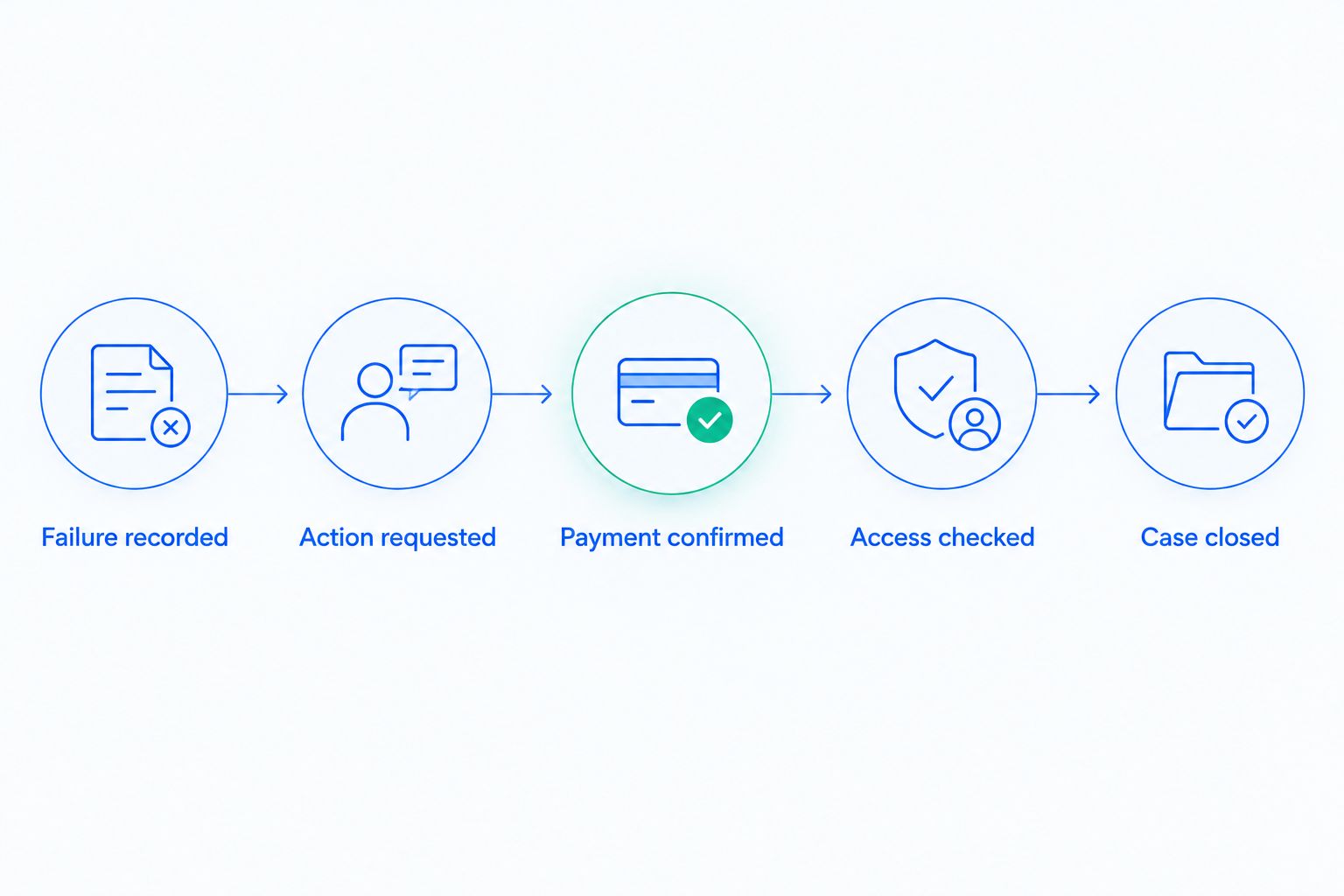
For example, a saved replacement card is an intermediate event. Inspect the overdue invoice afterward. Your test should also establish whether paying that invoice stops reminders and restores access when your policy requires it.
Write down the expected result before each test. For a practical starting scope, follow 1 failed renewal from the initial failure to its final state. Then add cases that use different payment methods or access rules in your own setup.
The guide to testing dunning software before switching it on provides a focused next step before a live rollout.
Run a recovery review before choosing
Use a 30-day review window as a starting scope, not a benchmark. List the failed renewal invoices created during that window and track their outcomes consistently.
Separate the records into paid, still unpaid, and otherwise closed. Keep refunds, credits, and canceled balances distinct from collected payments. Otherwise, a smaller overdue balance can look like recovery even when no money arrived.
For each unresolved invoice, record:
- The payment failure and required next action.
- The messages already sent to the member.
- The person responsible for follow-up.
- The current access state.
- The next review date.
Set a 7-day review interval for your initial evaluation if you need a concrete operating schedule. This is a suggested cadence, not a claim about optimal retry timing. Payment attempts should follow the payment situation and your configured recovery rules.
Your 2026 review should answer a plain question: is the main problem missing tooling, missing ownership, or a broken handoff? Choose software for a tooling gap. Choose a managed service when the recurring work needs an owner. Fix the integration when payment and access disagree.
Discuss your recovery setup
Explain your billing platform, failed-payment process, and who owns unresolved renewals.
How we ranked
This ranking prioritizes billing fit, recovery ownership, customer action, access handling, reporting, and operational control. It does not assign recovery-rate scores or claim head-to-head performance results.
Managed recovery ranks first for the specific problem of unowned failed payments. Self-managed software ranks next for teams that can operate the process. Stripe's built-in approach is the baseline to assess before adding another system.
Treat the 2026 shortlist as a buying framework. Confirm current product scope and integration details directly before making a purchase decision.
Which dunning option should you choose?
Choose managed recovery if nobody owns failed renewals today. Ask for a clear scope covering reviews, message maintenance, unresolved accounts, and the handoff back to your team.
Choose self-managed software when an accountable employee will run the process. Keep Stripe's built-in retries and emails when they meet your requirements and your team manages the remaining work.
Do not make the decision on reminder volume alone. A useful recovery process gets the right action from the member, confirms payment, and leaves access in the correct state.
FAQ
What’s the best dunning software for membership platforms?
The best choice depends on billing compatibility and who owns recovery. Choose managed recovery when nobody runs the process, self-managed software when an employee owns it, and assess existing Stripe retries and emails before adding another system.
Do I need separate dunning software if I already use Stripe?
You need separate software only when it addresses a defined gap in your current process. Review Stripe retries, customer emails, unresolved invoices, and membership-access handling before deciding.
Should I hire someone to manage failed-payment recovery?
Hire recovery management when ongoing reviews, message updates, and unresolved-account follow-up have no reliable internal owner. Agree on those responsibilities and confirm your billing setup before starting.
Does connecting Stripe guarantee compatibility with my course platform?
No. Confirm which system creates recurring invoices, whether the recovery provider supports that billing arrangement, and how payment status reaches the system controlling course access.
Does a member updating their card mean the renewal was recovered?
No. Confirm that the overdue invoice was paid. A saved card update alone does not establish that the failed renewal balance was collected.
Should I remove membership access after a failed payment?
Use a written access policy rather than treating every failure identically. Define how overdue invoices, customer action, successful payment, and cancellation affect membership access, then test those transitions.
How do I compare recovery results fairly?
Track the same defined group of failed renewal invoices through their outcomes. Separate collected payments from credits, refunds, cancellations, and balances that remain unpaid.
One last thing
Test whether reminders stop after payment, not just whether they start after failure. Ask your billing owner to follow a recovered invoice through the next scheduled message and check the membership state. That final check belongs in the acceptance test for any recovery setup.
Related guides
- Dunning software or managed recovery: who owns the work?
- When built-in Stripe recovery is enough
- Deciding when to restrict account access