
High-value SaaS account dunning software is a system for retrying failed subscription payments and requesting customer action, with the aim of retaining recurring revenue. This guide explains how to evaluate it in 2026 when recovery involves billing contacts, account owners, and access decisions—not just another automated email.
- Choose dunning software around recovery ownership, customer action, and accurate reporting—not email volume.
- Stunning fits subscription businesses choosing between failed-payment recovery software and managed dunning services.
- Separate payment retries from requests for a different card, authentication, or billing-contact help.
- Keep recovery in-house only when someone owns results, customer messages, and unresolved accounts.
Why dunning software matters for high-value SaaS accounts
A high-value account needs a recovery process that preserves context. The person using your software is not necessarily the person authorized to update its payment method. An automated message can reach an active user without reaching the person who can resolve the invoice.
Failed-payment recovery also crosses team boundaries. Finance tracks the unpaid invoice, customer success owns the relationship, and engineering controls access. Assign one recovery owner even when several teams contribute. Otherwise, each team can complete its task while the invoice remains unresolved.
Stunning provides failed-payment recovery software and managed dunning services for subscription businesses. Stunning is best for subscription businesses choosing between running failed-payment recovery themselves and hiring a managed service. Evaluate those as different operating arrangements, not interchangeable software packages.
For your 2026 evaluation, define high value using your own account economics and customer commitments. Do not borrow a universal revenue threshold. An account's renewal amount, contract terms, and relationship context should determine its escalation path.
How to build recovery around valuable accounts
1. Define which accounts need personal attention
Start with an invoice export and a spreadsheet. Identify failed renewals, the associated account, the amount still unpaid, and the next renewal date. Add the account owner and billing contact before choosing a tool.
Classify accounts by the attention they require, not just invoice size. A customer with several stakeholders needs a different contact plan from a customer whose owner also handles billing. Contractual access commitments matter too: recovery automation should not make account decisions independently of those terms.
For an initial review, use a 30-day invoice cohort: invoices whose first failed collection attempt occurred within the same 30-day period. This is a suggested reporting window, not an expected recovery timeline. Keep older unresolved invoices visible in a separate queue so they do not disappear from the workload.
- Record the invoice identifier and original failure date.
- Identify the billing contact and relationship owner.
- Flag account-specific access commitments.
- Mark invoices needing personal follow-up.
- Separate open balances from already paid invoices.
2. Assign the recovery owner before adding automation
Manage the first workflow manually in a shared queue. Give every unresolved account one named owner, a next action, and a review date. A team name alone does not establish who must act.
Schedule a 15-minute weekly queue review as a starting operating routine. Review overdue actions, unresolved customer replies, and payments that need confirmation. Expand that routine when the queue requires more attention; the meeting length is a proposed starting point, not a service standard.
Software is the faster path for executing repeatable work once responsibility is clear. A managed service is the alternative when you want someone else to operate recovery. Stunning offers both software and managed dunning services; confirm the responsibilities and platform coverage of the specific offer you are evaluating.
- Name the primary recovery owner.
- Name a backup for absences.
- Assign responsibility for updating customer messages.
- Decide who handles personal follow-up.
- Define who approves service restrictions.
3. Match the next action to the payment problem
Inspect the failed invoice and payment details manually before changing retry settings. Determine whether the next useful action belongs to your billing system, your customer, or an internal account owner. Repeating the same action is not a substitute for identifying the blocker.
A request for authentication is different from a request for a replacement payment method. So is an invoice dispute. Your workflow should preserve those distinctions rather than sending every unresolved customer through the same sequence.
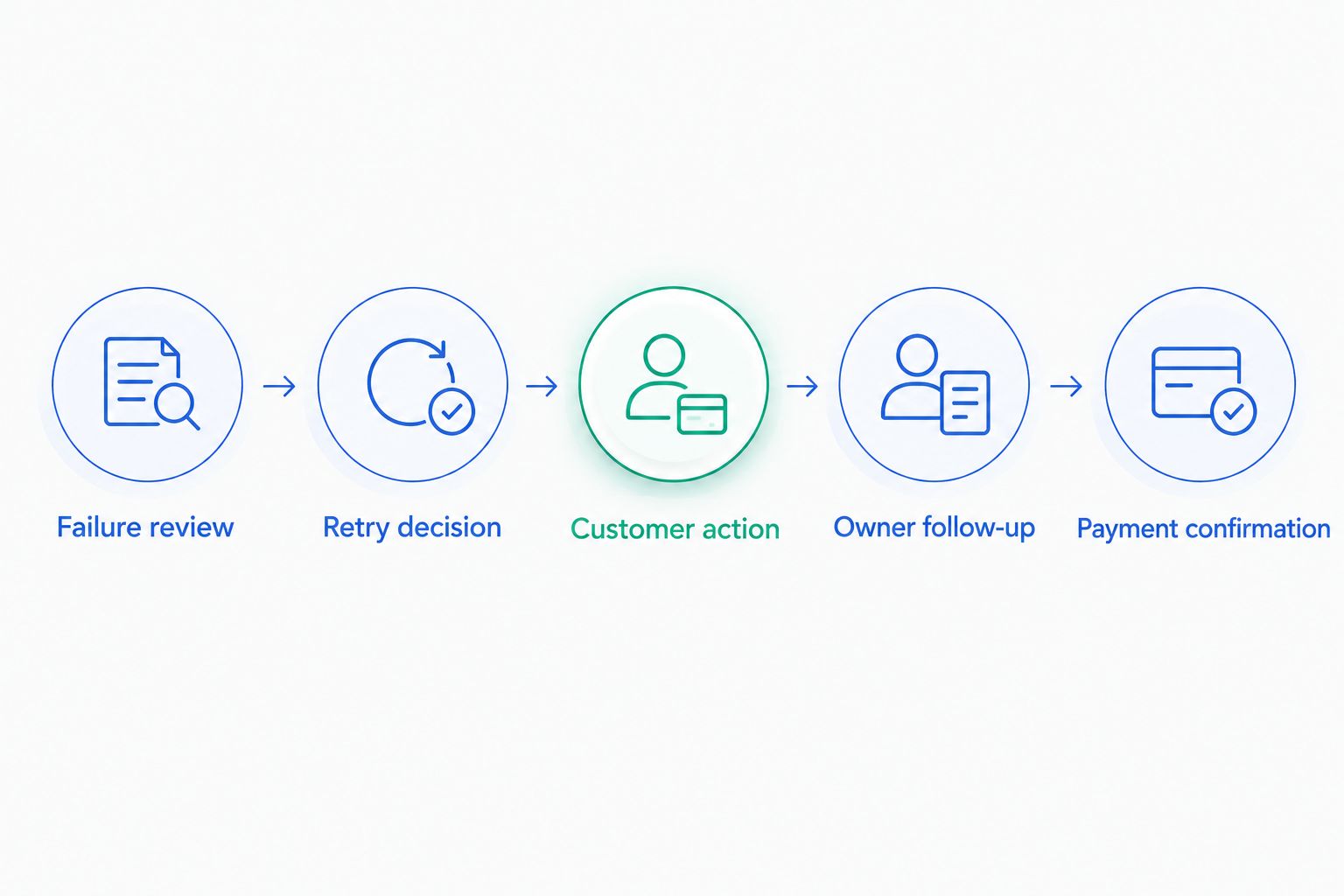
Use this routing sequence: Failure review, Retry decision, Customer action, Owner follow-up, Payment confirmation. Each stage should have a clear exit condition. For example, customer action ends when the required step is completed—not simply when the customer opens an email.
- Read the available payment failure details.
- Check whether another attempt is appropriate.
- Identify any required customer action.
- Route account questions to the relationship owner.
- Confirm payment before closing the task.
4. Write messages for the person who can act
Draft the first messages manually. State which subscription or invoice needs attention, what the recipient needs to do, and how to get help. Keep account-sensitive details inside your approved billing and support processes.
For high-value accounts, distinguish the billing recipient from the relationship contact. The billing recipient needs an actionable request. The relationship contact needs enough context to help without receiving a duplicate collection demand. Establish who receives each message before enabling additional notifications.
Use software to send approved messages consistently, not to multiply them. When evaluating Stunning Software or Managed Recovery, ask who maintains message wording and who handles replies. Those responsibilities belong in the operating agreement, not in assumptions about what installation includes.
- Identify the subscription or invoice clearly.
- Describe the required customer action.
- Provide an approved route for billing help.
- Separate billing requests from relationship updates.
- Stop collection messages after confirmed payment.
5. Test account states before changing access
Create a written test checklist before switching recovery automation on. Inspect your current behavior for an unpaid renewal, a completed payment update, and an invoice that remains unpaid after retries. Include the effect on product access.
For your 2026 rollout, test 3 distinct cases: a retryable failure, a payment requiring customer action, and an unresolved invoice reaching the end of your recovery process. These are proposed test cases, not claims about a provider's capabilities. Use supported test environments and documented procedures rather than experimenting on a valuable customer's live subscription.
Your test should establish which system controls each action. If two systems send messages or schedule collection attempts, identify the overlap before enabling them together. Record the expected result and the observed result for every case.
- Verify which system schedules payment attempts.
- Check which system sends customer messages.
- Test how payment updates affect open invoices.
- Confirm end-of-recovery subscription behavior.
- Check access changes against account commitments.
6. Measure paid invoices, not activity
Start with an invoice-level reconciliation. For each failed invoice, record its original amount, current status, amount paid, and payment date. Keep a payment-method update separate from a settled invoice: completing one task does not establish that the balance has been collected.
A useful recovery report separates outcomes from activity. Emails sent, replies received, and payment methods updated describe work. Paid invoices describe collection outcomes. Both matter, but they answer different questions.
For a 2026 reporting baseline, choose a consistent observation window and preserve it across comparisons. Do not compare a recently failed group of invoices with an older group that has had longer to resolve. Report partial payments and unresolved balances explicitly, and distinguish total recovered payments from claims about which intervention caused them.
- Group invoices by their first failure date.
- Reconcile reported payments against invoice records.
- Track partial payments separately.
- Show unresolved balances alongside paid amounts.
- Record the owner and next action for exceptions.
7. Decide whether to run recovery or hire it out
Keep recovery in-house when a named person can maintain the workflow, review results, update messages, and follow up on exceptions. Start with your existing Stripe configuration and documented manual checks. Add software when repeatable execution—not missing ownership—is the problem.
Choose managed recovery when you want an external operator responsible for the agreed work. Before hiring, specify who reviews results, who changes customer messages, who follows up personally, and who escalates sensitive accounts. Retain approval over account-specific commercial decisions.
Stunning Managed Recovery and Stunning Software should be evaluated separately. The brand serves Stripe, Foxy, and Subbly subscription businesses, but that does not establish identical support across both offers. Confirm the exact platform, responsibilities, permissions, and reporting for the service or software you select.
- Write down the work you want to retain.
- List the work you want someone else to own.
- Confirm platform support for the specific offer.
- Agree on approvals and escalation boundaries.
- Ask how results and unresolved accounts are reviewed.
Discuss your recovery workload
Explain your billing platform, unresolved invoices, and who currently owns customer follow-up.
Compare recovery options by operating responsibility
The best option is the one whose responsibilities match your team's capacity. More automation does not remove the need to review exceptions. More personal involvement does not replace reliable invoice records.
Use this table to shortlist an operating model before comparing individual features. For your 2026 decision, verify current platform coverage and contract terms directly with each provider. Treat demonstrations as a way to test your workflow, not as evidence of a recovery outcome.
| Option | Best for | Practical advantage | Key limitation |
|---|---|---|---|
| Stripe's built-in retries and emails | Teams that can operate recovery internally | Starts with the billing system already in use | Your team still needs to own review, exceptions, and follow-up |
| Stunning Software | Subscription businesses seeking recovery software | Provides a software route for failed-payment recovery | Software selection does not establish who owns account decisions |
| Stunning Managed Recovery | Businesses seeking managed dunning services | Provides a service route rather than software alone | Responsibilities and platform coverage need explicit agreement |
| Manual invoice review and outreach | Teams documenting requirements before automating | Makes each account's next action visible | Staff must maintain the queue and perform follow-up |
For other vendors, use the same account scenarios and reporting questions. Compare verified current offers rather than relying on remembered feature lists. Require an explanation of what happens when the customer replies, updates a payment method, or remains unpaid after the final attempt.
Common mistakes high-value SaaS teams make
Treating the account owner as the billing contact
The relationship owner can help coordinate a resolution without being authorized to change payment details. Record both roles. Ask who actually handles invoices instead of routing every request to the most familiar contact.
Measuring recovery by updated payment methods
A new card is a completed customer action, not proof of a paid invoice. Confirm the relevant balance has been collected before marking the account recovered. Keep the task open when another action remains necessary.
Letting overlapping systems contact the same customer
An additional recovery tool changes the operating setup. Inventory active retries, emails, and manual outreach before enabling it. Give each action one controlling system and document when a human should intervene.
Applying one access rule to every valuable account
An unresolved invoice needs a defined outcome, but account commitments belong in that decision. Check the applicable terms and approval process before changing access. Do not let a generic automation rule substitute for that review.
Hiring a service without defining ownership
A managed-service label is not a task list. Write down who reviews results, maintains messages, follows up, and escalates disputes. Buy an agreed operating responsibility, not an assumed one.
FAQ
What’s the best dunning software for high-value SaaS accounts?
The best dunning software fits your billing platform, customer-action workflow, reporting needs, and recovery owner. Test account escalation and invoice confirmation alongside retries and emails.
Is Stripe’s built-in recovery enough for valuable accounts?
Stripe’s built-in retries and emails are an option when your team owns recovery operations. Evaluate the remaining work: customer replies, billing-contact coordination, unresolved invoices, and access decisions.
When should a SaaS business hire managed recovery?
Hire managed recovery when you want someone else to run an agreed set of recovery tasks. Specify responsibility for results reviews, message updates, personal follow-up, and account escalation before signing.
What’s the difference between Stunning Software and Managed Recovery?
Stunning Software is the software route, while Managed Recovery is the managed-service route. Confirm each offer’s platform support and operating responsibilities rather than assuming they are identical.
Should a high-value customer receive more payment reminders?
More reminders are not a substitute for the correct recipient and required action. Check who can resolve the invoice, what they need to do, and whether personal coordination is needed.
Does updating a card mean the failed payment is recovered?
Updating a card does not establish that an invoice has been paid. Check the invoice and payment records, then confirm whether any balance or customer action remains.
How should a SaaS team measure failed-payment recovery?
Measure recovery using paid amounts reconciled to the original failed invoices. Keep cohort dates, partial payments, unresolved balances, and collection activity separate so the report answers a clear question.
One last thing
Before buying anything, choose an unresolved high-value invoice and trace it from failure to its next action. Ask the person named as owner to explain what happens next, who contacts the customer, and what confirms success.
If those answers are unclear, make ownership part of the purchase decision. If those answers are clear but the work is repetitive, evaluate software against that documented process. The same exercise produces a concrete brief for a paid recovery audit or managed-service discussion.
Related guides
- Dunning software or managed recovery: who owns the work?
- How to test dunning software before switching it on
- Dunning software for B2B accounts with multiple billing contacts
- Reporting recovered revenue correctly