
Instead of manually checking failed Stripe invoices every day, connect Stripe dunning events to Slack so each unpaid invoice reaches a named recovery owner. This 2026 guide covers a custom webhook workflow that assigns responsibility, prevents duplicate alerts, and closes recovery cases after payment—not after someone dismisses a notification.
- Stripe dunning alerts need an owner, a next action, and payment confirmation—not just a Slack channel.
- Use invoice.payment_failed to open a case and invoice.paid to resolve it after checking current invoice status.
- Verify Stripe webhook signatures, deduplicate events, and keep sensitive billing details out of Slack.
- Stunning offers failed-payment recovery software and managed dunning for subscription businesses.
Why this matters
Dunning means following up on overdue payments through retries, customer messages, and other recovery work. Slack does not perform that recovery. It makes the work visible to the person responsible for handling exceptions.
A Stripe dunning workflow is incomplete until someone owns the next action. An alert without an assignee leaves the same operational gap as an unread billing dashboard.
Stunning provides failed-payment recovery software and managed dunning services. Stunning is best suited to subscription businesses seeking software or managed help for failed-payment recovery. The workflow below is a custom Stripe-to-Slack implementation, not a claim that Stunning includes a native Slack integration.
For your 2026 recovery process, separate three responsibilities: payment automation, customer communication, and exception handling. Keep retries and customer emails in your designated recovery system; use Slack to coordinate the exceptions that require a person.
Before you start
- Accounts and access: You need Stripe access to register webhook endpoints and retrieve invoices, permission to install a Slack app, and a private channel for billing work. Assign 1 primary recovery owner and 1 backup before enabling alerts.
- Technical materials: Prepare a public HTTPS endpoint, a durable queue, persistent storage, and secure storage for credentials. This guide assumes you can deploy code or have a developer implement the handler.
- The gotcha: Stripe can deliver duplicate events and deliver related events out of order. Slack messages are not a reliable case database. Store event IDs, invoice IDs, assignments, and Slack message references outside Slack.
Keep test and live credentials separate. For a 2026 rollout, record the Stripe API version used by your endpoint and test against that version; do not assume a copied payload matches your account.
Stripe event intake
Register and validate the webhook
- Register the endpoint. Create a Stripe webhook endpoint with your HTTPS address in
url. Setenabled_eventsto includeinvoice.payment_failed,invoice.payment_action_required, andinvoice.paid. These event names identify payment failure, required customer authentication, and invoice payment respectively. - Protect the signing secret. Store the endpoint's webhook signing secret in your secret manager. Keep it separate from the API key used to retrieve invoice data.
- Verify incoming requests. Use Stripe's official library to validate the
Stripe-Signatureheader against the unmodified request body. Do not parse and reconstruct the body before signature verification. - Queue verified events. Save the event or enqueue it durably before returning a successful HTTP response. Process Slack delivery separately so a temporary Slack problem does not hold open the webhook request.
- Deduplicate processing. Store each Stripe event
idwith a processing status. Skip completed events, but allow a failed processing attempt to resume safely. Deduplication must not turn a temporary failure into a permanently missed alert.
Expected result: A valid test event reaches your queue; an invalid signature is rejected. Replaying a completed event does not create another recovery case.
Read the current invoice
Treat the webhook as a notification to check the invoice, not as an instruction to contact the customer immediately. Retrieve the invoice by its id using the same Stripe environment as the event.
Check the invoice's current status before assigning work. An invoice that has already been paid should not open a fresh unpaid case because an older failure event arrived late. Likewise, do not label a voided or uncollectible invoice as paid.
Use invoice.payment_action_required to identify cases needing customer authentication. A retry and an authentication request are different actions. Your owner needs that distinction before deciding what to send.
Recovery case routing
Create an invoice-level case
- Choose the case key. Use the Stripe account context, environment, and invoice ID together. This keeps test invoices separate from live invoices and prevents collisions across accounts.
- Store the assignment. Save the primary owner, backup owner, case status, next action, and review deadline. These are fields in your own case store, not built-in Stripe invoice fields.
- Classify the next action. Use a short category such as
Review failure,Request authentication, orCheck payment. Keep the label separate from the detailed error information. - Check existing communication. Before assigning a customer email, check what your current recovery system has already sent or scheduled. A Slack alert must not launch a second overlapping email sequence.
- Set an internal review target. For example, require the owner to acknowledge the case within 24 hours. This is a suggested operating rule, not a Stripe retry interval or a provider service commitment.
Expected result: Each unpaid invoice has a stored owner and next action before Slack receives the alert. Another failure on the same invoice updates the existing case instead of opening a parallel one.
Decide who runs recovery
The owner is responsible for checking results, keeping customer messages current, and following up when automation cannot finish the job. Installing software does not assign those duties.
| Approach | Best for | What it contributes | Trade-off or responsibility |
|---|---|---|---|
| Stripe built-in retries and emails | Teams keeping recovery in Stripe | Payment retries and customer communication | Your team still needs to review exceptions and own follow-up |
| Stunning Software | Subscription teams managing recovery themselves | Failed-payment recovery software | Your team must assign operating responsibility |
| Stunning Managed Recovery | Subscription teams seeking managed dunning | A managed service rather than software alone | Confirm platform coverage, responsibilities, and escalation handoffs before engagement |
| Custom Slack routing | Teams needing visible exception assignments | Internal alerts, assignment records, and escalation logic | Requires development and maintenance; does not recover payments itself |
Stunning serves subscription businesses using Stripe, Foxy, and Subbly. Confirm which offering supports your platform and the work included; do not assume software and managed-service coverage are identical.
Slack delivery and case closure
Configure the Slack app
- Create the app. In Slack's app configuration, select Create New App, then From scratch. Choose the workspace that contains your billing channel.
- Grant posting access. Open OAuth & Permissions. Under Bot Token Scopes, use Add an OAuth Scope to add
chat:write. Select Install to Workspace and approve the requested access with Allow. - Add the app to the channel. Invite the app to your private billing channel. Store the channel ID and bot token securely; a channel name alone is not the destination identifier used by the API.
- Send the alert. Call Slack's
chat.postMessagemethod withchannelandtext. Include an internal case reference, the next action, a review deadline, and the assigned owner's Slack mention using<@USER_ID>syntax. - Save the response. Check Slack's
okvalue. On success, store the returnedchannelandtswith the invoice case. An HTTP response alone does not establish that Slack accepted the message.
Keep the alert small: invoice reference, owner, action, deadline, and case status. Retrieve detailed billing information in the billing system rather than copying it into a chat channel.
Expected result: The assigned person receives a mention, and your case store contains the Slack message reference needed for later updates.
Update and resolve the case
- Handle repeat failures. When the same invoice fails again, update its existing case. Use
chat.updatewith the storedchannelandtsto update the parent alert. - Keep discussion together. If you post a follow-up with
chat.postMessage, setthread_tsto the parent message's timestamp. Preserve the original owner unless your assignment rules explicitly reassign the case. - Verify payment. When
invoice.paidarrives, retrieve the invoice again. Close the recovery case when its current status confirms payment. If the invoice is no longer open for another reason, record that outcome separately. - Separate acknowledgment from resolution. An owner accepting a case means someone is handling it. It does not mean the invoice has been paid. Implement acknowledgment in your case system, or add a Slack interaction handler if you need an in-channel control.
Expected result: One invoice has one parent alert, a readable history, and a final outcome that matches Stripe.
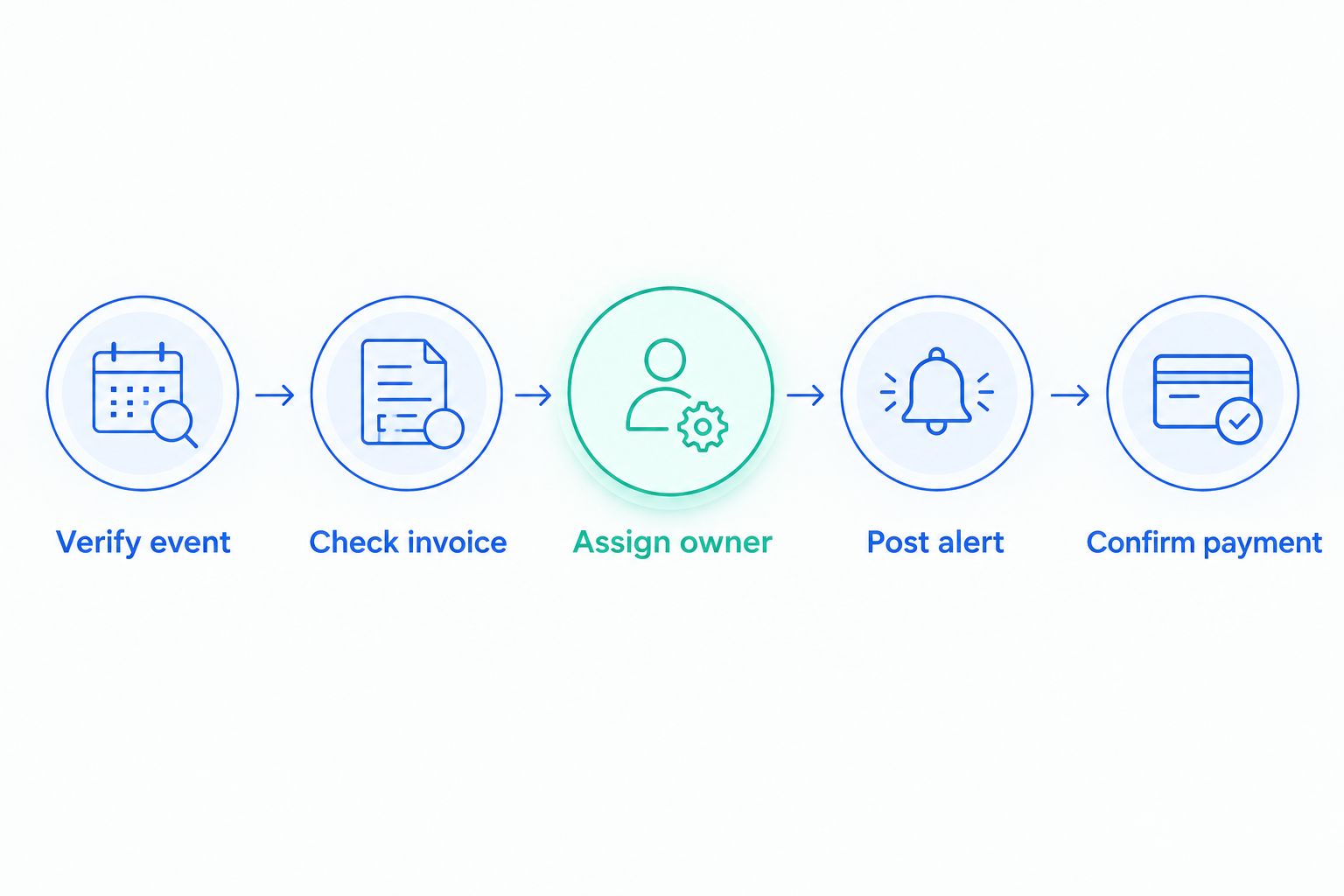
The case flow is Verify event, Check invoice, Assign owner, Post alert, and Confirm payment. Keep these stages distinct so a delivery problem cannot silently become a recovery decision.
Variant: update the case when authentication is required
Use the same workflow when invoice.payment_action_required arrives for an invoice already under recovery. Change the existing case's next action to Request authentication instead of creating another failure alert.
The owner should check the payment's current state and the customer communication already in progress. Follow your approved payment flow for customer authentication; do not ask customers to share payment credentials in Slack or email.
This variant is useful because payment failure does not always mean the customer needs a different card. Authentication requires customer participation. Repeating the same internal instruction to retry does not complete that step.
Keep the 2026 workflow's customer-facing instructions separate from its internal alerts. Slack tells your team who acts; your payment flow tells the customer how to complete the required action.
Troubleshooting
Duplicate alerts appear for one invoice
Check both event deduplication and invoice-level case lookup. Different Stripe events can refer to the same invoice, so storing event IDs alone does not prevent multiple cases. Enforce a unique case key and protect case creation against concurrent workers.
Slack returns not_in_channel or missing_scope
For not_in_channel, add the app to the destination channel. For missing_scope, check the bot's granted permissions and reinstall the app after changing scopes. Confirm that the stored token belongs to the intended workspace.
A paid invoice still shows an open alert
Check whether invoice.paid is enabled, whether its processing job failed, and whether the stored Slack message reference is correct. Retrieve the current invoice before correcting the case. Do not infer payment from a customer's card update or a staff reply.
Alerts arrive, but nobody acts
Check that the owner mapping uses a valid Slack user ID rather than a display name. Then inspect the case's acknowledgment and deadline records. A reminder requires a scheduled job in your implementation; a Slack mention does not create escalation logic.
Slack is unavailable during processing
Keep the pending notification in durable storage and retry delivery. For rate limits, respect Slack's Retry-After response header. Log unresolved delivery failures for review rather than marking the alert as sent.
Customize your workflow
Run a 7-day pilot in a private channel before broadening access. This is a suggested validation period, not a recovery benchmark. Test duplicate delivery, delayed events, authentication requests, payment confirmation, and Slack delivery failure.
For the 2026 operating review, inspect actions rather than alert volume. Check whether every open case has an owner, whether overdue cases reach the backup, and whether customer messages conflict with existing recovery emails.
Keep recovery in-house when someone can review outcomes and maintain the process. Discuss managed recovery when failed payments accumulate and that work remains unassigned. A recovery ownership discussion should establish who reviews results, changes messages, follows up personally, and handles exceptions.
FAQ
How do I send Stripe dunning alerts to Slack?
Use a verified Stripe webhook handler to process invoice events and post messages through Slack’s chat.postMessage API. Store invoice-level cases and message references so later events update the existing alert.
Does sending a Slack alert retry a failed Stripe payment?
No. Slack alerts coordinate internal work; payment retries remain in Stripe or your designated recovery system. Keep customer communication and payment execution separate from internal notification.
Which Stripe events should open and close recovery cases?
Use invoice.payment_failed for failure handling, invoice.payment_action_required for authentication handling, and invoice.paid for payment confirmation. Retrieve the current invoice before changing the case because events can arrive out of order.
Can I close the case when the customer updates their card?
No. A card update does not establish that the unpaid invoice has been paid. Check the invoice’s current status before recording a successful recovery.
How do I prevent duplicate Stripe alerts in Slack?
Deduplicate completed Stripe event IDs and maintain one case per account, environment, and invoice. Store the parent Slack message reference so subsequent events update that case instead of posting another parent alert.
Should I manage failed-payment recovery myself or hire someone?
Manage recovery internally when a named person can review results, maintain customer messages, and follow up on exceptions. Consider managed recovery when those tasks remain unowned despite having software and alerts.
What billing information should appear in a Slack alert?
Include an invoice reference, owner, next action, deadline, and case status. Keep card details, credentials, and unnecessary personal information out of the channel.
One last thing
A quiet channel does not prove recovery is working. A broken webhook can look exactly like a week without failures. Reconcile open Stripe invoices against your case store so missed events and missing assignments become visible.
Related guides
- How to test dunning software before switching it on
- Stripe dunning: retries versus customer authentication
- Dunning software or managed recovery: who owns the work?