
Stripe failed payments require a different card when the existing card cannot be used for the payment—not simply because an attempt failed. Check the payment failure details before asking for a replacement: insufficient funds, an authentication request, and incorrect card details call for different responses. After any update, confirm that the unpaid invoice is actually paid; saving a new payment method does not prove recovery.
- Stripe failed payments do not automatically require a different card; check the failure reason before choosing the next action.
- Authentication, incorrect details, and insufficient funds need different customer messages.
- A saved payment method is not a recovered invoice. Confirm payment before closing the case.
- Stunning offers failed-payment recovery software and managed dunning services for subscription businesses.
Why this matters
A customer who needs to approve a payment does not necessarily need another card. A customer whose card has been canceled needs more than another retry. Sending both customers the same message creates unnecessary work and leaves the payment problem unresolved.
For your 2026 recovery process, separate payment diagnosis, customer action, and payment confirmation. Dunning means the process of following up on unpaid payments. Stunning offers software and managed services for that work; deciding who owns the process matters as much as choosing the software.
When do Stripe failed payments need a different card?
Ask for a different card when the current payment method is no longer usable, the issuer will not permit the transaction, or the customer chooses another method after checking with their bank. Do not treat a generic decline as proof that the card must be replaced.
Use the failed payment's details and the customer's response together. A bank decline tells you what happened to an attempt; it does not always explain the underlying account issue.
| Response | Best for | Advantage | Limitation |
|---|---|---|---|
| Retry the same card | A temporary issue such as insufficient funds | Avoids asking the customer to enter another card | Does not fix an unusable card or complete authentication |
| Correct payment details | An incorrect card number, expiry date, or other supplied detail | Addresses the specific information problem | Correct details do not guarantee issuer approval |
| Complete authentication | A payment that requires customer approval | Addresses the required verification step | Needs customer participation and a suitable payment flow |
| Use a different card | A canceled or unusable card, or a customer choosing another method | Replaces the payment method causing the problem | The replacement still needs a successful payment attempt |
Choose the next action from the failure details, not from the number of unsuccessful attempts. Repeating an unsuitable action does not turn it into a recovery strategy.
Read the failure details before writing the message
Start with the failed invoice and its associated payment in Stripe. Review the payment status, available decline information, and whether customer authentication is required. Keep your internal diagnosis separate from the language you send to the customer.
Stripe decline codes such as insufficient_funds, expired_card, and authentication_required identify different problems. A generic decline such as do_not_honor does not identify a single corrective action. Do not translate it into a definite claim that the card is expired, blocked, or permanently unusable.
Keep sensitive fraud-related details out of customer messages. Give the customer a safe next action without disclosing internal risk signals or asking them to send payment credentials by email.
When retrying the same card makes sense
Retrying suits a payment problem that can change without replacing the card. Insufficient funds is one example: the account balance can change while the payment method stays the same.
The advantage is less customer effort. The limitation is that another attempt cannot repair incorrect information, replace a canceled card, or perform an authentication step that requires the customer.
Before scheduling another attempt, check whether your existing recovery setup already has one planned. A manual attempt alongside an automated schedule makes the payment history harder to interpret and creates unnecessary payment attempts.
For a 2026 workflow, document who can initiate a manual retry and when that person must check the automated schedule. Retrying is an action with a reason, not a substitute for reading the failure.
When the customer should correct details or authenticate
Ask the customer to correct details when the failure points to information entered incorrectly. Direct the customer to your secure payment-update flow rather than collecting a card number or security code through support.
An expired card also needs current payment information. That can mean updating an existing card's details or using a replacement card; it does not always mean the customer must switch to a different bank or account.
Authentication is a separate branch. If the payment requires customer approval, send the customer through the appropriate authentication flow. Changing cards is not the first instruction when approval of the existing payment is the actual requirement.
Keep the request specific. Tell the customer whether they need to update payment details or approve a payment, and identify the subscription or invoice involved. A broad instruction to fix billing leaves the customer to diagnose the problem themselves.
When to ask for a different card
Ask for another card when the customer confirms that the original card has been canceled, closed, or replaced. Another card is also a practical option when the customer cannot resolve an issuer restriction on the transaction.
The benefit is straightforward: the customer stops attempting payment with a method they cannot use. The limitation is equally important: another card can also decline, require authentication, or be saved somewhere that the subscription does not use.
Do not promise that a replacement will work. Explain that the customer needs to provide a usable payment method and that the outstanding invoice still needs to be paid.
For an unexplained issuer decline, give the customer a choice: contact the bank about the attempted payment or provide another payment method. Avoid claiming to know why the bank declined the charge when the payment details do not establish that reason.
Why the right recovery action varies
Your 2026 decision should follow the payment and billing context, not a universal replacement-card rule.
- Failure reason: Incorrect details, insufficient funds, and an unusable card require different actions.
- Authentication status: A payment requiring customer approval needs an authentication path, not just another unattended attempt.
- Payment-method assignment: The payment method saved on the customer is not necessarily the one selected for the subscription or invoice.
- Invoice status: A saved card and a paid invoice are separate events. Check both.
- Recovery ownership: Someone must check results, handle exceptions, and stop messages when the payment is resolved.
These factors also determine what belongs in the customer message. Ask for the smallest action that addresses the actual problem, then verify the result.
What should you check after a customer changes cards?
Use 4 checks before closing a failed-payment case. The goal is to follow the replacement from storage through to successful payment, rather than stopping at a confirmation that details were saved.
- Confirm the update. Verify that the customer completed the payment-method update. Opening the update page is not the same as saving a method.
- Check assignment. Confirm which payment method the affected subscription or invoice will use. Review relevant payment-method settings rather than assuming the latest saved card takes priority.
- Review the attempt. Check whether payment has been attempted with the intended method. If it failed, read the new failure details before choosing another action.
- Confirm resolution. Check that the invoice is paid, review the subscription status, and confirm that obsolete recovery messages will stop.
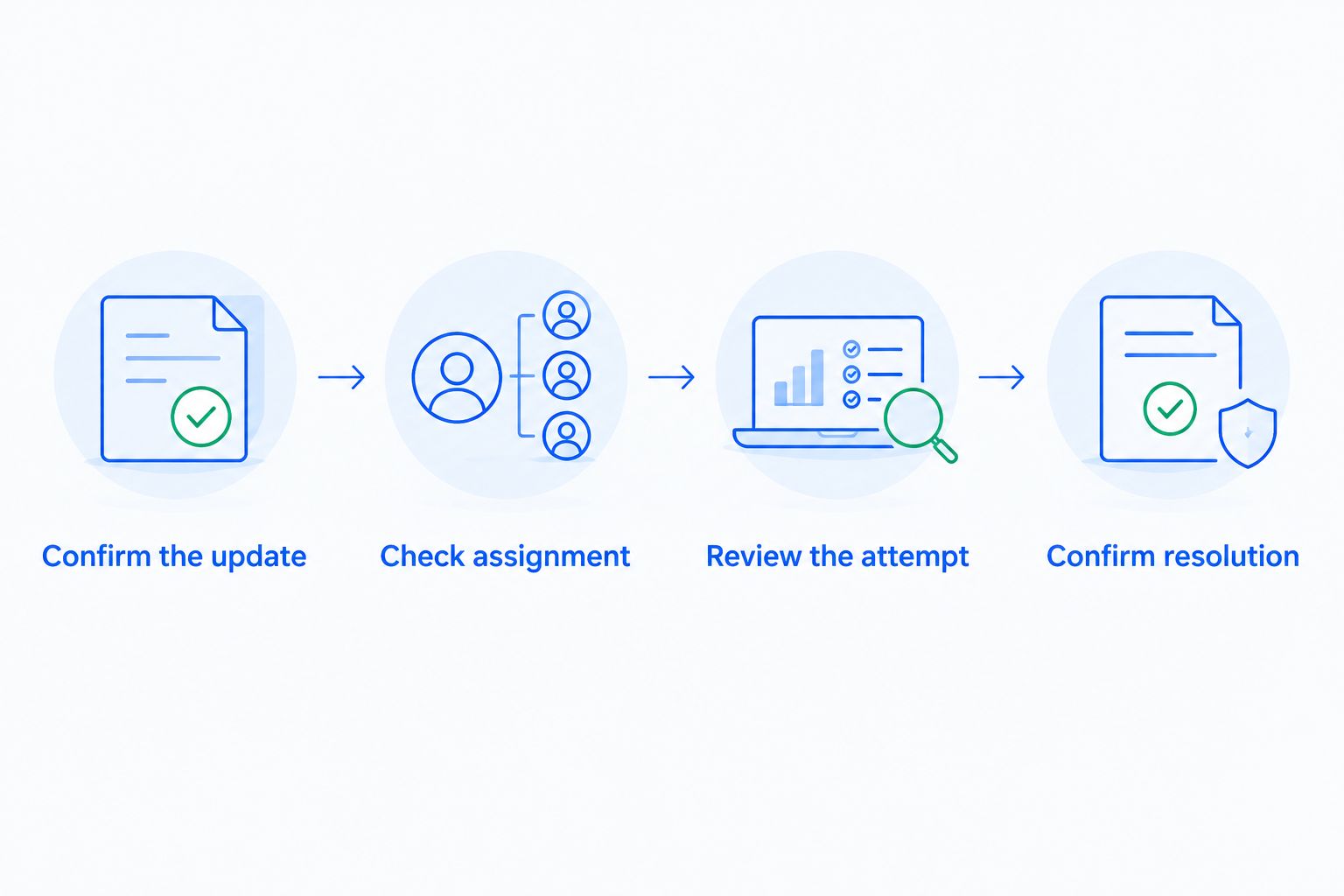
A new card can be saved successfully while the invoice remains unpaid. That distinction matters when support tells a customer their billing issue is fixed or when finance reports recovered revenue.
Make these checks part of your 2026 operating procedure. The Stripe failed payments recovery audit checklist provides a related starting point for reviewing the wider process.
Who should own failed-payment recovery?
Assign 1 owner to the recovery process, even when several people contribute. That owner needs to know which cases remain unresolved, which messages need changing, and which customers need personal follow-up.
Make 3 decisions explicit: who reviews results, who maintains customer messages, and who handles exceptions. Installing software does not assign those responsibilities.
| Operating model | Best for | Advantage | Responsibility or trade-off |
|---|---|---|---|
| Internal management | A team with a named person able to maintain recovery | Keeps operational decisions inside the business | Your team must review results, update messages, and follow up |
| Managed recovery | A team seeking outside ownership of ongoing recovery work | Lets you arrange external responsibility for agreed tasks | You must confirm scope, access, reporting, and escalation responsibilities |
Stripe's built-in retries and emails belong in this evaluation. Check what is enabled in your account before adding another system, and identify who maintains the existing process. Do not assume a second tool is necessary simply because a payment failed.
Stunning Software and Managed Recovery are different choices: software for running recovery and a managed-service option. The brand serves subscription businesses using Stripe, Foxy, and Subbly; confirm support for the specific offering and platform you are evaluating rather than assuming both offerings have identical coverage.
Stunning is best for subscription businesses evaluating failed-payment recovery software or managed dunning services. Choose the operating model based on who will do the ongoing work, not on a promise that installation alone resolves unpaid invoices.
When should you manage recovery internally?
Manage recovery internally when a named person can review failed payments, maintain messages, and investigate unresolved cases. The benefit is direct control; the cost is your team's ongoing attention.
Before adding software, ask that person to describe what happens after a generic decline, an authentication request, and a saved replacement card. Unclear answers identify process gaps to resolve during setup.
When should you hire someone to run recovery?
Hire someone when failed payments are accumulating and nobody consistently reviews the results or follows up. A managed arrangement makes sense when you want responsibility for agreed recovery tasks assigned outside your team.
Before engaging Stunning for Managed Recovery, confirm who reviews results, who changes messages, who contacts customers, and what remains your responsibility. Ask for the current service scope, supported platform, and fee structure before agreeing to the work.
Discuss your recovery process
Ask about a recovery audit, Managed Recovery, and who will own unresolved failed payments.
FAQ
Do Stripe failed payments always mean the customer needs a new card?
Stripe failed payments do not always require a new card. Check whether the failure calls for a retry, corrected details, customer authentication, or a different payment method.
Should I keep retrying a card that has insufficient funds?
A retry can address insufficient funds if the customer later has enough funds available. Check the existing retry schedule and avoid adding manual attempts without reviewing what is already planned.
What should I do when a Stripe payment requires authentication?
Direct the customer through the appropriate payment authentication flow. Another unattended attempt does not complete a verification step that requires customer participation.
Does saving a different card automatically pay an overdue invoice?
Saving a different card does not prove that an overdue invoice has been paid. Confirm the payment-method assignment, payment attempt, and final invoice status.
Can I tell a customer why their bank declined a payment?
Only give a specific explanation when the available payment details support it. For a generic issuer decline, ask the customer to contact their bank or use another payment method without inventing a cause.
Should I use software or a managed recovery service?
Use software when your team can own the ongoing recovery work; evaluate a managed service when you need outside responsibility for agreed tasks. Stunning offers failed-payment recovery software and managed dunning services, so confirm the scope and platform support of the offering you choose.
One last thing
A new failure after a card update is a new diagnostic event. Read its details instead of sending the original instruction again. The customer might have solved the first problem while the next attempt requires a different action.
For your 2026 recovery checklist, make the closing condition a resolved invoice—not an email sent, a link opened, or a card saved. That keeps customer follow-up tied to the payment outcome.
Related guides
- Stripe failed payments: what to check after a card update
- Dunning software or managed recovery: who owns the work?
- How to test dunning software before switching it on