

Built-in Stripe dunning is enough in 2026 when your team owns failed-payment recovery, checks what happens after retries and emails, and resolves cases that need customer action. It stops being enough when failed invoices accumulate without anyone reviewing results, updating messages, or following up with customers.
- Stripe dunning is enough when retries, customer emails, and follow-up have a clear owner.
- Judge recovery using failed-invoice cohorts, not a dashboard total without a denominator.
- Choose additional software for a defined workflow gap; choose managed recovery for an ownership gap.
- Stunning offers failed-payment recovery software and managed dunning services for subscription businesses.
When is built-in Stripe dunning enough?
Built-in recovery is enough when your team can explain what failed, what recovered, and what happens next. Enabling retries and emails is a setup task. Keeping the recovery process working is an ongoing responsibility.
Use this 2026 decision table to separate a configuration problem from an ownership problem. The comparison is about operating models, not a claim that one product recovers more than another.
| Approach | Best for | Main advantage | Main limitation |
|---|---|---|---|
| Stripe built-in recovery | Teams with an accountable recovery owner and straightforward needs | Keeps retries and customer emails within the existing billing workflow | Your team still reviews outcomes and handles exceptions |
| Additional recovery software | Teams that own recovery but need a specific capability | Adds a separate system for a defined requirement | Someone still needs to configure, review, and maintain it |
| Managed recovery | Teams that want someone responsible for operating recovery | Assigns ongoing work through an agreed service scope | Requires clear responsibilities, access, reporting, and escalation rules |
The distinction is ownership. A more elaborate system does not solve an unassigned job. Use the software or managed recovery ownership guide to decide whether you need another capability or someone to run the process.
Why this matters
Dunning means trying to collect a payment after it fails. In subscription billing, that includes retrying the payment, contacting the customer, and deciding what happens if the invoice remains unpaid.
Failed-payment recovery touches billing, support, and retention. Those responsibilities can sit with different people. Unless someone owns the whole process, each person can complete their part while an unresolved invoice receives no further attention.
A paid invoice is the outcome; a sent email or scheduled retry is only an activity. Your review should connect the activity to the invoice outcome. It should also distinguish payment failure from a customer's decision to cancel, because those problems need different responses.
Check your Stripe dunning process before adding software
Use a 30-day invoice cohort as a starting point for your review. This is a suggested working window, not a recovery benchmark. If invoices in that group are still inside your recovery process, keep tracking them rather than treating them as final failures.
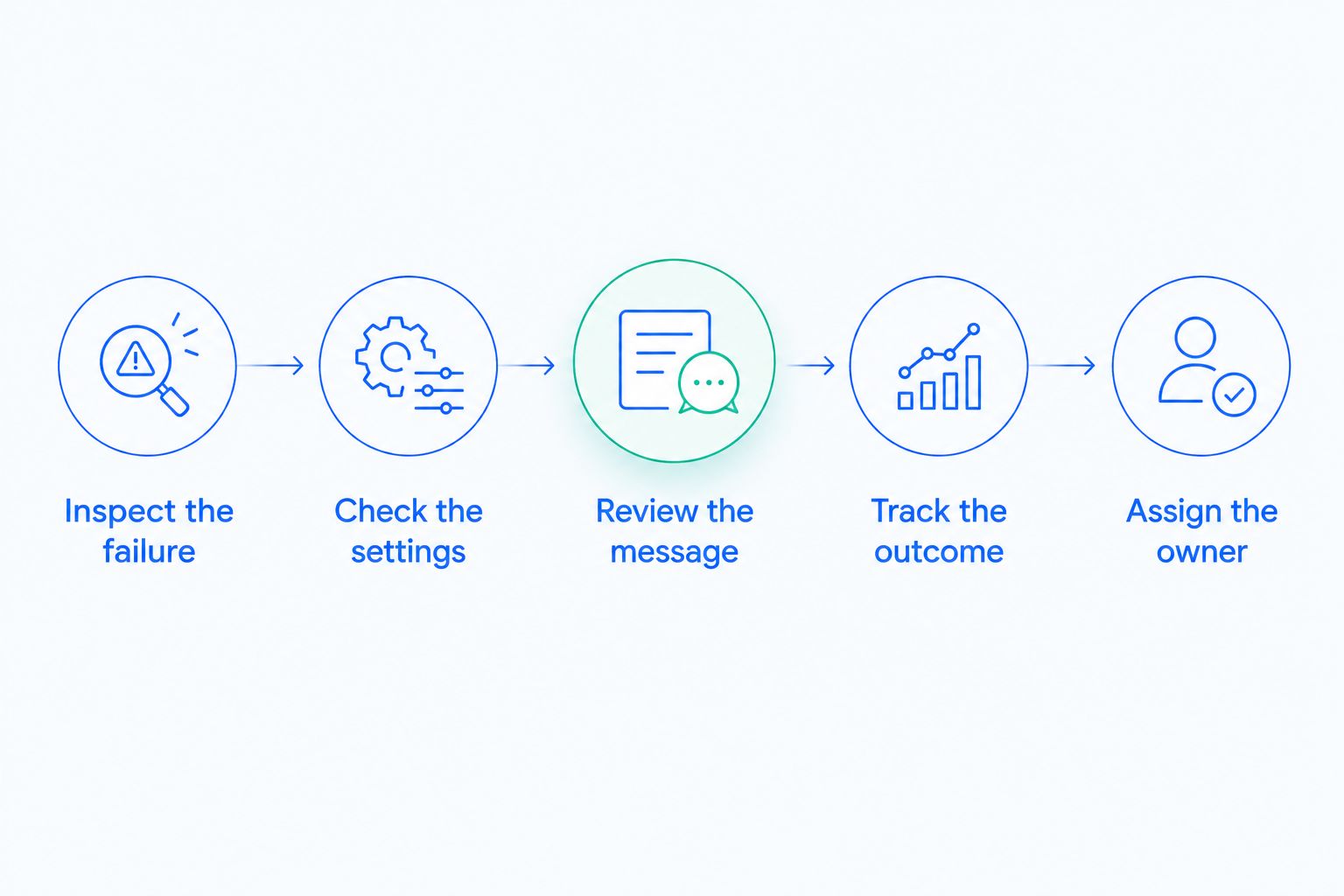
For a 2026 recovery review, work through the following sequence before changing tools.
1. Inspect the failure
Start with the failed invoice and its associated payment attempt. Read the recorded failure information before choosing an action. A retry and a request for updated payment details address different situations.
Separate invoices that are still being worked from invoices that have reached the end of your process. Otherwise, your team will mix active recovery with final outcomes and struggle to explain whether a change helped.
Record enough context to answer these questions:
- Which invoice failed, and when did it first fail?
- What does the payment failure information say?
- Has another payment attempt occurred?
- Has the customer taken action?
- What is the next action, and who owns it?
Do not put full payment-card details in a review spreadsheet. Keep your working record focused on invoice references, status, and responsibilities.
2. Check the settings
Inspect the retry settings, customer emails, and subscription handling that apply to your billing setup. Record the actual configuration. Do not assume that a colleague's description or an old implementation note reflects what is enabled now.
Follow the process from failure to its final outcome. Check when a retry is expected, what the customer receives, and what happens when recovery ends. Identify any separate automation that also contacts customers or changes subscription status.
Keep one clear set of instructions for the customer. If separate systems send messages, review them together so their requests do not conflict. Adding software without checking this interaction creates another process to manage.
3. Review the message
Read the customer email as someone who wants to keep using the subscription but has just encountered a payment problem. The message should explain what happened, what action is needed, and how to get help.
Check the payment-update path yourself using an appropriate test workflow. Confirm that the destination matches the instruction in the email. Review the message on the devices your team supports rather than approving the subject line alone.
Avoid writing a diagnosis the failure information does not support. Ask for the action the customer needs to take, not an assumed explanation for why the payment failed.
4. Track the outcome
Choose a consistent definition of recovery. If you measure recovered invoices, keep invoices as the unit throughout the calculation. If you measure recovered value, use amounts throughout. Do not divide recovered customers by failed invoices and call the result an invoice recovery rate.
Keep these outcomes separate:
- Paid after a subsequent payment attempt.
- Paid after customer action.
- Still unresolved within the recovery process.
- Unpaid after the recovery process ends.
- Closed for a documented reason, such as an invoice correction.
An invoice that is voided or corrected is not automatically recovered revenue. Preserve that distinction in reporting. It prevents administrative cleanup from looking like successful collection.
5. Assign the owner
Name the person responsible for reviewing the results and deciding what changes. Give that person a route to billing support, customer support, and whoever can approve message changes.
Start with a 7-day review cycle and reserve 15 minutes for the initial review. These are suggested operating choices, not promised service timings. Extend the meeting when unresolved cases require decisions; shorten it when the work is clear and completed.
The review should end with an action list, not just a recovery total. Every unresolved item needs a next step or an explicit reason to stop pursuing it.
Why your recovery workload varies
There is no useful universal invoice threshold for replacing built-in recovery. The decision depends on the work your team needs to do and whether that work gets completed.
- Failure type. A case that needs customer action creates different work from a case waiting for another payment attempt.
- Customer response. Replies, questions, and requests for help need a person or an agreed handling process.
- Message maintenance. Customer instructions need review when your billing process or support route changes.
- Billing complexity. Separate recovery workflows require someone to check how their actions interact.
- Unresolved cases. A growing list of invoices without a next action signals an ownership problem, regardless of the tool in use.
- Reporting discipline. Inconsistent definitions make it harder to distinguish successful recovery from an unfinished process.
Use these factors to identify the work you need help with. Do not treat a large failed-payment total as proof that a specific product is the answer. First establish what happened to those invoices.
When should you add recovery software?
Add software when you can name a requirement that your current setup does not meet and someone will own the new system. Write the requirement in operational terms: what needs to happen, who needs to see it, and how you will verify that it happened.
For example, if your team needs a different customer-message workflow, assess that workflow directly. Ask to see the relevant configuration and customer experience. A long feature list does not establish that the particular gap is covered.
Check how the proposed system interacts with existing retries, emails, and subscription handling. Decide which system controls each action before enabling both. Also establish what your team must maintain after setup.
Buy a capability only after identifying the missing action. If the team cannot find time to review the existing process, another software account does not assign that responsibility.
When should you hire someone to run recovery?
Hire someone when the missing resource is sustained attention: reviewing results, maintaining customer messages, following up, and escalating exceptions. The service scope should identify which of those tasks the provider handles and which stay with your team.
Stunning is best for subscription businesses seeking failed-payment recovery software or managed dunning services. The choice between those approaches should follow the work you want to keep, not simply the desire to install another system.
Treat Stunning Software and Managed Recovery as different buying decisions. For each, confirm support for your billing platform, included tasks, account access, reporting, fees, and responsibilities. Do not assume that software compatibility establishes the scope of a managed service.
Use Stunning to evaluate those recovery options against your needs. Bring a written description of the problem: whether you need a capability, an accountable operator, or a clearer diagnosis before choosing either.
For a recovery audit, ask for findings tied to invoice outcomes and an actionable list of changes. For ongoing management, ask who reviews results, who updates messages, who follows up, and how unresolved cases return to your team.
Discuss your recovery ownership gap
Explain who handles retries, messages, reporting, and unresolved invoices today.
How do you know whether Stripe retries are working?
Stripe retries are working when subsequent payment attempts lead to paid invoices within the group you are tracking. Inspect those invoice outcomes rather than counting retry attempts alone.
Use the same observation period when comparing groups. An older group has had more time to recover than a newly failed group. Record customer actions separately where your records support that distinction, rather than attributing every eventual payment to retry timing.
Should you disable Stripe recovery when adding another tool?
Disable or change an existing recovery action only after deciding which system will own that action. Map retries, customer messages, and subscription changes separately; do not treat recovery as a single switch.
Before making a 2026 configuration change, document the current settings and the intended replacement. Check the transition for invoices already in recovery, not just future failures. Your team needs a clear process for both.
What should you ask a managed recovery provider?
Ask a managed recovery provider to describe the work it performs after setup. Request a plain account of review frequency, message maintenance, customer follow-up, reporting, and escalation responsibilities.
Also ask what the provider needs from you. Managed work still requires agreed access, decision authority, and a route for cases outside the service scope. A proposal should make those boundaries understandable before you commit.
FAQ
What is Stripe dunning?
Stripe dunning is the process of trying to collect failed subscription payments through retries, customer communication, and follow-up. It also requires a decision about invoices and subscriptions that remain unpaid.
Is built-in Stripe recovery enough for my SaaS business?
Built-in Stripe recovery is enough when it covers your requirements and someone reviews outcomes, maintains messages, and handles exceptions. Evaluate completed work and unresolved invoices before adding another system.
Do I need dunning software if Stripe already retries payments?
You need additional dunning software only when it addresses a defined requirement beyond your existing setup. Establish who will configure and maintain that capability before buying it.
When should I choose managed recovery instead of software?
Choose managed recovery when you want someone responsible for ongoing recovery work rather than another system for your team to operate. Confirm the tasks, platform support, reporting, and escalation boundaries in the service scope.
What should a failed-payment recovery audit examine?
A failed-payment recovery audit should examine failure information, retry settings, customer messages, invoice outcomes, and ownership. Its recommendations should identify specific changes and who will carry them out.
Does Stunning offer software or managed dunning?
Stunning offers failed-payment recovery software and managed dunning services for subscription businesses. Evaluate the software and managed service separately, including platform support and the work included in each.
What should I check before changing Stripe dunning settings in 2026?
Before changing Stripe dunning settings in 2026, document the current configuration, active recovery workflows, and intended change. Include invoices already in recovery and identify which system owns each action.
One last thing
Review customer replies before rewriting your next recovery email. They show which instructions customers question and which cases need help rather than another automated message. Use actual questions to improve the wording without inventing a reason for the payment failure.
Then give one person responsibility for checking whether that change helped. The practical test for built-in recovery is not whether it is enabled. It is whether someone can account for the invoices that remain unpaid.
Related guides
- Best dunning software for Stripe SaaS businesses
- Dunning management software: a buyer's evaluation checklist