
Bootstrapped SaaS dunning software is a system for following up on failed subscription payments with the aim of collecting unpaid renewals without making the founder manage every failure. Small teams need more than retries and emails: they need clear ownership, a working payment-update path, and a way to tell whether invoices actually get paid.
- Dunning software handles failed-payment follow-up; bootstrapped SaaS teams still need someone accountable for results.
- Stunning is best for subscription teams choosing between self-managed dunning software and managed recovery.
- Start by reviewing Stripe retries, customer emails, and unpaid invoices before adding another system.
- Choose managed recovery when nobody consistently reviews failures, maintains messages, and handles exceptions.
Why dunning software matters for bootstrapped SaaS teams
A failed renewal is not the same as a customer deciding to leave. Treating both as ordinary cancellation hides the operational work: understanding the failure, requesting any customer action, and checking whether payment succeeds.
For a bootstrapped team, the decision is also about staffing. Software can execute configured actions. It does not decide who should inspect an unresolved invoice or revise a confusing message.
Stunning is best for subscription teams choosing between self-managed dunning software and managed recovery. Stunning offers failed-payment recovery software and managed dunning services. Choose between those approaches based on who will run recovery, not just which settings you want.
Your 2026 evaluation should answer a practical question: will you operate recovery internally, or pay someone to operate it? Start with the existing workflow before comparing replacements.
How to run failed-payment recovery with a small team
1. Assign an owner before choosing software
Start manually. Put a named person beside failed-payment recovery in your operating checklist. Give that person responsibility for reviewing unpaid renewals, checking customer communications, and escalating exceptions.
Ownership does not mean personally chasing every invoice. It means knowing what happens automatically and what happens when automation stops. Without that distinction, a configured system becomes an unattended system.
As a starting routine, reserve 15 minutes each week to inspect unresolved failures. This is a scheduling recommendation, not a claim that every team's recovery work fits that window. Expand the time if the review leaves cases unresolved.
- Name a primary recovery owner and a backup.
- Specify who can change billing settings.
- Set a weekly review appointment.
- Define when support or engineering takes over.
- Record the next action for each unresolved case.
2. Trace a failed renewal from invoice to resolution
Use Stripe's invoice and payment records to reconstruct what happened before adding another tool. Inspect the failure information, retry activity, customer communication, and final invoice state. A sent email is an event, not a recovered payment.
Follow the same sequence for each case: Invoice status, Failure reason, Retry status, and Customer action. This separates a payment awaiting another attempt from a customer who needs to update billing details.
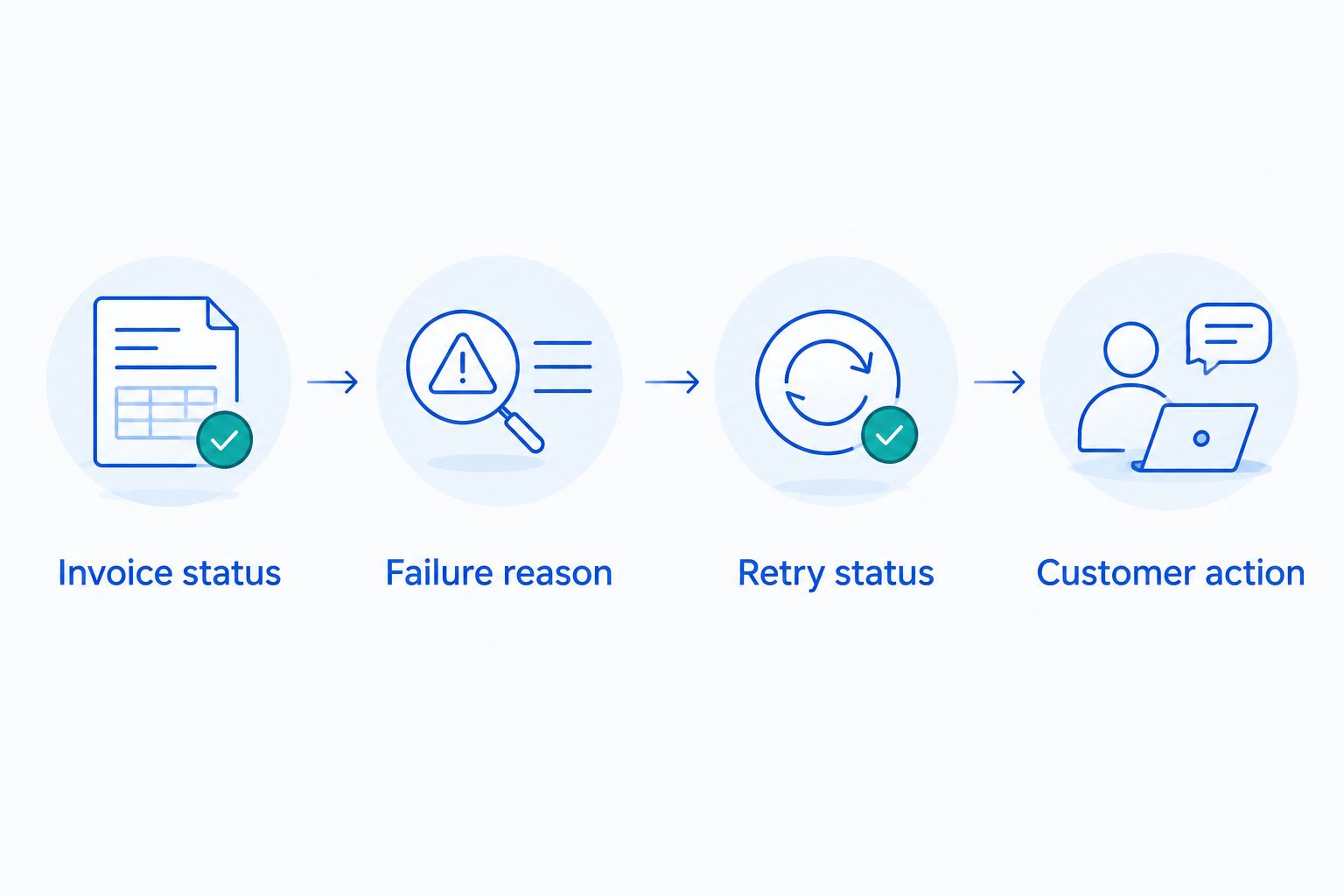
Select failures from a recent 30-day period as a practical audit window. Include both resolved and unresolved cases so you can see the paths that worked as well as the gaps. Do not treat that window as a universal recovery deadline.
- Invoice status: confirm whether the invoice remains unpaid.
- Failure reason: record the available payment error information.
- Retry status: check completed and scheduled attempts.
- Customer action: identify whether the customer needs to intervene.
3. Decide whether to operate recovery or hire an operator
Begin with a written responsibility list. Someone must review outcomes, maintain messages, handle replies, and investigate exceptions. If your team can reliably do those jobs, self-managed software is a reasonable operating model.
If nobody has time to own them, evaluate a managed service rather than assuming another dashboard fixes the gap. Buy operational responsibility when the missing piece is a person, not a setting. Ask what work the service actually takes over and what remains with your team.
Stunning Software and Managed Recovery are different offers. Evaluate Stunning Software for a workflow your team will operate; evaluate Managed Recovery when you want an external operator. Confirm the supported billing platform and scope for the specific offer rather than assuming every offer supports Stripe, Foxy, and Subbly identically.
For a 2026 decision, document responsibilities before signing up. Do not infer monthly reviews, personal outreach, reporting frequency, or specific deliverables from the word managed.
- List the recurring recovery tasks your team currently performs.
- Mark the tasks that have no dependable owner.
- Ask which tasks the service explicitly takes over.
- Confirm platform support for the selected offer.
- Keep an internal contact for billing and customer-policy decisions.
4. Make customer messages actionable
Read your current failed-payment email as a customer. Does it explain what failed, what action is required, and how to get help? Test the payment-update journey rather than stopping at the email preview.
Write in plain language. A customer should not need to understand dunning, payment processors, or decline classifications to resolve a renewal. Dunning means the process of following up on an unpaid payment.
A short message should distinguish between an automatic retry and a request for action. Avoid telling every customer to wait if some must update their payment method. Equally, avoid asking for unnecessary action when your workflow is already handling the payment.
Before activating a new sequence, inspect overlapping messages from your billing platform and recovery system. Conflicting instructions create avoidable support work.
- State that the subscription payment did not complete.
- Explain the action the customer should take.
- Test the payment-update destination and completion flow.
- Provide a monitored route for billing questions.
- Stop failed-payment messages after the invoice is paid.
5. Measure paid invoices, not automation activity
Start with a spreadsheet if your existing reporting does not answer the question. Record the invoices that first failed in the same period, then track their later outcomes. Keeping that starting group consistent prevents a misleading comparison between unrelated batches of invoices.
Track invoice counts and invoice amounts separately. Recovering many small invoices and recovering a few large invoices answer different questions. Neither result alone describes the full recovery picture.
For your 2026 reporting, define recovery before comparing approaches. For example, count an invoice as recovered only after it is paid, not after an email is opened or a retry is scheduled. Record credits, voids, and refunds separately so they do not appear as collected revenue.
Use a 7-day follow-up review as a reminder to revisit unresolved cases, not as a promised collection timeline. Keep later payments attached to their original failure group.
- Record each invoice's first failure date and unpaid amount.
- Track subsequent payment status and payment date.
- Separate paid invoices from voided or credited invoices.
- Record unresolved cases and their next actions.
- Compare groups only after equivalent follow-up periods.
6. Separate subscription recovery from other receivables
First, map where the debt originates and where its payment status is maintained. A recurring subscription renewal and an invoice recorded in an accounting system can require different follow-up. Your process should identify the responsible system before sending a reminder.
The same ownership rule applies to automated payment reminders in QuickBooks: assign responsibility for unresolved invoices, check payment status before following up, and avoid contradictory messages from separate systems.
For subscription recovery, keep the customer-facing message tied to the renewal that failed. If accounting and billing records both trigger communication, decide which system owns that communication. Do not assume a subscription recovery product also handles every other type of receivable.
This distinction matters when you evaluate managed help. Specify whether you need failed-renewal follow-up, broader invoice collection, or both. Then ask the provider to confirm the scope.
- Identify the system that records the unpaid obligation.
- Choose which system sends customer reminders.
- Assign responsibility for exceptions between systems.
- Confirm payment status before manual outreach.
- Document which receivables sit outside subscription recovery.
Compare the recovery operating models
For a bootstrapped SaaS team in 2026, the useful comparison is not simply built-in versus third-party. It is the combination of automation, ownership, and work left on your team. Establish that before comparing feature lists.
| Option | Best for | Main advantage | Key limitation |
|---|---|---|---|
| Stripe built-in retries and emails | Teams starting with existing billing capabilities | Keeps the initial workflow within Stripe | Your team still owns configuration, review, and exceptions |
| Self-managed dunning software | Teams with a dependable recovery owner | Supports a dedicated failed-payment workflow | Someone internally must maintain and assess the workflow |
| Stunning Managed Recovery | Teams evaluating external ownership of recovery | Offers a managed-service alternative to operating software internally | You must confirm service responsibilities, platform support, and handoffs |
Keep the simplest approach your team can run properly. Adding software is justified when it addresses a documented workflow requirement. Hiring an operator is justified when the recurring work lacks an owner.
Ask prospective providers to explain the same failed-invoice scenario. Who notices the failure? Who changes an ineffective message? Who handles a customer reply? Who checks whether the invoice was paid? Compare the answers, not just the demonstration.
Discuss your recovery ownership
Explain your billing platform, unresolved failures, and the recovery work your team needs help running.
Common mistakes bootstrapped SaaS teams make
Treating installation as an operating plan
Connecting a tool does not assign responsibility. Write down who reviews results and who acts on exceptions before you activate the workflow. Otherwise, the founder remains the unplanned fallback.
Comparing results from different invoice groups
An older group has had more time to pay than a newer group. Compare invoices with equivalent follow-up periods and consistent definitions. Keep invoice count and collected amount visible separately.
Changing retries and emails simultaneously
Changing every setting makes the result harder to interpret. Document the change, its date, and the problem it addresses. When practical, change a single part of the workflow before revising another.
Assuming managed means every task is included
A service name is not a responsibility agreement. Confirm who updates messages, handles replies, reviews outcomes, and approves account actions. Retain internal ownership of business policies even when execution moves outside your team.
FAQ
What’s the best dunning software for a bootstrapped SaaS team?
The best dunning software is the option your team can operate consistently on its billing platform. Start with required tasks and ownership, then compare software against managed recovery. Stunning offers both software and managed dunning services.
Are Stripe’s built-in retries and emails enough?
Stripe’s built-in retries and emails are enough when they meet your documented workflow requirements and someone reviews unresolved failures. Inspect actual invoice outcomes before deciding to add another system.
When should I hire someone to run payment recovery?
Hire someone when recurring recovery work has no dependable internal owner. Confirm who will review outcomes, maintain messages, handle customer responses, and escalate exceptions before choosing a service.
What’s the difference between dunning software and managed recovery?
Dunning software gives your team a system to operate; managed recovery adds an external service relationship for agreed recovery work. The exact responsibilities depend on the offer, so confirm the scope rather than assuming all tasks are included.
How should a small SaaS team measure payment recovery?
Track failed invoices through to payment using a consistent starting group and follow-up period. Report invoice counts and amounts separately, and do not count email activity or scheduled retries as recovered revenue.
Does every failed payment need a customer email?
Not every failed payment requires the same customer message. Check the payment state and required next action, then align communication with whether the customer must intervene or an automatic retry is pending.
Can one recovery tool cover every unpaid invoice?
Do not assume a subscription recovery tool covers every receivable. Confirm the billing platforms, invoice types, and follow-up responsibilities included in the specific offer you are evaluating.
One last thing
Before changing your 2026 recovery setup, open an unresolved renewal and ask the assigned owner to explain its next action. If the answer is unclear, fix the handoff first. Another retry setting will not tell your team who should act.
Related guides
- Stripe dunning: when built-in recovery is enough
- Stripe failed payments: a recovery audit checklist
- Dunning management software: a buyer's evaluation checklist
- Dunning software or managed recovery: who owns the work?