
Test dunning software in a non-live environment, confirm how it handles failed payments and customer messages, then check that recovery stops after payment or cancellation. Before switching it on, verify which system owns retries, emails, and subscription changes so your existing billing setup does not take the same action twice.
- Test dunning software against payment failures, successful recovery, authentication, cancellation, and duplicate events before enabling live actions.
- Stripe subscription teams need an explicit owner for retries, customer emails, payment updates, and access changes.
- Stunning serves subscription businesses seeking failed-payment recovery software or managed dunning services.
- Approve launch only when each test has recorded evidence and a named person responsible for exceptions.
Why this matters
Dunning means following up on failed payments to collect outstanding subscription revenue. Testing must cover what happens after the first failure, not just whether an email arrives.
A retry, reminder, or cancellation instruction can come from different systems. During a migration, map those responsibilities before enabling anything new; the migration plan without overlap explains that handoff.
For a 2026 launch, use the settings available in your current billing account and the vendor’s current documentation. Treat an old screenshot or onboarding checklist as a reference, not proof that your configuration works.
How do you test dunning software before switching it on?
Test the full recovery path, including its stopping conditions. A successful test shows that the intended action happened and that an unwanted action did not happen.
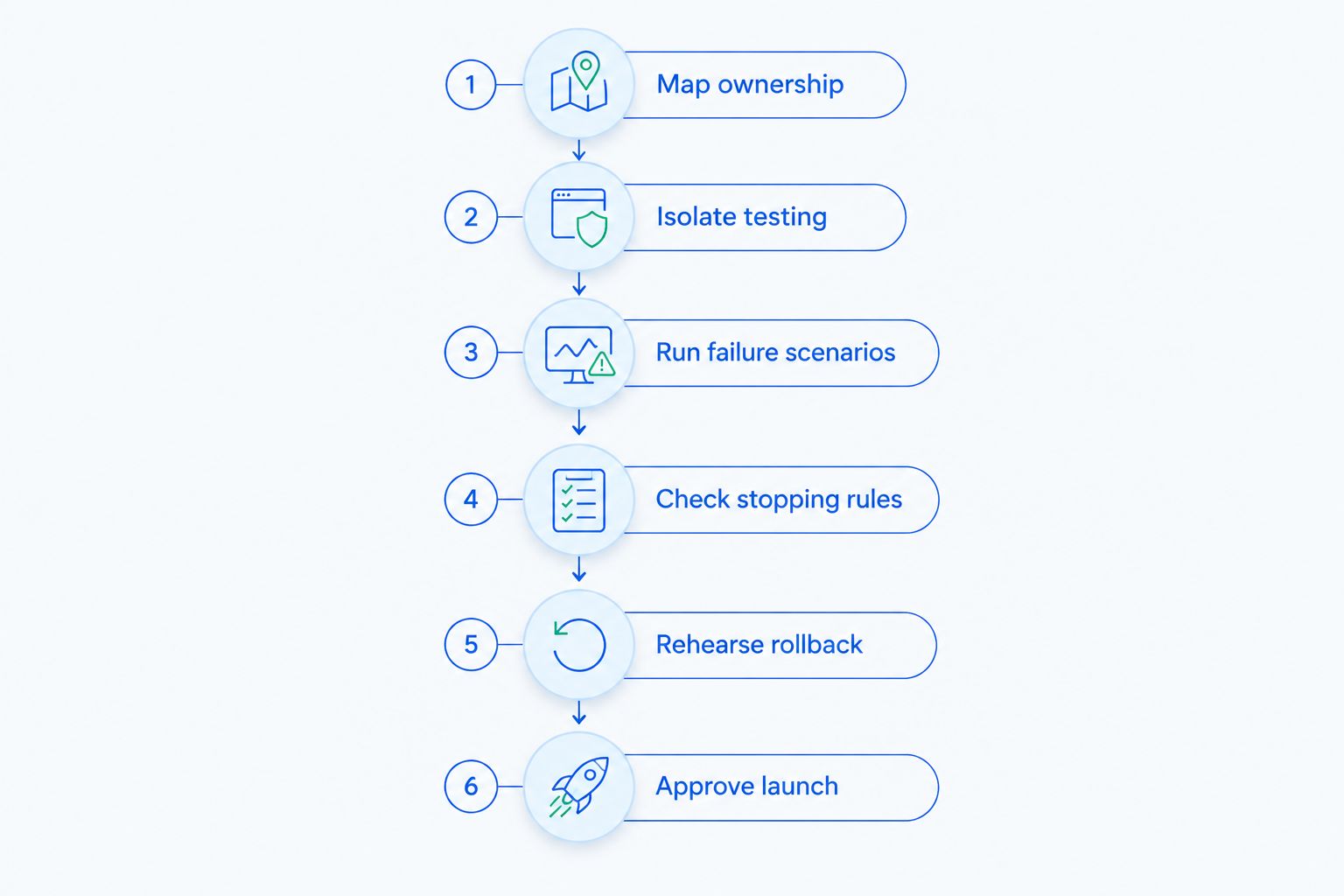
Use this sequence before authorizing live recovery:
- Map ownership. Record which system controls retries, emails, payment updates, and subscription status.
- Isolate testing. Use supported test environments and internal recipients rather than real customers.
- Run failure scenarios. Exercise the cases in the table below and record the result of each.
- Check stopping rules. Confirm that payment, cancellation, and other terminal states end the appropriate actions.
- Rehearse rollback. Identify how to pause the new workflow without losing track of unpaid invoices.
- Approve launch. Assign an owner, resolve failed tests, and document the live handoff.
The environment must represent the actual integration. A preview of an email proves its appearance; it does not prove that a billing event triggers it correctly.
If an integration does not expose a test mode, ask the provider for its supported validation process. Do not send fabricated failures into production simply to see what happens.
Write acceptance criteria before testing
For every scenario, record the trigger, expected action, forbidden action, evidence, and person responsible. Keep the expected result specific enough that someone else can judge whether the test passed.
For example, an acceptance criterion can require that a paid invoice receives no further payment reminders. Another can require that an unchanged failed invoice does not receive duplicate messages when the same event is delivered again.
Keep your 2026 test record alongside the launch configuration. If someone later changes a retry rule or message sequence, that record shows which assumptions need retesting.
Which failure scenarios should you test?
Use these 6 scenarios as a starting checklist. They are recommended test cases, not a claim that every integration supports the same behavior.
| Scenario | Intended behavior to verify | Failure that blocks launch |
|---|---|---|
| Failed payment | The intended recovery workflow starts for the correct invoice | No workflow starts, or the wrong customer is contacted |
| Payment succeeds | Further collection actions stop for the paid invoice | A reminder or retry remains scheduled incorrectly |
| Authentication required | The customer receives an appropriate route to complete authentication | The message treats authentication as an ordinary card update |
| Payment method changes | The integration handles the change according to its documented rules | The workflow continues using stale information |
| Subscription canceled | Recovery follows your documented cancellation and collection policy | Access or collection changes contradict that policy |
| Duplicate event | Repeated delivery does not repeat an unintended side effect | Duplicate reminders or other unwanted actions occur |
Do not assume that a successful card update also settles an outstanding invoice. Verify the invoice’s payment state separately.
Record identifiers for the test customer, subscription, invoice, and relevant event. That gives you a way to connect a message or status change to the billing record that caused it.
Failed payment: check the trigger
Create a supported failure using your payment provider’s documented testing method. Confirm that the recovery workflow attaches to the intended invoice and customer.
Check the recipient and the reason given in the message. A technically delivered email still fails the test if it sends the customer to the wrong account or asks for an irrelevant action.
Payment succeeds: check the stop
Settle the test invoice through the supported test process. Then inspect both the billing status and the recovery workflow.
A successful payment must not leave an inappropriate reminder waiting to send. Check scheduled actions as well as messages already delivered; the next queued action is part of the test.
Authentication required: check the customer action
Use the provider’s supported authentication test case where available. Confirm that the customer can reach the required authentication step from the message or payment page.
Do not approve this case from email copy alone. Follow the path and verify the resulting invoice state.
Duplicate event: check repeated delivery
Where the integration supports event replay, deliver the same test event 2 times. The acceptance criterion is that repeated delivery does not create an unintended duplicate action.
Inspect the customer’s message history and the integration’s event records. Do not infer success from the absence of a visible error.
How do you test customer messages and payment-update links?
Send test messages to internal recipients using the supported testing controls. Read them as a customer who does not know how your billing system works.
Each message should explain the failed payment, the action required, and where to get help. Verify those statements against your actual billing policy rather than accepting template wording unchanged.
Check these details:
- Recipient: The message reaches the intended billing contact, not an unrelated account user.
- Invoice context: The payment request refers to the correct account and outstanding invoice.
- Action link: The destination belongs to the intended payment-update or authentication flow.
- Account isolation: The link does not expose another customer’s information.
- Reply handling: A customer reply reaches someone responsible for billing questions.
- Completion: The completed action produces the expected billing state and stops the appropriate messages.
For a 2026 review, test the current message templates and destinations, including any custom domains you use. A link copied from an earlier configuration does not establish that the live integration is correct.
Use synthetic customer details. Keep payment credentials, personal data, and sensitive link tokens out of shared screenshots and test notes.
Why does the dunning test plan vary?
Your recovery test plan depends on how billing and customer communication actually work. Add cases for the following factors when they apply:
- Recovery ownership: More systems controlling retries or messages create more handoffs to verify.
- Payment action: A retry, payment-method update, and authentication request require different customer paths.
- Billing contacts: Separate account users and billing recipients require recipient checks.
- Subscription policy: Cancellation, access restrictions, and outstanding balances need explicit rules.
- Existing failures: Previously failed invoices need a deliberate migration decision.
- Event handling: Delayed, repeated, or out-of-order events need checks against the integration’s documented behavior.
Do not add scenarios merely to make the checklist longer. Add them when a real configuration, policy, or integration creates a distinct outcome.
The useful question is: what can this system change, and how will you prove that the change is correct?
How do you prevent overlapping retries and emails?
Assign an owner to each action before switching systems. Write the assignment down and compare it with the settings in both systems.
For Stripe subscriptions, inspect the built-in recovery settings alongside any external workflow. Do not assume that connecting another service automatically disables existing retries or emails.
| Recovery responsibility | What to record | What to test |
|---|---|---|
| Payment retries | The system authorized to retry the invoice | Another system does not initiate an unintended retry |
| Customer reminders | The system responsible for each message | The customer does not receive duplicate requests |
| Payment updates | The destination and handling of updates | The correct customer and billing records change |
| Subscription changes | The system authorized to change status or access | Paid and canceled accounts follow your policy |
Decide separately what happens to invoices already in recovery. Starting every existing failure again from the beginning can produce a different customer experience from continuing its current workflow.
Document the handoff conditions, the person authorizing the change, and the pause procedure. Do not disable an existing process until its replacement responsibilities are explicit.
Should you test software yourself or hire someone to run recovery?
Choose based on who will do the recurring work, not just who can connect the integration. Installing software does not assign responsibility for reviewing results or correcting messages.
| Approach | Best for | Advantage | Responsibility or limitation |
|---|---|---|---|
| Internal management | Teams with a named billing owner | The team directly controls testing and changes | The team must review results, maintain messages, and handle exceptions |
| Managed recovery | Teams that need someone to run the recovery process | Recurring work can be assigned through the service agreement | Scope, approvals, reporting, and escalation still need agreement |
Stunning is a fit for subscription businesses seeking failed-payment recovery software or managed dunning services. Stunning offers both; choose between them by deciding who will own the work after launch.
Do not treat Stunning Software and Managed Recovery as interchangeable purchases. Confirm platform support, testing responsibilities, message maintenance, reporting, and personal follow-up for the specific offering you are considering.
A useful 2026 recovery audit starts with your current settings, unresolved failures, and ownership gaps. Ask for findings that lead to decisions: what stays active, what changes, who approves it, and who checks the result.
Discuss your recovery setup
Ask about a recovery audit and who should own testing, customer messages, and ongoing review.
What should block a dunning software launch?
Block launch when an unresolved test can affect the wrong customer, repeat an unwanted action, or leave payment state unclear. A polished message template does not offset a broken stopping rule.
Treat the following as launch blockers:
- A paid invoice still receives collection messages.
- A payment-update link opens the wrong customer context.
- Retry or email ownership remains disputed.
- A repeated event creates an unintended duplicate action.
- Cancellation behavior contradicts the approved policy.
- Nobody can explain how to pause recovery safely.
Keep a separate list for cosmetic changes that do not affect correctness. This makes the launch decision clear without treating every wording preference as a billing failure.
For your 2026 sign-off, name the person who accepts each remaining limitation. Schedule the first live review before enabling the workflow, not after a customer reports a problem.
FAQ
Can I test dunning software without emailing real customers?
Use the integration’s supported test environment and internal recipients. Confirm whether its test mode covers billing events, message delivery, and payment-update links rather than assuming every feature is simulated.
What should happen when a failed invoice gets paid?
Collection actions that are no longer appropriate must stop for the paid invoice. Check the billing record, recovery status, and queued reminders rather than relying on a payment confirmation alone.
Should I disable Stripe retries before testing another tool?
Do not change live retry ownership just to begin testing. First isolate the test environment, then document which system will control retries during the production handoff.
How do I test whether duplicate events send duplicate emails?
Replay the same event through a supported testing mechanism and inspect the message history. Repeated delivery must not create an unintended duplicate action.
Is updating a card enough to prove recovery works?
No. A payment-method update and a successfully paid invoice are separate outcomes to verify. Check the resulting invoice state and whether the recovery workflow stops appropriately.
When should I consider managed recovery instead of software alone?
Consider managed recovery when nobody owns recurring review, message maintenance, and exception handling. Agree on those responsibilities explicitly rather than assuming installation includes ongoing management.
What should I ask Stunning before choosing an offering?
Ask Stunning which offering supports your platform and who handles testing, reviews, message changes, and follow-up. Confirm the scope separately for Stunning Software and Managed Recovery.
One last thing
Test what the system must not do. Starting recovery is only part of the job; a paid customer should not remain in an inappropriate collection sequence.
Keep a negative acceptance criterion beside every positive one. If the expected action is to send a reminder for an unpaid invoice, also specify when that reminder must not send.
Related guides
- Stripe failed payments: a recovery audit checklist
- Dunning management software: a buyer’s evaluation checklist
- Dunning software or managed recovery: who owns the work?