
Instead of manually reconciling retries and customer emails during a switch, migrate your dunning management software with an invoice-level handoff that assigns each action to one system. Keep existing failed invoices under a named owner, route new failures deliberately, and verify that retries and messages stop after payment succeeds.
- Migrate dunning management software by assigning retry, email, and follow-up ownership before enabling the replacement.
- Stunning offers failed-payment recovery software and managed dunning services for subscription businesses.
- Separate existing failed invoices from new failures to prevent overlapping recovery sequences.
- Verify payment updates, successful-payment exits, and rollback before expanding the migration.
Why this matters
Dunning means following up on failed payments to collect an unpaid balance. A migration changes who performs that work. It does not erase unpaid invoices, scheduled messages, or payment attempts already in progress.
Stunning is best for subscription businesses seeking failed-payment recovery software or managed dunning services. Your migration still needs an internal decision-maker who approves ownership, customer communications, and the handoff.
For a Stripe subscription business, the key distinction is between billing and recovery. Replacing a recovery tool does not necessarily mean moving subscriptions or changing the payment processor. Define exactly what changes before disconnecting anything.
Stunning offers software and managed dunning services. Choose the operating model before configuring the replacement: someone must review outcomes, maintain messages, and handle exceptions after installation.
For your 2026 migration, write the acceptance criteria before the launch date. A connected account is not evidence that the handoff works.
Before you start
- Access and authority: Have authorized access to your billing platform, outgoing recovery tool, replacement service, and customer-message settings. Name the person who can approve changes and restore the previous configuration.
- A recovery inventory: Record open failed invoices, scheduled attempts, active messages, payment-update destinations, exclusions, and customer-support commitments. Preserve the information needed to reconstruct each invoice's history.
- The hidden gotcha: Disabling an integration is not proof that queued messages or scheduled actions have stopped. Establish how each system handles pending work before changing ownership.
Do not assume the same connection method or platform support across Stunning Software and Managed Recovery. Confirm the requirements for the specific offering and billing platform you choose. Support for Stripe, Foxy, or Subbly at the brand level does not establish identical setup mechanics for every offering.
Use a written runbook rather than relying on memory. The bold labels below are suggested runbook fields, not claims about buttons or menus inside any vendor's interface.
Recovery ownership
Choose the operating model
Pick the arrangement your team can maintain after the migration. These are operating choices, not a ranking of recovery results.
| Approach | Best for | Advantage | Trade-off |
|---|---|---|---|
| Stripe built-in retries and emails | Teams keeping recovery inside their existing Stripe setup | Keeps the starting workflow within the billing platform | Your team still owns configuration, review, and exceptions |
| Recovery software | Teams with a named recovery operator | Gives the operator a dedicated recovery system | Installing software does not assign responsibility for ongoing work |
| Managed recovery | Teams seeking someone to run recovery | Makes operational responsibilities part of the service discussion | Requires clear scope, access boundaries, and approval rules |
Stunning Software and Managed Recovery represent different ways to run failed-payment recovery. Evaluate the software against your team's ability to operate it. Evaluate the managed service against the work you want assigned, including results reviews, message updates, and personal follow-up.
Neither arrangement removes the need for internal accountability. Your business still decides customer policy, cancellation treatment, and who can approve exceptions.
Record the action owners
- Create a Recovery owner field in the runbook. Name one accountable person rather than a department.
- Create separate Retry owner, Email owner, and Personal follow-up owner fields. Assign exactly 1 owner per action for each invoice group.
- Record your Billing lifecycle owner. This covers decisions such as subscription cancellation or access changes, which are separate from sending a reminder.
- Add a Stop condition for successful payment, cancellation, disputed balances, and invoices your team excludes from collection.
- Record the 2026 configuration date and the approver. Preserve the previous settings alongside the proposed settings.
Expected result: Every action has an owner and an explicit stopping rule. No invoice group depends on two systems independently deciding what to do next.
Invoice handoff
Separate existing and new failures
Do not treat every unpaid invoice as a fresh failure. An invoice with prior reminders needs different handling from one that failed after the handoff.
- Record an exact Cutover timestamp, including the time zone. Use that boundary consistently in your migration records.
- Create an Existing failures group for invoices already in recovery before the boundary. Include their latest payment outcome, customer contact history, and next planned action.
- Create a New failures group for invoices entering recovery after the boundary. Decide which system receives those invoices.
- Record an Exclusion reason for disputed balances, agreed payment arrangements, or other cases your team has removed from automated collection.
- Reconcile the groups against the billing records. Resolve invoices with uncertain ownership before enabling customer-facing actions.
Expected result: Each unpaid invoice belongs to a defined group. The migration record explains which system acts next and why.
Choose the handoff method
Two handoff methods are useful. Neither is automatically safer without knowing how the outgoing and replacement systems handle invoice selection.
| Method | Best for | Advantage | Trade-off |
|---|---|---|---|
| Existing-case drain | Teams able to isolate existing invoices from new failures | Preserves the existing sequence for invoices already in recovery | Requires temporary operation of both systems with strictly separate invoice groups |
| Full handoff | Teams able to transfer history and stop outgoing actions reliably | Establishes one recovery operator after the boundary | Requires careful treatment of prior reminders, pending attempts, and incomplete history |
For an existing-case drain, keep the outgoing system responsible only for its assigned invoices. For a full handoff, preserve enough history to avoid sending a first reminder to someone who has already received several.
Parallel systems are acceptable; duplicate ownership is not. If either system cannot exclude the other system's invoice group, do not use a parallel drain.
Retry and message configuration
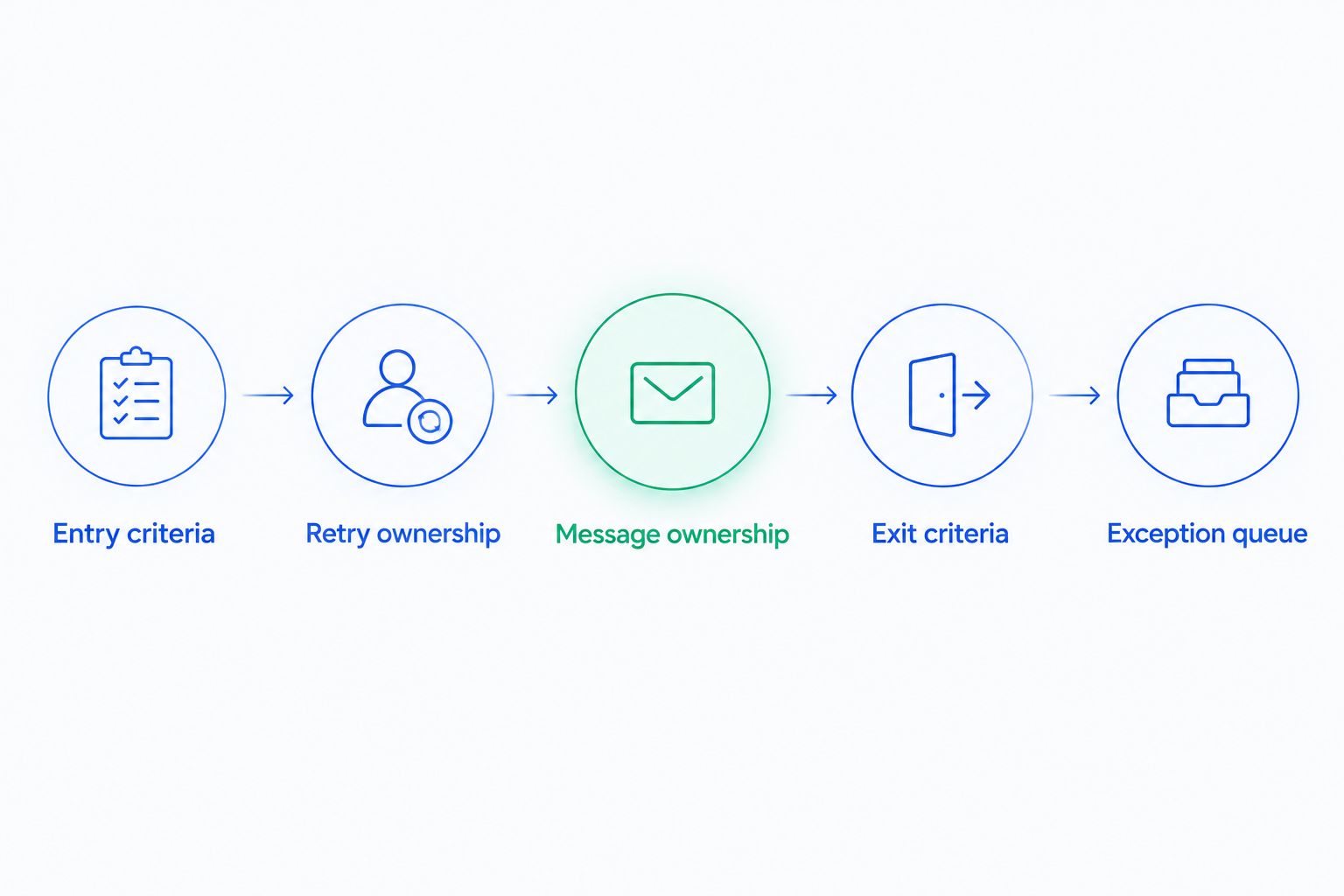
Map the customer journey
Build the replacement workflow from the invoice state, not just from an incoming notification. A failure notification can be followed by a successful payment before a delayed action runs.
- Set Entry criteria that identify the intended invoice group. Confirm that already-paid invoices and excluded cases do not qualify.
- Set Retry ownership separately from message ownership. If the billing platform owns payment attempts, do not enable a second retry scheduler without an explicit reason and tested coordination.
- Set Message ownership for each recovery stage. Review sender details, reply handling, wording, and the destination customers use to update payment details.
- Set Exit criteria so that payment success stops further recovery activity for that invoice. Define handling for cancellation and other terminal outcomes separately.
- Assign an Exception queue to a person. Include customer replies, unresolved payment updates, and cases that cannot proceed automatically.
Expected result: The replacement knows when to enter, what it owns, when to stop, and who handles exceptions.
For your 2026 message review, read the sequence as a customer would. Remove instructions that refer to the outgoing tool. Confirm that replies reach someone who can help rather than an unmonitored inbox.
A payment-update link also needs functional testing. Reaching a confirmation screen does not, by itself, establish that the intended invoice has been paid. Check the billing outcome separately.
Verification and cutover
Prove the handoff before expanding
Use the testing facilities supported by your billing platform and recovery provider. Confirm what the test environment covers; a simulated event does not prove that live email delivery or every production permission works.
- Prepare a Test record for each critical path: a new failure, an existing failure, a payment update, successful payment, and an excluded invoice.
- Follow each record through the billing platform and recovery system. Verify the invoice identifier rather than matching only on customer email.
- Check Duplicate actions. Require 0 duplicate messages and 0 competing retry schedules on the test invoices before expanding.
- Check Successful-payment exit. Confirm that the invoice leaves recovery and that no later action remains scheduled by either operator.
- Record a Rollback owner and the exact conditions for pausing the replacement. Preserve enough history to restore ownership without replaying completed messages.
- Approve the cutover, then reconcile the first live invoice group before widening coverage.
Expected result: You have evidence that the intended actions occur once, excluded actions do not occur, and paid invoices stop receiving recovery treatment.
Use the Stripe failed-payment recovery audit checklist to organize the billing checks around this handoff. Keep the evidence in your 2026 migration record so later changes have a clear reference point.
Variant: hand off when payment details change
A payment-method update is an adjacent workflow, not a second migration. Use it to recheck the invoice without restarting every reminder.
- Identify how your billing platform reports the relevant payment-method update. Confirm that the recovery provider supports the event or another reliable way to check it.
- Match the update to the customer and intended unpaid invoice. Do not assume one customer record means one unpaid balance.
- Recheck invoice status before taking another action. If payment has already succeeded, stop recovery for that invoice.
- Leave payment attempts with the assigned retry owner. Do not add an immediate attempt merely because another system also saw the update.
- Preserve the reminder history. An updated payment method should not erase messages already sent.
Expected result: Payment updates reach the assigned recovery owner without creating a fresh, overlapping sequence.
Keep your 2026 acceptance checklist explicit about this distinction: payment details updated and invoice paid are different outcomes. Your customer messages should reflect the outcome you have actually verified.
Troubleshooting
Customers receive duplicate emails
Compare the invoice identifier, sender, and send time in both systems. Pause the conflicting message source, then correct invoice-group exclusions before resuming it. Include billing-platform emails in the investigation; the outgoing vendor is not the only possible sender.
Existing invoices receive a first reminder again
The replacement has entered old invoices without sufficient sequence history. Pause those invoices, recover their previous contact history, and assign the next appropriate action manually. Do not solve the problem by restarting every customer at the beginning.
A paid invoice remains in recovery
Compare the current invoice status with the recovery system's recorded state. Check the event-delivery or synchronization records available in the integration, correct the connection problem, and stop queued actions for the affected invoice.
A customer updates payment details but remains unpaid
Check whether the intended unpaid invoice actually received another payment attempt. Verify which owner is responsible for that attempt and whether the updated method applies to the relevant billing record. Do not tell the customer that recovery is complete until payment succeeds.
Rollback creates another overlap
A rollback restored the outgoing workflow without removing replacement ownership. Pause customer-facing actions, reconcile invoices changed since cutover, and restore one owner per action. Roll back the assignment of work, not just the integration connection.
Customize your workflow
After cutover, give the recovery owner a recurring review task. Check unpaid invoices, completed recoveries, customer replies, stopped sequences, and exceptions. Keep the definitions consistent so a configuration change does not masquerade as an improvement.
Keep recovery in-house when someone can own the work. Discuss Managed Recovery when that ownership is missing. The decision is about operation, not simply which integration connects successfully.
Before hiring a service, ask who reviews results, who updates messages, who follows up personally, and which approvals remain with your team. For Stunning, confirm those responsibilities against the specific Managed Recovery scope rather than assuming they follow from the software connection.
Discuss your recovery handoff
Ask about Managed Recovery scope, migration responsibilities, and the work your team will still own.
FAQ
How do I migrate dunning management software without duplicate emails?
Assign each invoice group to one message owner before enabling the replacement. Check outgoing queues, billing-platform emails, and replacement entry rules, then verify that each test invoice receives only its intended messages.
Should I disable Stripe retries when switching recovery software?
Disable Stripe retries only when your approved plan assigns payment attempts to another system. Retry ownership and email ownership are separate decisions; changing the message sender does not automatically require changing the retry operator.
Can I leave existing failed invoices in the old tool?
Yes, if both systems can reliably separate existing failures from new failures. Keep the old tool responsible only for its assigned invoices and reconcile ownership until that group has finished.
Does updating a payment method mean the failed invoice is paid?
No, a payment-method update does not establish that an unpaid invoice has been collected. Check the invoice status and the assigned retry owner’s next action before marking recovery complete.
Should my team choose software or managed recovery?
Choose software when a named person can operate recovery, and consider managed recovery when you need that work assigned to a service. Confirm responsibility for reporting, messages, follow-up, and exceptions before signing off.
Does a dunning migration require moving subscriptions?
A recovery-tool migration does not necessarily require moving subscriptions. Define whether the project changes recovery operations, the billing platform, or both before configuring the handoff.
What should trigger a migration rollback?
Use predefined failures such as duplicate customer messages, conflicting retry schedules, or paid invoices remaining in recovery. Pause the affected actions and reconcile invoice ownership before restoring the outgoing workflow.
One last thing
Your first post-migration check should include a paid invoice, not just a failed one. A workflow that starts correctly but fails to stop can keep contacting customers who have already resolved the problem.
Put that check on the sign-off sheet: successful payment recorded, recovery exited, pending actions cleared. Migration is complete when the old and new systems agree about what no longer needs doing.
Related guides
- Dunning management software: a buyer's evaluation checklist
- Dunning software or managed recovery: who owns the work?
- Stripe dunning: when built-in recovery is enough