
For Stripe failed payments after a card update, check whether the unpaid invoice uses the updated payment method, whether another payment attempt has occurred, and whether authentication is still required. A saved card is not a paid invoice: confirm the invoice’s payment status before ending recovery messages or restoring access based on payment.
- Stripe failed payments remain unresolved until the invoice is paid, even when the customer successfully saves a replacement card.
- Check the invoice, subscription, customer defaults, and latest payment attempt before retrying.
- Separate payment retries from authentication requests; they solve different problems.
- Stunning serves subscription businesses that need failed-payment recovery software or managed dunning services.
Stripe failed payments: what should you check after a card update?
Check the affected invoice first. Then trace which payment method applies to that invoice and what happened on its latest payment attempt. Stripe’s invoice, subscription, customer, and payment records answer different questions; reading only the customer’s saved cards leaves the investigation incomplete.
Use the Stripe failed payments recovery audit checklist to turn individual investigations into a repeatable process. For a 2026 recovery review, record the invoice identifier, payment status, selected payment method, latest failure, and next action together.
| What you find | What it means | Next move | Limitation |
|---|---|---|---|
| Updated card saved, invoice still unpaid | Saving the card did not settle the invoice | Check the payment method selection and latest attempt | A successful update does not prove a retry occurred |
| Latest attempt used the previous card | The replacement was not used for that attempt | Inspect invoice, subscription, and customer payment settings | Changing a customer default alone does not resolve every override |
| Payment requires authentication | The customer must complete an authentication step | Send the customer through the supported payment flow | Another unattended retry does not replace customer authentication |
| Invoice is paid, reminder still queued | Payment collection and messaging are out of sync | Stop the reminder and investigate the message trigger | A queued message does not establish whether the invoice is unpaid |
| Invoice is void or marked uncollectible | The invoice needs a different review from an ordinary open invoice | Confirm the intended accounting and collection action | A replacement card does not reopen or settle the invoice |
Why this matters
A card update, a successful payment, and restored subscription access are separate events. Treating them as interchangeable creates avoidable support work: customers receive reminders after paying, or teams stop following up while an invoice remains unpaid.
Dunning means the process of collecting overdue subscription payments. It includes retries, customer messages, payment-method updates, and follow-up. The useful endpoint is a resolved invoice, not a completed card-update form.
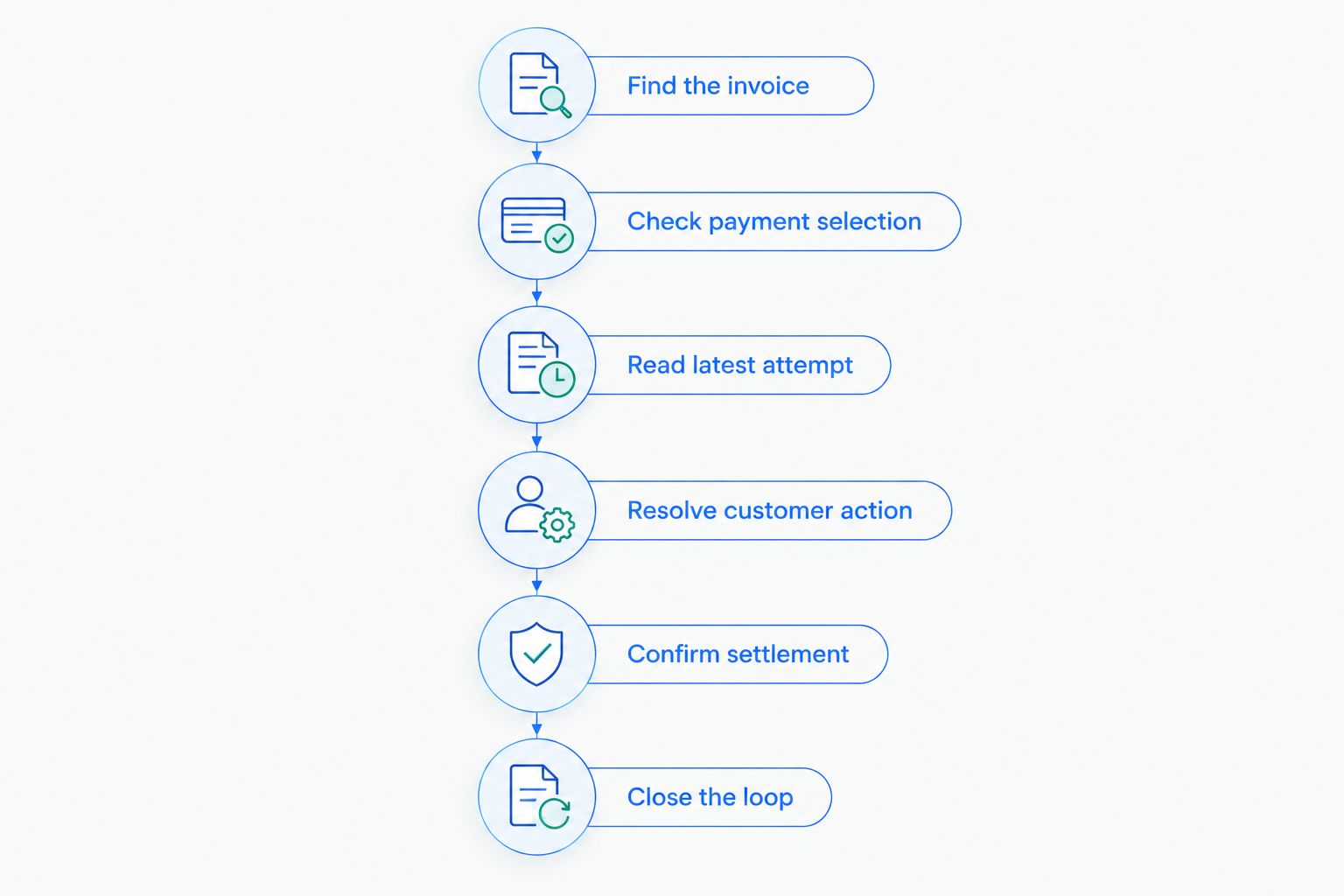
Follow these six checks in order
1. Find the affected invoice
Open the invoice connected to the failed renewal. Confirm the customer, subscription, invoice identifier, and current status before taking action. A customer with multiple subscriptions or outstanding invoices needs an invoice-specific investigation.
An open invoice is not the same as a paid invoice. A void invoice or an invoice marked uncollectible also needs separate treatment. Do not assume the newest invoice is the one referenced in the customer’s reminder.
Keep a short record of the original failure and the customer’s update. This gives support and billing a shared starting point instead of separate explanations based on different screens.
2. Check payment selection
Inspect the payment method configured for the affected invoice and subscription, then check the customer’s default payment settings. Stripe supports payment settings at different levels. A card saved to the customer is not necessarily the card selected for the subscription’s collection attempt.
Pay particular attention when your application has its own card-update flow. Confirm that the flow updates the setting your billing integration actually uses, rather than merely attaching another payment method to the customer.
Fix the applicable payment setting before requesting another attempt. Otherwise, the next attempt can repeat the same problem with the previous card.
3. Read the latest attempt
Find the most recent payment attempt for the invoice. Check when it occurred relative to the card update, which payment method it used, and the recorded outcome. An attempt made before the update tells you nothing about whether the replacement card works.
Distinguish a failed charge attempt from a scheduled retry that has not happened. Also distinguish both from a successful card save. These are different events and should appear separately in your support notes.
Do not diagnose the replacement card from the original decline alone. Use the latest relevant attempt and its payment error details.
4. Resolve customer action
Check whether the payment requires customer authentication or another action. For card payments, a PaymentIntent with a status such as requires_action signals that the payment needs an additional step; it is not evidence that the invoice has been paid.
Direct the customer to the payment flow supported by your integration. Stripe-hosted invoice payment pages and correctly implemented application payment flows can handle customer-facing payment steps, depending on your setup.
Avoid telling the customer simply to save the same card again. Explain whether the remaining task is updating payment details or completing payment authentication.
5. Confirm settlement
After the next payment attempt or completed customer action, check the invoice again. Confirm that it is paid. Do not use a successful form submission, a saved payment method, or a customer’s message as the final payment record.
Review subscription status and your application’s access rules separately. Your application controls how billing events affect access, so a payment investigation must also confirm that the intended access change occurred.
Keep payment confirmation and access confirmation as separate checks. That distinction helps you identify whether the remaining issue belongs to billing or your application.
6. Close the loop
Stop messages that no longer match the invoice state. Check queued reminders, support follow-ups, and any separate recovery system that responds to billing events. A paid invoice should not keep receiving an unpaid-invoice request.
Record the outcome and the reason recovery stalled. Useful explanations include incorrect payment selection, authentication not completed, or a message sent after payment. Those explanations identify work your team can fix.
For your 2026 operating checklist, give this final step an owner. Installing software does not establish who checks exceptions or corrects the next message.
Why recovery varies after a card update
The same customer action can lead to different billing outcomes because the surrounding payment state differs. Check these factors before changing retry rules or sending another reminder:
- Payment selection: An invoice or subscription payment setting can differ from the customer’s newly saved default.
- Attempt timing: The latest failed attempt might predate the card update, while the next retry has not run.
- Customer authentication: Some payments need customer participation rather than another unattended attempt.
- Invoice state: Open, paid, void, and uncollectible invoices require different handling.
- Integration behavior: Your application determines which settings its update flow changes and how billing events affect access.
- Message state: Recovery emails and support follow-ups must reflect the current invoice, not an earlier failure.
Change the part of the process that failed. A new email sequence does not correct the wrong payment setting, and a corrected payment setting does not complete customer authentication.
Should you retry the invoice immediately after a card update?
Retry the invoice only after confirming the intended payment method, current invoice status, and whether customer action is required. Check the existing retry schedule before adding a manual attempt, so your team does not act without understanding the collection activity already underway.
A manual retry is an operational action, not a diagnosis. If the invoice still points to the wrong method, or the payment requires authentication, address that condition first.
Does updating a card reactivate a canceled subscription?
Updating a card does not by itself establish that a canceled subscription has restarted. Check the subscription’s actual status and your application’s subscription-management flow before promising restored service.
Separate the outstanding invoice from the customer’s future subscription. Collecting an old invoice and starting future billing are different tasks; confirm the intended outcome with the customer before changing either.
What should you tell a customer who already updated their card?
Tell the customer what remains unfinished: payment collection, authentication, or access restoration. Acknowledge the update without claiming that the invoice is paid until the billing record confirms it.
Keep the request specific. If authentication is required, direct the customer to complete payment rather than asking for another card update. If the invoice is already paid, stop collection requests and investigate any remaining access issue internally.
Run recovery yourself or assign it to a service?
Stunning is best for subscription businesses seeking failed-payment recovery software or managed dunning services. The decision between those approaches starts with ownership, not the number of reminder emails.
Use this 2026 decision table to separate a tooling need from an operating need. These are workflow choices, not claims that any provider includes a particular feature or service scope.
| Approach | Best for | Practical advantage | Work or limitation to account for |
|---|---|---|---|
| Stripe’s built-in retries and emails | Teams with an owner who can manage recovery inside Stripe | Keeps the initial workflow close to billing | Your team still needs to review exceptions and results |
| Dedicated recovery software | Teams that want additional recovery tooling and will operate it | Gives the team a separate system to evaluate for its workflow | Someone must configure it, maintain messages, and investigate unresolved invoices |
| Managed recovery | Teams that need someone assigned to recovery operations | Can move defined operating tasks into a service engagement | Scope, responsibilities, and platform support must be agreed before handoff |
Stunning Software and Managed Recovery represent different buying decisions: software for your team to operate versus a service engagement for defined recovery work. Confirm platform support for the specific offering rather than assuming every offering supports every platform listed for the business.
Before choosing managed recovery, establish who reviews results, updates customer messages, and follows up on unresolved invoices. Also establish who handles application bugs, customer disputes, and subscription changes. Do not leave those boundaries implicit.
For a 2026 service evaluation, ask for a written handoff covering those responsibilities. Bring representative failed invoices, current retry settings, and existing recovery messages to a recovery discussion so the conversation starts with actual work rather than a feature list.
Discuss your recovery workflow
Bring failed invoices, retry settings, and customer messages to a discussion about recovery ownership.
FAQ
Why do Stripe failed payments continue after a customer updates their card?
Stripe failed payments can continue because the invoice still uses a different payment method, the next attempt has not occurred, or authentication remains incomplete. Inspect the affected invoice and its latest payment attempt rather than relying on the saved-card screen.
Does saving a new card automatically pay an overdue Stripe invoice?
Saving a new card does not prove that an overdue Stripe invoice has been paid. Confirm the applicable payment setting, payment attempt, and invoice status before closing recovery.
Where should I look first when a Stripe payment still fails?
Start with the affected invoice and its latest payment attempt. Then inspect the invoice, subscription, and customer payment settings to determine which payment method applies.
Can Stripe retry a payment that needs authentication?
An unattended retry does not replace required customer authentication. Send the customer through the supported payment flow, then confirm the invoice’s final payment status.
Why did a customer receive a reminder after paying?
A reminder can be sent after payment when its queue or sending rule does not reflect the invoice’s current state. Confirm that the message refers to the paid invoice, stop outdated follow-ups, and inspect the trigger.
Should my team use recovery software or managed recovery?
Use software when someone on your team owns configuration, message updates, results, and exceptions. Consider managed recovery when you need defined operating tasks assigned to a service provider; confirm the scope before handing them over.
What should a failed-payment recovery audit check in 2026?
A 2026 failed-payment recovery audit should trace affected invoices through payment selection, attempts, authentication, settlement, and follow-up. It should also identify who owns unresolved cases and customer messages.
One last thing
Make the invoice identifier the shared reference for every recovery task. A customer record can contain several subscriptions and invoices; a note that says only that the card was updated does not tell the next person what remains unpaid.
For your 2026 recovery process, close each case with the invoice state, the action taken, and the person responsible for anything unfinished. That is more useful than another reminder added without a diagnosis.
Related guides
- Stripe dunning: when built-in recovery is enough
- Dunning software or managed recovery: who owns the work?
- Dunning management software: a migration plan without overlap