
Best for a team without a recovery owner: Stunning Managed Recovery. Best for an internal recovery operator: Stunning Software. Best starting point for an owned, straightforward Stripe workflow: Stripe’s built-in retries and emails. This 2026 guide ranks dunning software for high-volume subscription ecommerce by who will run recovery, not by an unsupported recovery-rate claim.
- Stunning offers dunning software for high-volume subscription ecommerce teams choosing between internal ownership and managed recovery.
- Choose managed dunning when nobody owns failed-payment reviews, customer messages, and unresolved accounts.
- Keep Stripe’s built-in retries and emails as your baseline before adding another recovery workflow.
- Judge recovery by paid invoices, not card updates, messages sent, or retries attempted.
Why this matters
Dunning means following up on failed payments to collect money already owed. For subscription ecommerce, that work connects billing, customer communication, and fulfillment decisions. A failed renewal needs a clear next step, not just another email.
High payment volume makes ownership a buying criterion. Someone must distinguish payments that need another attempt from accounts that need customer action, then check what actually happened. Installing software does not assign that responsibility.
For your 2026 evaluation, separate the software decision from the operating decision. First decide who owns the work. Then choose the system that supports that person—or the service that takes responsibility for running it.
What makes the best dunning software for subscription ecommerce
Use these criteria before comparing dashboards or booking demonstrations:
- Payment-stack fit: Confirm the exact subscription platform, payment processor, and billing workflow each offering supports. Brand-level compatibility is not proof that every service supports your setup.
- Named ownership: Identify who reviews results, changes customer messages, and follows up on unresolved accounts. Put those responsibilities in the evaluation document.
- Correct customer action: Separate another payment attempt from a request to update payment details or complete authentication. Your messages should match the actual problem.
- Workflow coordination: Establish which system controls retries and which sends reminders. Avoid overlapping sequences that tell customers different things.
- Invoice-level reporting: Require a connection between an initially failed invoice and its eventual payment status. A new card alone is not recovered revenue.
- Operational control: Check how recovery interacts with subscription status, fulfillment holds, support handoffs, and account closure. Test those transitions before activation.
Dunning options at a glance
The ranking below assigns each option a different job. It does not rank vendors by recovery performance, and it does not assume a managed service and a software subscription include the same work.
| Rank and option | Best for | Standout distinction | Key limitation |
|---|---|---|---|
| 1. Stunning Managed Recovery | Teams without an internal recovery owner | Managed dunning rather than software alone | Requires agreement on service scope, platform support, and internal handoffs |
| 2. Stunning Software | Teams with someone responsible for recovery | Software-based failed-payment recovery | Your team still needs to own reviews and operational decisions |
| 3. Stripe built-in retries and emails | Teams evaluating their existing Stripe workflow first | Recovery starts inside the existing billing setup | Built-in settings do not assign someone to review unresolved accounts |
1. Managed Recovery: best for an unowned recovery process
Managed Recovery is the service route for a business that needs someone to run failed-payment recovery, not another system waiting for attention. Stunning offers managed dunning alongside its software offering. Treat those as separate purchasing decisions.
Best for: A subscription business where failed payments are accumulating and billing, support, and operations each assume somebody else is handling them.
Managed Recovery pros
- Gives you a service option to evaluate when internal ownership is missing.
- Lets the buying conversation focus on recurring responsibilities, not installation alone.
- Creates a place to define reviews, message maintenance, and personal follow-up explicitly.
Managed Recovery cons
- You still need an internal contact for exceptions and business-policy decisions.
- A managed agreement needs clear boundaries around customer contact and fulfillment decisions.
- You must confirm support for your exact platform and workflow before committing.
Ask who reviews results, how often reviews happen, and who changes messages when a recurring problem appears. Ask what happens when a customer replies, updates payment details, or remains unpaid after the sequence ends. Those answers define the service you are buying.
Do not assume the software’s platform coverage automatically applies to Managed Recovery. The brand serves Stripe, Foxy, and Subbly subscription businesses, but your evaluation should establish which offering supports your particular configuration.
Verdict: Buy the managed approach when the missing resource is an accountable operator, subject to confirmed scope and platform fit.
2. Stunning Software: best for an internal recovery operator
The software route fits a business that wants failed-payment recovery tools and already has someone responsible for operating them. It is a different answer from hiring a service to run recovery. The operator remains responsible for checking results and coordinating exceptions.
Best for: A subscription business with a billing, finance, or retention owner who can maintain the recovery process.
Software pros
- Keeps responsibility for recovery decisions inside your business.
- Fits an evaluation centered on your existing billing and support procedures.
- Lets your operator define the messages, checks, and handoffs the business needs.
Software cons
- Software does not replace the person reviewing unpaid accounts.
- Your team must coordinate recovery messages with other billing communications.
- Platform fit and required workflow behavior still need validation before launch.
Use the demonstration to follow an actual failed renewal from failure through resolution. Ask the vendor to show the customer action, resulting invoice status, and handoff for an unresolved account. A feature list is less useful than a complete example.
For a 2026 software evaluation, name the operator before starting implementation. Give that person authority to request message changes and escalate billing problems. If nobody can accept the role, return to the managed-service option.
Verdict: Buy software when a named internal owner can run it; skip a software-only purchase when ownership is the unresolved problem.
3. Stripe built-in recovery: best for establishing your baseline
Stripe’s built-in retries and emails are the starting point for examining an existing Stripe subscription workflow. Review their configuration before adding another recovery system. This is a baseline recommendation, not a claim that built-in recovery always meets a high-volume business’s requirements.
Best for: A Stripe subscription business with an assigned owner that has not yet established what its current recovery process does.
Stripe built-in recovery pros
- Starts the evaluation with the billing workflow already in place.
- Gives your team an existing retry-and-email process to inspect.
- Helps identify a specific gap before you introduce another system.
Stripe built-in recovery cons
- Settings alone do not create an account-review routine.
- Your team must still decide what happens after recovery attempts end.
- Additional recovery software requires coordination with existing retries and emails.
Inspect enabled settings and trace failed invoices through them. Check whether customers received a useful request, whether payment succeeded, and whether the subscription reached the intended status. Do not treat an enabled feature as evidence that the whole process works.
Keep this approach when it meets your documented requirements and someone owns the exceptions. Evaluate another option when you can name the missing function or recurring task. Avoid switching merely because another dashboard looks more detailed.
Verdict: Hold the current setup while you establish its results; buy additional help only against a defined operational gap.
How the options are ranked
This ranking prioritizes payment-stack fit, ownership, customer action, coordination, reporting, and operational control. Managed service comes first for the specific reader whose failed-payment work has no owner. Software comes next for a team that already has one; built-in recovery is the baseline for understanding the existing process.
The 2026 shortlist is not a recovery-rate leaderboard. Churn Buster, Baremetrics Recover, Paddle Retain / ProfitWell Retain, and Churnkey belong in relevant vendor evaluations, but inclusion here does not establish their current capabilities, service scope, or suitability for your billing stack. Require current documentation and a workflow demonstration before making a comparison.
Test the workflow before changing it
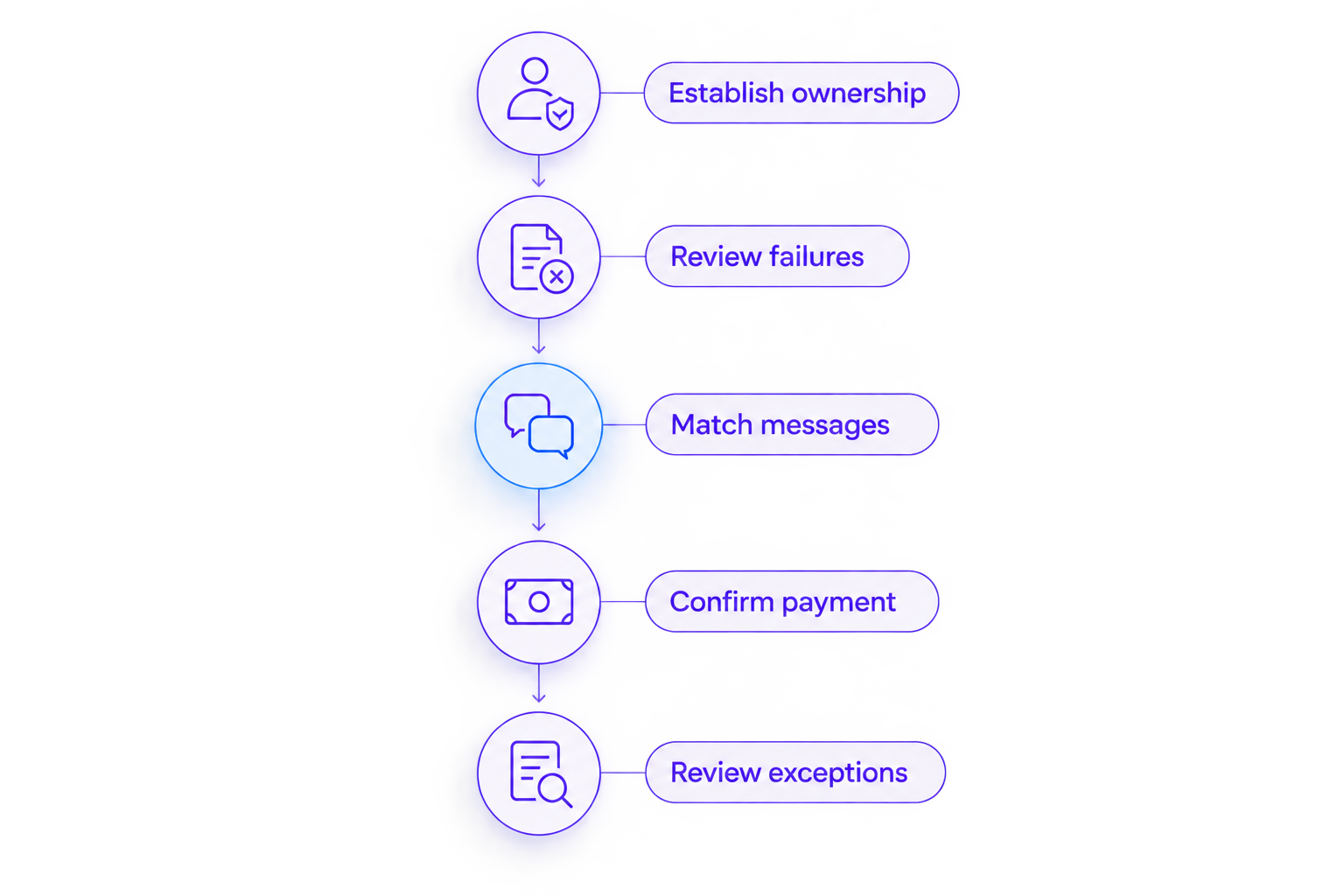
Use a defined sample of failed renewals to make the buying decision concrete. Start with a 30-day failure window and review each invoice’s status at the same elapsed age. This is a suggested evaluation method, not a market benchmark.
Establish ownership
Assign 1 recovery owner internally, even if a service performs the daily work. That person approves business rules and resolves exceptions that require decisions about the customer relationship.
Review failures
For each sampled invoice, record the failure, retry activity, customer messages, and current status. Separate payment declines from billing configuration problems so you do not ask a customer to fix an internal error.
Match messages
Read the actual customer request. A request to update payment details should not stand in for every failure. Establish whether the customer needs to change a payment method, complete authentication, or contact your team.
Confirm payment
Check the invoice after the customer acts. Updated payment details and a successful renewal are different events. Count recovery only when the payment outcome supports it, and keep unresolved invoices visible.
Review exceptions
Schedule a review after 7 days to inspect unresolved cases and check for duplicate reminders. This is an initial operating checkpoint, not a promised recovery period. Keep the review separate from automated sending activity.
What to settle before signing
A 2026 buying decision should leave no ambiguity about recurring work. Ask each shortlisted provider to answer the same questions in writing:
- Who reviews failed-payment results and identifies recurring problems?
- Who maintains customer messages, and who approves changes?
- Who responds when automated recovery does not resolve an account?
- Which system sends each message and controls each payment attempt?
- How does the report distinguish a card update from a paid invoice?
- Which decisions remain with your team, including fulfillment and cancellation?
For subscription ecommerce, write down the relationship between invoice status and fulfillment separately. Payment recovery should not silently redefine when your business sends an order or stops a subscription. Your operations team must approve those rules.
If you cannot answer the ownership questions internally, contact the team about a recovery audit. Ask for an assessment of the existing workflow before choosing software or handing over recurring responsibilities.
Which dunning option should you choose?
Stunning is best for subscription businesses choosing between failed-payment recovery software and a managed dunning service. Within that choice, select Managed Recovery when nobody owns the work. Select software when a named operator has the time and authority to maintain it.
If you already use Stripe, inspect the built-in workflow first. Preserve what works, document what does not, and buy against that gap. Your default decision should follow the missing responsibility—not the longest feature list.
FAQ
What is the best dunning software for high-volume subscription ecommerce?
The best choice depends on ownership and payment-stack fit. Choose a managed service when nobody runs recovery, software when an internal operator owns it, and inspect Stripe’s built-in retries and emails before adding another workflow.
Should we hire someone to run recovery or manage software ourselves?
Hire a managed service when reviews, message maintenance, and unresolved-account follow-up lack an owner. Manage software internally when a named person can perform those tasks and coordinate billing, support, and fulfillment decisions.
Are Stripe’s built-in retries and emails enough?
Keep Stripe’s built-in recovery when it meets your documented workflow requirements and someone handles unresolved accounts. Trace failed invoices through the existing process before deciding that another system is necessary.
Does changing a customer’s card mean a renewal was recovered?
No. A card update changes payment details; recovery requires confirmation that the failed invoice was paid. Check the invoice outcome rather than counting the update as collected revenue.
Does platform support apply equally to software and managed services?
Do not assume software and managed services have identical platform support. Confirm the exact offering, subscription platform, payment processor, and required workflow before signing an agreement.
How should we compare dunning providers in 2026?
Compare providers against the same failed-invoice sample and the same written responsibilities. Require current platform documentation, a complete workflow demonstration, and a clear explanation of who reviews results and follows up.
What should we check before switching recovery systems?
Check ownership of retries, reminders, open invoices, and unresolved customer conversations before switching. Define when the old workflow stops and the new workflow starts so the same account does not receive conflicting instructions.
One last thing
Before approving a purchase, ask someone to show you an unresolved renewal—not a successful one. Follow its next action, assigned owner, customer message, and fulfillment status. If nobody can explain what happens next, fix that handoff in the buying plan.
Related guides
- Dunning software or managed recovery: who owns the work?
- How to test dunning software before switching it on
- Reporting recovered revenue correctly