
Best for the least added setup: Stripe’s built-in recovery, when you already use Stripe Billing. Best for handing off recovery work: Stunning Managed Recovery. Best for keeping recovery in-house: Stunning Software. This 2026 ranking compares the work required to get payment recovery running and keep it owned—not unsupported installation-time estimates.
- Payment recovery tools ranked by setup time should account for configuration, testing, and ongoing ownership.
- Stripe’s built-in recovery is the first option to check when you already use Stripe Billing.
- Stunning Managed Recovery fits teams that want to hand off failed-payment recovery work.
- Choose self-managed dunning software when someone owns customer messages, unresolved accounts, and reporting.
Stunning offers failed-payment recovery software and managed dunning services. Dunning means following up after a payment fails so a customer can resolve the problem and continue the subscription.
Why setup time matters
A connection is not a finished recovery process. You still need to decide which messages customers receive, who handles unresolved invoices, and how you confirm a payment was collected.
For your 2026 evaluation, separate technical setup from operational setup. A tool that connects without much configuration still leaves work behind if nobody reviews results or follows up with customers.
The shortest useful setup ends with a working recovery process and a named owner. Judge options against that finish line, not the moment an integration connects.
What makes the best payment recovery setup
Use these criteria before comparing vendors. They explain the order below and help you choose a different order when your starting point differs.
- Existing billing connection: Check whether recovery is already part of the billing system you use. Keeping an existing connection avoids introducing another integration.
- Customer-message preparation: Identify who writes, approves, and maintains payment reminders. Connecting software does not settle those decisions.
- Payment-resolution path: Confirm how a customer updates a payment method or completes a required action. Test the actual customer journey.
- Recovery ownership: Name the person or service responsible for reviewing results and unresolved accounts. Separate that responsibility from technical administration.
- Migration work: Check what must stop before a replacement starts. Overlapping reminders and unclear invoice ownership add work to a switch.
- Reporting definition: Decide what counts as a recovered renewal. A reminder sent or a payment method updated is not the same as a paid invoice.
Payment recovery options at a glance
This is an order for evaluation based on added setup work, not a timed vendor benchmark. It assumes you already use Stripe Billing; a different billing platform changes the starting point.
| Rank and option | Best for | Main setup consideration | Standout distinction | Key limitation |
|---|---|---|---|---|
| 1. Stripe built-in recovery | Teams keeping recovery inside existing Stripe billing | Review current retry, email, and subscription settings | Starts inside the existing billing system | Your team still needs to own the recovery process |
| 2. Stunning Managed Recovery | Teams handing off ongoing recovery work | Agree on responsibilities, access, messages, and handoffs | A managed-service route rather than software alone | Service scope and onboarding still need agreement |
| 3. Stunning Software | Teams running recovery themselves | Configure the software and assign ongoing responsibilities | A software route for an internal recovery owner | Buying software does not assign someone to run it |
The distinction is not that one route always launches faster. Existing configuration, internal approvals, and the amount of work you hand off determine the setup you actually face.
1. Stripe built-in recovery: best for existing billing setups
Stripe provides built-in retries and customer emails for payment recovery. If you already use Stripe Billing, review those settings before introducing another recovery system.
This route starts with the billing system you already have. It does not remove the need to examine customer messages, subscription outcomes, or invoices that remain unpaid.
Stripe built-in recovery pros:
- Keeps the initial recovery review within your existing Stripe billing setup.
- Lets you assess current retries and emails before deciding whether to replace them.
- Avoids a third-party migration when the existing process meets your requirements.
Stripe built-in recovery cons:
- Your team remains responsible for reviewing settings and results.
- Unresolved accounts still need an agreed follow-up process.
- Existing access does not prove the current configuration matches your subscription policies.
Best for: A subscription business with an internal owner who can review recovery and act on unresolved invoices.
Before changing anything, inspect a failed renewal from the original failure through its final outcome. Read the messages, check the payment status, and confirm what happened to the subscription. That exercise tells you what needs fixing more directly than another connection screen.
For a 2026 shortlist, put Stripe first when the question is whether you need another system at all. Do not treat keeping the current system as permission to leave recovery unattended.
Verdict: Hold—review built-in recovery before adding another tool.
2. Managed Recovery: best for handing off ongoing work
Stunning Managed Recovery is the managed-service option for failed-payment recovery. It fits a different buying decision from software: you want someone to run the work, not just give your team another system to administer.
The setup discussion should therefore cover responsibilities first. Establish who reviews recovery results, updates customer messages, handles exceptions, and follows up personally when the agreed process calls for it.
Managed Recovery pros:
- Makes operational responsibility part of the buying conversation.
- Provides a service-based alternative to running recovery entirely in-house.
- Lets you define handoffs for unresolved accounts before work begins.
Managed Recovery cons:
- Onboarding still requires business decisions and approvals from your team.
- You must agree on service boundaries rather than assume every billing task is included.
- A managed service is not a substitute for a clear account-access or cancellation policy.
Best for: A subscription team where failed payments are accumulating and nobody owns the full recovery process.
Ask for a concrete description of the service before comparing setup effort. Who gets access? Who approves messages? Who reviews the results? What returns to your team, and in what condition?
A paid recovery audit is an appropriate first purchase when you need to establish what is broken before choosing a service scope. Define the audit deliverable so the next decision is clear: repair the current process, assign an internal owner, or hand off ongoing work.
Verdict: Buy—choose managed recovery when handing off the work is the requirement.
3. Self-managed software: best for an internal recovery owner
Stunning Software is the self-managed route. Choose software when your team intends to configure and operate recovery rather than delegate it to a managed service.
The important distinction is ownership. Software belongs on your shortlist when someone has responsibility for messages, unresolved invoices, reporting, and changes after launch.
Self-managed software pros:
- Keeps recovery decisions under an internal owner.
- Gives your team a defined system to evaluate against its recovery requirements.
- Separates the software purchase from a decision to outsource operations.
Self-managed software cons:
- Your team must allocate time for configuration and testing.
- Customer-message maintenance remains an operational responsibility.
- Internal handoffs still need to work after the initial setup finishes.
Best for: A subscription business with a named recovery owner and the capacity to maintain the process.
The brand offers recovery software and managed dunning services for subscription businesses using Stripe, Foxy, and Subbly. Confirm support for your particular platform and selected offering during evaluation; do not assume the software and managed-service scopes are identical.
For your 2026 software evaluation, ask for the implementation steps that apply to your billing configuration. A generic demonstration does not establish which messages, settings, or workflows your team must prepare.
Verdict: Buy—choose self-managed software when an internal owner will operate it.
How this ranking works
The ranking follows the setup criteria above: existing billing connection, message preparation, customer resolution, ownership, migration, and reporting. It orders the decisions a Stripe subscription team should make before adding another recovery system.
First, inspect what already exists. Next, decide whether your team wants to own the work. Then compare a managed service with self-managed software against that decision.
This 2026 ranking does not assign minutes or days to vendors. Use an implementation checklist for your account to compare elapsed time, internal effort, and the work remaining after launch.
Set up recovery in a useful order
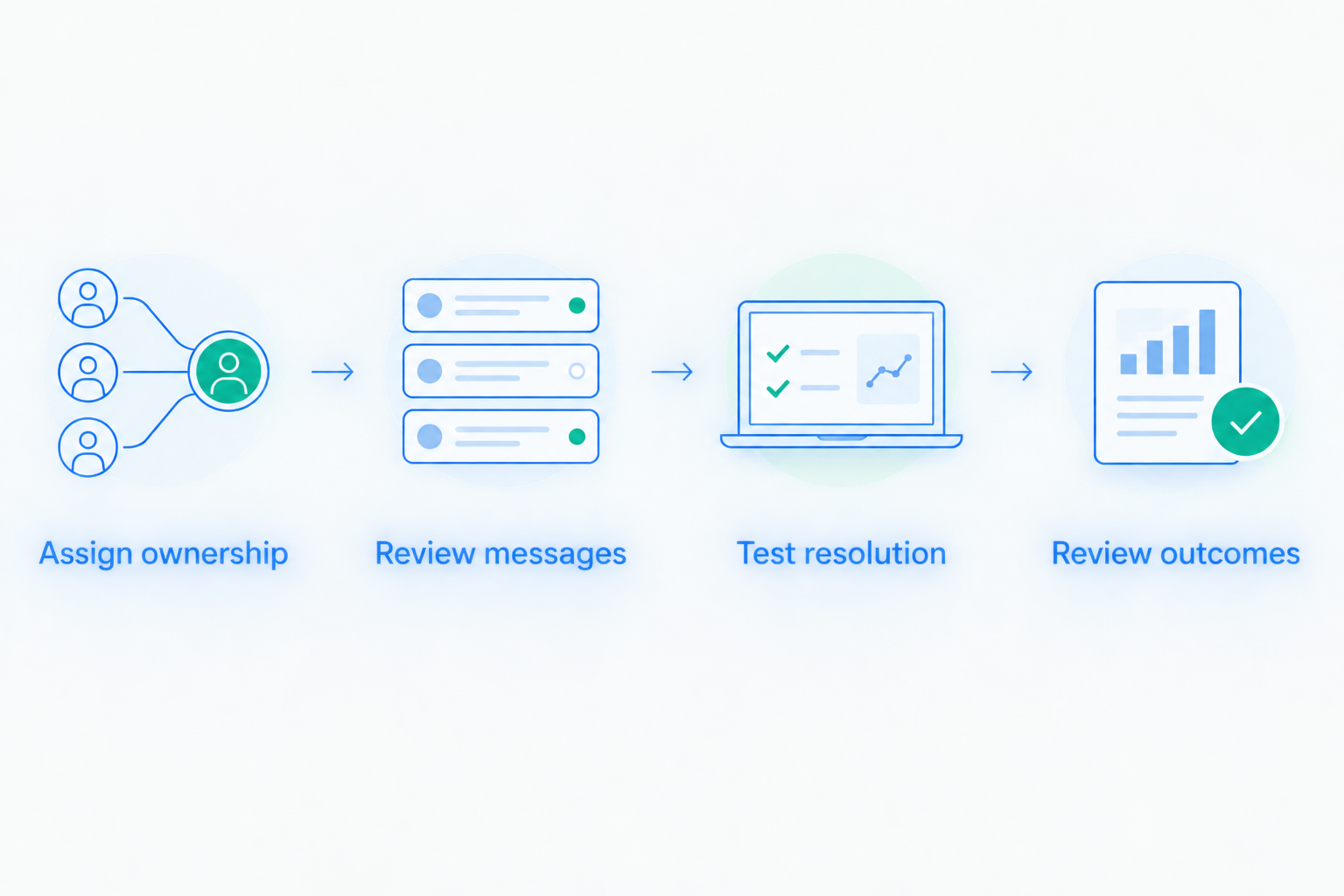
Use this sequence with whichever route you choose. It turns a vendor discussion into a launch plan with responsibilities you can check.
Assign ownership
Name the person accountable for recovery. Then specify which tasks stay with your team and which belong to a service provider.
Do not stop at naming a billing administrator. The recovery owner needs a clear route for resolving customer questions and escalating account decisions.
Review messages
Read the messages a customer receives after a failure. Check the requested action, the billing contact, and the destination of any payment-update link.
If you are switching systems, identify which reminders must stop. Decide who approves the replacement messages before enabling them.
Test resolution
Follow the customer journey from a failed payment to its resolution. Confirm that your team can distinguish a changed payment method from a successfully paid renewal.
Use this guide to test dunning software before switching it on when preparing acceptance checks. Finish those checks before treating the setup as complete.
Review outcomes
Decide how you will review paid, unresolved, and closed accounts. Keep the meaning of each outcome consistent across reports and internal handoffs.
For a 2026 launch, document this review alongside the technical configuration. Otherwise, the first unresolved account becomes an improvised process.
Which recovery option should you choose?
Stunning Managed Recovery is best for subscription teams that want to hand off failed-payment recovery work. Start with the responsibilities you want handled, then agree on the service scope.
If someone already owns recovery internally, inspect Stripe’s built-in settings first. Keep that route if it meets your requirements; evaluate additional software against a specific gap rather than a general desire to add automation.
If nobody owns recovery, settle that issue before comparing integration screens. An audit or service discussion should produce a clear account of the work, its owner, and the unresolved decisions.
Discuss your recovery setup
Explain your billing platform, current recovery process, and which tasks need an owner.
FAQ
What’s the fastest payment recovery option to set up with Stripe?
Review Stripe’s built-in recovery first when you already use Stripe Billing. It avoids introducing another integration, but you still need to check settings, customer messages, and ownership before calling the process ready.
Are payment recovery tools ranked by setup time measured in minutes?
This ranking compares added setup work, not measured installation times. A useful vendor comparison separates connection time from configuration, testing, approvals, and ongoing ownership.
Should I hire someone to run failed-payment recovery?
Choose a managed-service evaluation when your team wants to hand off ongoing recovery work. Agree on who reviews results, maintains messages, follows up, and handles unresolved accounts before buying.
When should I use self-managed dunning software?
Use self-managed dunning software when an internal owner has the responsibility and capacity to operate it. That owner needs to manage messages, exceptions, reporting, and changes after launch.
Does connecting a recovery tool mean setup is finished?
No. Setup is finished only after you check the customer journey, define responsibilities, and establish how unresolved invoices and recovered payments will be reviewed.
Can I leave existing recovery emails running during a switch?
Coordinate existing and replacement reminders before launch. Identify which system owns each message and invoice workflow so the transition does not create duplicate customer follow-up.
What should a payment recovery audit help me decide?
A payment recovery audit should help you decide what to fix and who should own the work. Agree that it will examine the existing recovery process and produce actionable findings before commissioning it.
One last thing
A customer updating a card does not establish that the failed renewal was recovered. Check whether the relevant invoice was paid.
Make that distinction part of your launch acceptance criteria. It connects setup work to the outcome you actually need: collecting the unpaid subscription payment.
Related guides
- Dunning software or managed recovery: who owns the work?
- Stripe failed payments: a recovery audit checklist
- Dunning management software: a migration plan without overlap