
When Stripe dunning retries end, your configured end action determines whether the subscription becomes unpaid, becomes canceled, or stays past_due. Unpaid retains the subscription without continuing normal automatic collection; canceled ends the subscription. Neither status proves that an outstanding invoice was paid, and neither replaces your application's rules for customer access.
- Stripe dunning can end in unpaid, canceled, or past_due, depending on your configured end action.
- An unpaid subscription still exists; a canceled subscription cannot simply be restarted.
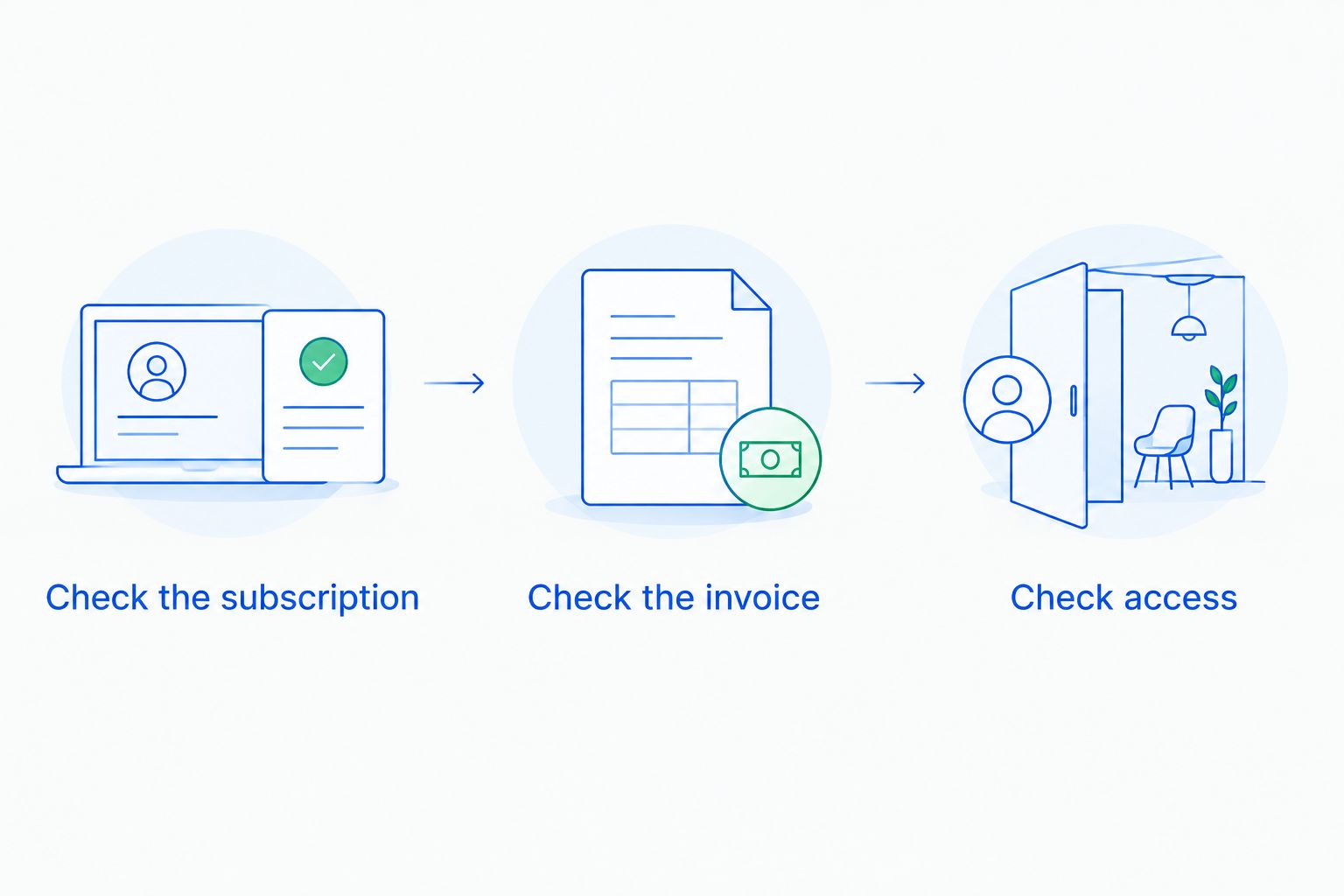
- Check the subscription, invoice, and application access separately before closing a failed-payment case.
- Stunning offers failed-payment recovery software and managed dunning for subscription businesses.
Why this matters
A failed renewal creates separate questions: does the customer still owe you money, does the subscription continue, and can the customer still use your product? One subscription status does not answer all of them.
For your 2026 recovery process, document the intended outcome before changing a retry setting. Use the Stripe failed-payments recovery audit checklist to organize the review, then check that your billing settings and application behavior agree.
The practical risk is a mismatch. Your billing system can stop collecting while your application keeps granting access, or your application can block a customer whose payment has since succeeded. Recovery needs an owner who checks the result, not just the configured action.
What happens to Stripe dunning after retries end: unpaid or canceled?
For automatically collected subscription renewals, Stripe lets you configure what happens after the retry process is exhausted. The distinction below follows Stripe's documented subscription lifecycle behavior; check your account's current settings when reviewing the workflow in 2026.
| Outcome | unpaid |
canceled |
|---|---|---|
| Subscription lifecycle | The subscription remains in an unpaid state | The subscription has ended |
| Future renewal invoicing | Invoice generation continues, but normal automatic collection is suspended | Regular renewal invoicing stops |
| Outstanding debt | The status does not establish that an invoice was paid | Cancellation does not establish that an invoice was paid |
| Customer return | Resolve the unpaid invoices and inspect the resulting subscription state | Create a new subscription rather than restarting the canceled one |
| Best for | A process that deliberately retains unpaid subscriptions for follow-up | A process that deliberately ends subscriptions after failed recovery |
| Main drawback | Requires clear handling of invoices, access, and unresolved accounts | Requires a new subscription if the customer returns |
Stripe also supports leaving a subscription past_due after retries. That is a separate choice, not another name for unpaid. Do not treat all failed-payment statuses as interchangeable in reports, support scripts, or application code.
Choose the end action that matches your retention and access policy. Retaining a subscription record is not itself a recovery strategy, and canceling a subscription is not evidence that the balance has been resolved.
What does an unpaid Stripe subscription mean?
An unpaid Stripe subscription remains a subscription, but automatic collection no longer proceeds as it did during the retry period. Stripe's subscription lifecycle documentation distinguishes this state from both past_due and canceled.
This option fits a deliberate follow-up process. Your team retains an account to investigate, contact, and reconcile rather than ending the subscription immediately.
The disadvantage is operational ambiguity if nobody owns the next action. A customer can remain unresolved while billing, support, and your application each interpret the status differently.
Before using unpaid as your final retry action, write down:
- Who reviews accounts that enter the unpaid state.
- Whether product access continues, becomes limited, or stops.
- Which invoice the customer must resolve.
- How the team checks the subscription after successful payment.
- When an unresolved account moves to cancellation or another documented disposition.
Do not send an unpaid customer a generic instruction to update a card and assume the case is complete. A usable payment method and a settled invoice are different facts. Check both.
What does a canceled Stripe subscription mean?
A canceled Stripe subscription has ended. Stripe does not let you restart that canceled subscription; a returning customer needs a new subscription.
This option fits a process that ends recurring service after the recovery window closes. It provides a clear subscription endpoint, but your application still needs to enforce the access policy you have chosen.
Cancellation does not mean that every invoice associated with the customer has disappeared. Inspect outstanding invoices separately, including whether any invoice needs collection, voiding, or another accounting treatment consistent with your policy.
The main trade-off is the return path. A customer who fixes a payment problem after cancellation needs a resubscription flow, not just a confirmation that their card details changed.
Separate ending the subscription from resolving the invoice. Support messages should explain the action the customer needs now, rather than asking them to repair a subscription that no longer exists.
Why Stripe dunning outcomes vary
Different outcomes do not necessarily indicate a broken retry process. Check these factors before changing the configuration:
- End action: Your selected action determines whether exhausted recovery leads to
unpaid,canceled, or continuedpast_duestatus. - Failure stage: An unsuccessful renewal is different from an incomplete initial subscription payment. Do not apply renewal instructions to every failed checkout.
- Collection method: Automatic card collection and invoice-based payment workflows do not follow identical collection paths.
- Invoice state: An invoice can remain unresolved even after the subscription changes state. Check its own status and payment details.
- Payment requirements: Some failures need customer action or a different payment method rather than another attempt with unchanged details.
- Application rules: Your own access logic determines what the customer can use after billing events arrive.
Use these factors to explain a specific account, not to justify adding retries blindly. Identify the failed payment, read its recorded failure information, and establish whether another attempt addresses the problem.
How do you check an account after retries stop?
Review 3 records: the subscription, the invoice, and application access. They answer different questions, and all need to agree before you mark recovery complete.
Check the subscription
Open the subscription and confirm its current status. Establish whether the subscription reached its configured retry endpoint or changed because of a separate action, such as a manual cancellation.
Record the next intended step. An unpaid subscription needs a resolution path; a canceled subscription needs a return path if the customer wants to continue.
Check the invoice
Identify the failed renewal invoice rather than relying only on the customer's overall billing page. Check whether that invoice remains open, has been paid, or has received another disposition.
Look for successful payment evidence before counting recovery. A card update, an email reply, and a retry attempt are activities; none alone establishes that the invoice was paid.
Check access
Confirm what your application currently allows and compare it with your policy. Inspect the relevant billing events and your application's handling of them when the result is wrong.
Do not give support a blanket rule that every canceled account lacks access or every active account has paid every invoice. Access is an application decision, and the invoice is the payment record.
What should you test before changing the end action?
Use a test environment to inspect the full lifecycle, including your application's response. A successful email preview does not test what happens when recovery ends.
For a 2026 release review, cover 4 checks:
- Retry endpoint. Confirm which subscription status your configuration produces after unsuccessful recovery.
- Customer action. Confirm that the message sends the customer to the correct payment-resolution flow.
- Access handling. Confirm that your application applies the intended restriction or restoration when billing changes.
- Return path. Confirm that a canceled customer can start a new subscription without confusing the new purchase with the old invoice.
Test the customer-facing language as well. An email that says the subscription will continue after a card update is misleading if the subscription has already been canceled and requires a new purchase.
Keep a record of the expected outcome for each check. When a future configuration change creates a mismatch, that record gives support and engineering a shared reference instead of competing assumptions.
Should you manage Stripe dunning yourself or hire someone?
Stunning is best for subscription businesses seeking failed-payment recovery software or managed dunning. The relevant decision is whether your team needs software to operate or someone accountable for running recovery.
| Approach | Best for | What you need to establish | Main limitation |
|---|---|---|---|
| Stripe's built-in retries and emails | Teams whose recovery needs fit the built-in controls | An internal owner for settings, messages, exceptions, and results | Configuration alone does not assign operational ownership |
| Recovery software | Teams with someone available to run recovery | Who maintains workflows and checks unresolved accounts | Your team still needs to operate the process |
| Managed recovery | Teams seeking outside responsibility for recovery work | Exactly which reviews, updates, and follow-ups the service includes | Scope and responsibilities need agreement |
Stunning Software and Managed Recovery represent different operating choices. Do not assume that a software purchase includes a person reviewing results, or that every managed engagement covers every platform and task. Confirm the applicable platform support and service scope before choosing.
For your 2026 operating plan, name who reviews results, updates customer messages, and follows up on exceptions. If those tasks have no owner, installing another tool leaves the central problem unresolved.
Ask for a recovery review through Stunning's contact page when you need help assessing the workflow. Bring examples of unpaid and canceled subscriptions, their associated invoices, and the access outcome you intended.
Discuss your recovery workflow
Explain where failed payments stop progressing and ask about software versus managed recovery.
Does updating a card recover an unpaid subscription?
An unpaid subscription is not recovered merely because the customer updates a card. Confirm that the relevant invoice was successfully paid, then inspect the subscription status and application access.
Your instructions should describe the whole resolution path. If customer action is still required after saving the payment method, make that next step explicit.
Can you restart a canceled Stripe subscription?
A canceled Stripe subscription cannot be restarted. Create a new subscription if the customer returns, and resolve the previous invoice separately.
Check your support templates for instructions that imply otherwise. Sending a canceled customer through a card-update flow alone does not recreate recurring service.
Should you keep access open after failed retries?
Unpaid and canceled statuses do not replace your access policy. Decide what access each state permits, implement that decision in your application, and test the result.
Customer messages must match the policy. Do not promise continued service while your application is removing it, or promise restoration before the required payment has succeeded.
FAQ
What’s the difference between unpaid and canceled in Stripe?
An unpaid subscription remains in an unpaid state; a canceled subscription has ended. Neither status establishes that an outstanding invoice was paid, so inspect the invoice separately.
Does Stripe always cancel subscriptions after retries fail?
No. Stripe’s configured end action can cancel the subscription, mark it unpaid, or leave it past_due. Check the settings that apply to your subscription renewal workflow.
Will Stripe keep charging an unpaid subscription automatically?
An unpaid subscription does not continue normal automatic collection. Inspect its invoice state and determine the required resolution rather than assuming another automatic retry is coming.
Does canceling a Stripe subscription clear unpaid invoices?
Canceling a subscription does not establish that its outstanding invoices were paid or otherwise resolved. Review those invoices and handle them according to your collection and accounting policies.
Is a card update enough to restore a canceled subscription?
No. A canceled subscription cannot be restarted through a card update. A returning customer needs a new subscription, with any previous invoice handled separately.
How do I know a failed payment has actually recovered?
Confirm successful payment of the relevant invoice, then check subscription status and application access. Do not count a saved card or an attempted retry as recovered revenue.
When should I ask Stunning about managed dunning?
Ask Stunning about managed dunning when you want outside responsibility for failed-payment recovery rather than only software to operate yourself. Confirm who reviews results, updates messages, handles follow-up, and supports your payment platform.
One last thing
For your next 2026 recovery review, start with a subscription whose retries have already ended. Trace its last invoice, customer message, and current access before changing any settings.
That account tests the handoff that retry configuration alone cannot settle: what happens when automation stops. The next move needs an owner, whether the subscription is unpaid or canceled.
Related guides
- Stripe dunning: when built-in recovery is enough
- Dunning software or managed recovery: who owns the work?
- What to check after a Stripe card update