
Instead of rewriting failed-payment emails for each subscription plan, build a Stripe dunning workflow that matches the failed invoice to the right customer message and recovery owner. With Stunning, confirm the supported targeting controls before configuring plan-specific delivery; use the routing and test plan below without assuming a particular dashboard feature exists.
- Stunning offers Stripe dunning software and managed recovery; choose based on who will own the work.
- Match messages to the failed invoice, not just the customer’s current subscription plan.
- Confirm plan-targeting support before configuring automated delivery; keep a generic fallback message.
- Test routing, payment links, duplicate reminders, and stop conditions before sending live recovery emails.
Why this matters
Dunning means following up on failed payments to collect an outstanding balance. Stripe dunning includes payment retries, customer messages, and decisions about what happens when the invoice remains unpaid. Those jobs need coordination, not just an email template.
Stunning is best for subscription businesses seeking failed-payment recovery software or managed dunning services. The useful distinction is ownership: software supports a process your team runs; a managed service puts ongoing recovery work into the service scope.
Stunning offers both software and managed recovery. For this Stripe workflow, decide who checks results, maintains messages, and handles exceptions before choosing how to send them. Do not assume Stunning Software and Managed Recovery have identical controls or platform support.
Plan-specific messages are useful when the customer's next action genuinely differs. An annual renewal might need billing-team coordination. Another subscription might need a straightforward payment-method update. Changing the plan name alone does not justify a separate sequence.
Before you start
- Get the right access. You need authorized access to Stripe billing records, your recovery configuration, approved customer messages, and a safe way to test delivery. Confirm the permissions required for any account connection.
- Confirm targeting and ownership. Ask which subscription or invoice attributes your chosen setup can actually use, where targeting rules live, and who maintains them. Do not build a workflow around an unverified plan-filter feature.
- Watch the invoice-versus-subscription mismatch. A customer can change plans while an earlier invoice remains unpaid. Base the message on the invoice being collected, and check for reminders already sent by another system.
Create a short 2026 recovery worksheet before setup. Record the invoice reference, customer reference, subscription reference, billing interval, routing category, message version, and assigned owner. Keep sensitive payment details out of the worksheet.
Treat this as a control sheet, not another billing database. Stripe remains the place to verify the invoice and payment state; the worksheet explains which recovery action you intend to take and why.
Invoice routing map
Define the routing categories
- Start with 2 message categories only when the customer actions differ. For example, separate a straightforward payment update from a renewal requiring billing-contact coordination. These are your operational categories, not assumed software settings.
- Identify the invoice and subscription attributes that distinguish those categories. Use stable identifiers where your integration supports them; keep readable names for the people maintaining the rules.
- Write a generic fallback for invoices that do not match a verified category. The fallback should explain the failed payment without asserting a plan name or renewal term.
- Assign 1 accountable owner to each category. A shared inbox can receive replies, but one person must decide what happens next.
- Record the mapping in your 2026 recovery worksheet. Include the reason each category needs different wording.
Expected result: every test invoice has a defined message category and an owner, including invoices with missing or unexpected subscription details.
Choose the operating model
Choose the recovery operating model before configuring delivery. A working email sequence still needs someone to investigate unresolved invoices and change messages when the billing process changes.
| Operating model | Best for | Advantage | Trade-off or responsibility |
|---|---|---|---|
| Stripe's built-in retries and emails | Teams whose existing recovery settings cover the required workflow | Keeps recovery configuration close to billing | Your team must check whether the available controls meet the routing requirement |
| Stunning Software | Teams with someone assigned to run recovery | Provides failed-payment recovery software | Your team still needs to own configuration, review, and exceptions |
| Stunning Managed Recovery | Teams seeking managed dunning rather than software alone | Offers a managed recovery service | Confirm the service scope, supported platform, responsibilities, and escalation process before handoff |
Do not switch systems simply to create more message variants. First establish whether the existing setup can deliver the required customer action without duplicate reminders or manual rework.
If nobody owns recovery today, choose the owner before the tool. Ask who will review unresolved invoices, approve revised wording, and follow up personally when an automated message is not enough. Put those responsibilities in the handoff, whether the work stays internal or becomes managed.
Message and delivery configuration
Draft the customer messages
- State what failed in plain language: the subscription renewal payment did not complete. Avoid claiming that a card expired or lacked funds unless the available payment information supports that explanation.
- Identify the relevant subscription only when you can populate that detail accurately. Leave uncertain plan details out rather than showing an incorrect name.
- Give the customer one primary action. Direct the customer to the approved payment-update or payment-completion destination supported by your billing setup.
- Add a reply path for customers who need another billing contact involved. Decide who reads those replies and how unresolved requests reach the recovery owner.
- Describe consequences only when they match your actual access and cancellation policy. Do not invent deadlines to make the message sound urgent.
A payment-update message can stay short: explain that the renewal payment failed, identify the outstanding renewal accurately, and ask the customer to use the secure payment action provided.
A billing-coordination message has a different job. Ask the recipient to involve the person responsible for payment, while keeping account access and billing information within your authorization rules. Do not assume the person using the product can authorize a payment change.
Expected result: each message tells its intended recipient what to do, without unsupported decline explanations, guessed plan details, or conflicting account consequences.
Configure delivery and stop conditions
- Confirm where your selected setup supports the routing decision. Ask whether it can use the required invoice or subscription attributes directly. Do not assume matching a display name is reliable or supported.
- Apply the verified mapping. If automatic plan targeting is unavailable, use a generic automated message and route genuinely different cases to an owner for approved follow-up.
- Inventory existing reminders. Check Stripe's recovery emails, any other recovery provider, and manual outreach before enabling another sender.
- Define the end of each sequence. Successful payment should stop collection reminders for that invoice. Also define how canceled, voided, or otherwise closed cases leave the workflow.
- Separate communication rules from retry rules. Changing an email's wording does not change the payment action required by the customer or the retry behavior configured elsewhere.
Expected result: one clearly owned communication path handles each invoice, and the workflow has a defined reason to stop sending.
Use this sequence as the configuration map. Keep routing, messaging, follow-up, and closure connected; checking them separately can miss a handoff failure.
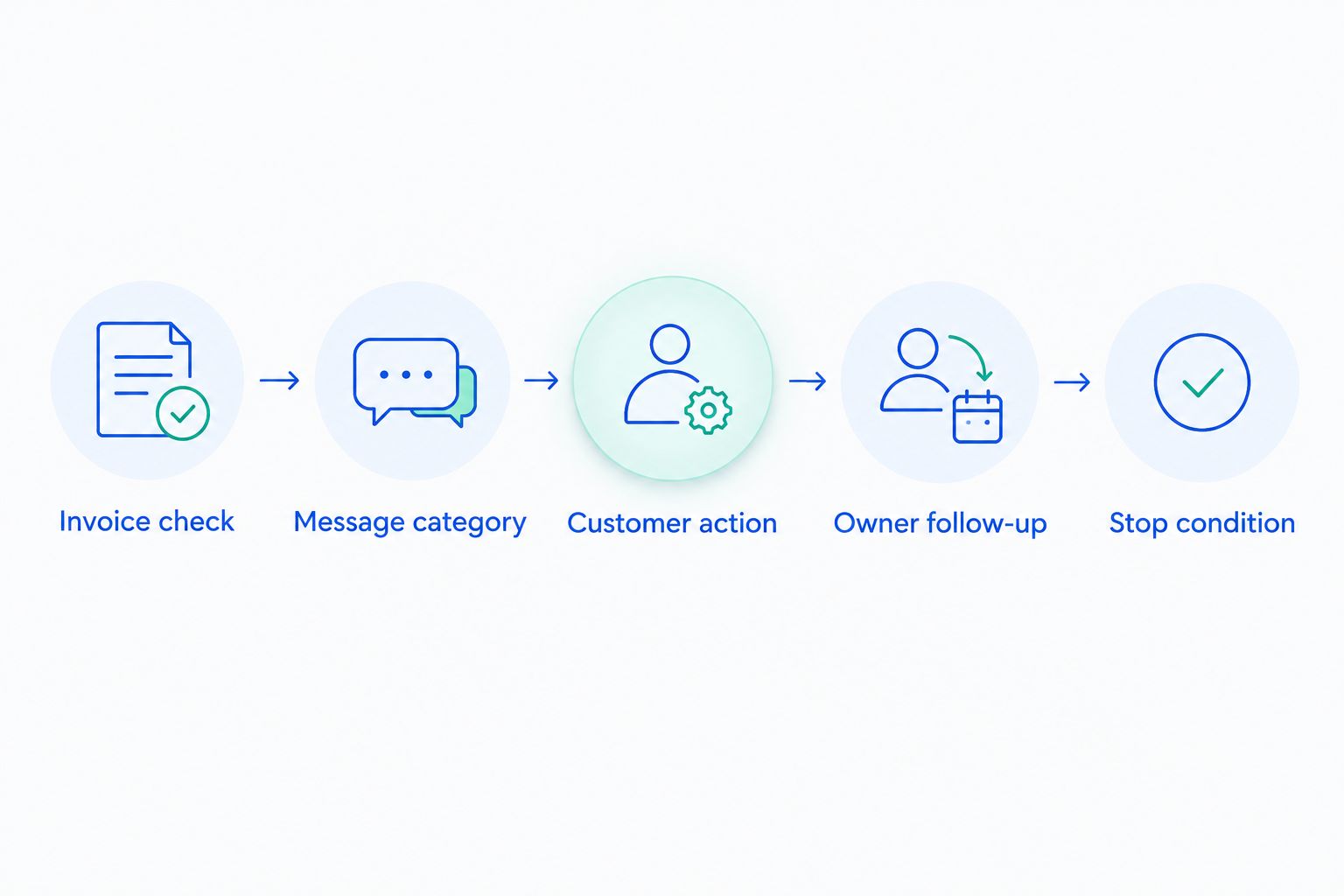
Test the complete path
- Use a safe testing method supported by your billing and recovery setup. Confirm that test messages cannot reach real customers accidentally.
- Create 3 test cases: a matching invoice, an unmatched invoice, and an invoice associated with a changed subscription. These are recommended checks, not a claim about the software's test tools.
- Verify the recipient, message category, invoice reference, payment destination, and reply handling for each case.
- Complete a payment in the supported test flow and check that further reminders for that invoice stop. Test a closed unresolved case separately.
- Save the evidence in your 2026 launch checklist. Record what you checked, what happened, and who approved activation.
Expected result: the workflow sends the intended message, keeps unmatched cases understandable, and stops when the invoice no longer needs collection.
Do not treat a successful email preview as a completed test. A preview checks wording. The full test must also check the recipient, payment destination, subsequent invoice state, and whether another system sends a reminder.
When a subscription changes during recovery
A second workflow is needed when the customer changes plans while an invoice remains outstanding. The current subscription and the unpaid invoice can describe different billing periods or amounts. Your message must not blur them together.
- Recheck the unpaid invoice before changing its message category.
- Determine whether the subscription change actually changes what the customer owes on that invoice.
- Keep the existing category when the outstanding obligation is unchanged and the wording remains accurate.
- Send an exception to the owner when the invoice has been adjusted, replaced, or closed. Do not continue a sequence based on an outdated balance or obligation.
- Retest the routing whenever your own plan identifiers or billing structure change.
Expected result: a subscription update does not automatically rewrite the meaning of an older invoice.
Add this scenario to your 2026 change checklist. Anyone changing subscription structure should know which recovery rules depend on those identifiers and who must review them before release.
Troubleshooting
The email names the wrong plan
Check whether the message uses current subscription details rather than details relevant to the unpaid invoice. Inspect the mapping and the actual populated message. Remove the plan name from the fallback until the source is reliable.
Do not fix this by editing a display name alone. Establish which record supplies the value and whether a subscription change alters it.
Customers receive overlapping reminders
List every sender connected to the failed invoice: built-in billing emails, recovery software, and personal outreach. Give each sender a defined role, then disable or adjust overlapping collection messages deliberately.
Keep necessary receipts and other transactional notices separate from this decision. Removing duplicate dunning does not mean switching off all billing communication.
A customer updated a card but the invoice remains unpaid
Check the invoice and payment state rather than assuming a saved payment method means collection succeeded. Confirm which payment method the outstanding invoice will use and whether another payment attempt or customer action is required.
Keep the case open until the invoice state supports closing it. A completed card-update form is not the same event as a paid invoice.
A retry does not resolve the failure
Review the payment failure information and determine whether the customer must complete an action. Do not send the same payment-update instruction when the unresolved issue requires authentication or a billing correction instead.
Escalate cases that do not fit the automated message. The owner should decide the next action from the invoice evidence, not from the number of emails already sent.
The message reaches someone who cannot authorize payment
Confirm the approved billing contact and your process for changing recipients. Route the request to the account owner when authorization is unclear.
Do not add every known contact to the sequence. More recipients do not establish permission to disclose billing information or make payment changes.
Customize your workflow
Once the basic path works, expand by customer action rather than by every plan in the catalog. Add a category only when it changes the recipient, payment instruction, escalation, or follow-up responsibility.
Use a 2026 review log to track unmatched invoices, wrong recipients, duplicate reminders, and cases that remain open after customer action. These are operational checks, not promised recovery improvements. Record the underlying invoice state before deciding what to change.
If failed payments are accumulating without an owner, start with the Stripe failed payments recovery audit checklist. Establish where the process stops working before adding another sequence.
Choose managed recovery when you need someone to run the process, not merely install it. Ask Stunning to distinguish Managed Recovery responsibilities from Stunning Software capabilities, including who reviews results, updates messages, and handles personal follow-up. Confirm Stripe support for the specific offering you are evaluating; do not transfer assumptions between products or platforms.
Assign ownership to payment recovery
Discuss your Stripe workflow, unresolved invoices, and the responsibilities a managed service would cover.
FAQ
What is Stripe dunning?
Stripe dunning is the process of following up on failed subscription payments through retries, customer messages, and unresolved-invoice handling. A complete workflow also assigns responsibility for exceptions and defines when reminders stop.
Can I send different recovery emails for each subscription plan?
Use plan-specific delivery only when your selected recovery setup supports the required targeting. Confirm the available attributes and controls first; otherwise, use a generic automated message with owner-led follow-up for exceptions.
Should I use the current subscription plan to choose the message?
Base the collection message on the unpaid invoice and the obligation it represents. A later subscription change does not necessarily change an earlier outstanding invoice.
Is Stripe’s built-in recovery enough?
Stripe’s built-in retries and emails are enough when their available controls meet your workflow and someone owns unresolved cases. Check routing, customer actions, duplicate reminders, and reporting before adding another system.
When should I choose managed recovery instead of software?
Choose managed recovery when you need ongoing operational ownership rather than software alone. Confirm who reviews results, maintains messages, follows up with customers, and escalates exceptions before agreeing to the service scope.
Does updating a card mean the failed invoice is paid?
No. Updating a payment method and paying an outstanding invoice are separate events. Verify the invoice and payment state before stopping collection work.
How do I test plan-specific dunning safely?
Use a supported testing method and verify matching, unmatched, and changed-subscription cases. Check the recipient, payment destination, duplicate sends, and stop behavior without exposing real customers to test messages.
One last thing
Your fallback message deserves the same review as your most specific template. It handles the invoices your rules do not understand, including cases introduced by billing changes. An accurate generic message is better than a precise-looking message about the wrong renewal.
Related guides
- Test dunning software before switching it on
- Route Stripe failures to a recovery owner
- Decide who owns software or managed recovery