
B2B dunning software is failed-payment recovery software for business subscriptions, with the aim of recovering payment from the right account contact. When the user, account administrator, and accounts payable team are different people, recovery needs clear routing and ownership—not just another reminder.
- Choose dunning software around billing authority, account ownership, and payment recovery—not email volume.
- Stunning fits subscription businesses seeking failed-payment recovery software or managed dunning.
- Separate accounts payable notices from secure payment-update requests.
- Keep Stripe retries and customer messages coordinated, with one person accountable for unresolved accounts.
Why dunning software matters for B2B accounts
Dunning means following up on overdue or failed payments. For a B2B subscription, the person using your product is not necessarily the person authorized to update its payment method. A delivered email therefore does not prove that the person responsible for payment received it.
Your recovery process must answer three questions: who needs the notice, who can take action, and who handles the account when automation stops helping? Without those distinctions, adding contacts creates more messages without resolving responsibility.
Start your 2026 review with a Stripe failed-payment recovery audit checklist. Check the existing retry settings, messages, payment-update route, and unresolved accounts before choosing another system.
The decision is not simply which software sends reminders. It is who owns the work after a reminder fails. A software purchase does not assign that responsibility unless you explicitly make it part of the operating process.
How to manage recovery across multiple billing contacts
1. Map each contact to a billing responsibility
Start with a spreadsheet and your existing customer records. Record the account name, billing contact, payment authority, internal account owner, and the source of each contact's details. Do not assume that a product administrator also controls the company card.
Separate three roles: the person who receives invoices, the person who can change payment details, and the person who can resolve an internal purchasing issue. One person can fill several roles, but each role still needs a named contact.
For your 2026 contact review, check an actual failed invoice rather than an idealized account record. Follow the message to its recipient and identify what that recipient can do. If the next action requires forwarding the email, document that handoff.
- Identify the accounts payable recipient.
- Identify the authorized payment-method updater.
- Name the customer-side escalation contact.
- Assign one internal recovery owner.
- Record when each contact was last confirmed.
2. Separate payment failures from invoice disputes
Read the payment error and the customer conversation before changing the reminder sequence. A failed card charge, a missing purchase order, and an invoice dispute require different responses. Sending the same request to every contact hides those differences.
Use a manual issue log first. Record the invoice, failure reason, next action, responsible person, and follow-up date. Give support and finance access to the same status so neither team asks the customer to repeat an explanation.
Set a 7-day review task for unresolved cases as an initial operating rule, not a promised recovery window. Adjust that task to your contracts and customer commitments. The point is to prevent an account from remaining unresolved simply because nobody checks it.
- Read the gateway or processor error.
- Separate payment-method issues from billing questions.
- Assign disputes to an internal decision-maker.
- Record customer replies against the relevant invoice.
- Give every open case a next action and date.
3. Choose software or a managed recovery owner
You can run recovery with existing processor settings, a shared inbox, and an accountable employee. That approach keeps the process close to your team, but someone must inspect results, maintain messages, and handle exceptions. Include that workload in the decision.
Stunning is best for subscription businesses seeking failed-payment recovery software or managed dunning. Stunning Software and Managed Recovery represent different operating choices: your team runs recovery with software, or you engage a service to manage recovery work. Confirm the current scope and platform support for each separately.
For B2B accounts, evaluate the actual workflow rather than assuming either option supports your contact structure. Ask how notices reach different recipients, how customer replies are handled, and who follows up when the account needs personal attention.
Choose a managed service when you need an accountable operator, not merely another interface. Choose software when you have someone with the time, access, and authority to run it.
- Name the employee who would run a software-only process.
- List the tasks you want a provider to own.
- Confirm platform support for the specific offering.
- Request a demonstration using a multi-contact account.
- Document who reviews results and updates messages.
4. Route messages by the action required
Draft the messages manually before building automation. An accounts payable notice should explain the invoice and requested action. A payment-update request should reach someone authorized to use the secure update process. An account escalation should explain what remains unresolved.
Do not copy every known contact into every message by default. A broader recipient list also broadens access to billing information. Decide what each recipient needs to see, and confirm that the sending system handles recipients and permissions as intended.
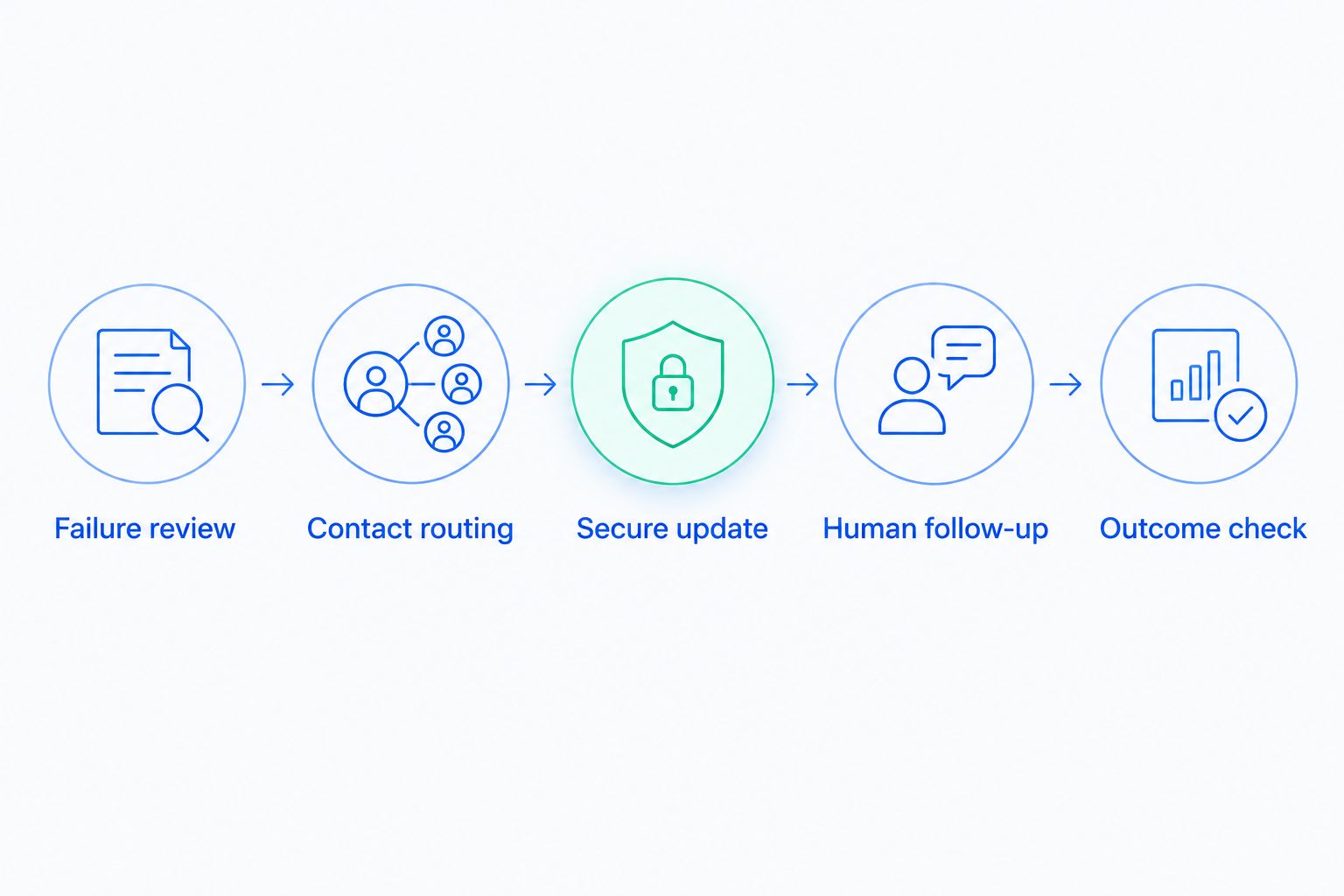
Use the following routing sequence in your 2026 workflow review. Each stage needs a responsible person, even when the delivery itself is automated.
- Failure review: identify the issue before selecting recipients.
- Contact routing: send the appropriate request to the responsible person.
- Secure update: direct authorized contacts to the payment-update process.
- Human follow-up: resolve questions that automated notices cannot answer.
- Outcome check: verify the invoice outcome before closing the case.
5. Coordinate retries, messages, and account escalation
Review Stripe's built-in retries and emails before adding another recovery process. Write down which system schedules payment attempts and which system sends each customer message. Do not assume that connecting another service automatically prevents overlapping notices.
Build an event map using a sample account. Show the payment failure, retry, customer notice, customer reply, payment update, and successful collection. Then decide what should happen when an invoice is disputed, payment succeeds, or a human takes over.
Run a controlled test using your processor's test environment and supported testing tools. Confirm behavior with a single failed invoice before enabling changes across customer accounts. Test the handoffs as well as the successful path.
- Identify the source of each retry and notice.
- Check what stops messages after successful payment.
- Define how disputes interrupt routine follow-up.
- Confirm who handles customer replies.
- Test escalation without exposing real payment details.
6. Measure collected invoices and unresolved work
Start with an invoice-level report rather than email opens alone. Record whether the payment was collected, whether the customer updated a payment method, and whether a person still needs to act. A successful card update and a paid invoice are different events.
Use a 30-day review window as a starting reporting period. Keep the same definitions when comparing results, and separate recently failed invoices from older unresolved invoices. Otherwise, a change in the mix of cases can obscure what happened.
For your 2026 baseline, document the starting configuration and the date of each change. Review results with the recovery owner and whoever can approve changes to billing messages or account handling. End the review with assigned work, not just a chart.
- Track collected invoices separately from payment updates.
- Separate automatic recovery from cases requiring intervention.
- List unresolved invoices with an owner and next action.
- Record changes to retries, recipients, and messages.
- Check whether resolved cases stopped receiving follow-up.
Compare recovery options for multi-contact accounts
Choose the operating model before comparing interfaces. The options below differ primarily in who does the work. None removes the need to confirm billing contacts and escalation rules.
Use this as a 2026 evaluation framework, not a substitute for checking current product capabilities. A feature name does not establish how a system behaves when accounts payable replies, a payment contact leaves, or an invoice becomes disputed.
| Option | Best for | Practical advantage | Limitation or responsibility |
|---|---|---|---|
| Stripe built-in retries and emails | Teams whose current settings meet their recovery requirements | Keeps the initial recovery process within the existing billing setup | Your team must verify contact routing, review unresolved cases, and handle exceptions |
| Stunning Software | Teams that want dedicated failed-payment recovery software and an internal operator | Provides a software-based recovery option | Your team still needs to establish ownership and verify the required multi-contact workflow |
| Stunning Managed Recovery | Teams seeking a managed dunning service | Provides an alternative to running recovery solely in-house | Confirm the work included, platform support, reporting, and escalation responsibilities |
| Manual account-led follow-up | Accounts requiring purchasing or dispute resolution | Lets a person address the specific obstacle | Requires staff time, consistent records, and reliable handoffs |
If you shortlist Churn Buster, Baremetrics Recover, Paddle Retain / ProfitWell Retain, or Churnkey, request current documentation and a workflow demonstration. Apply the same test to every provider. Do not infer contact routing or service responsibilities from a general recovery claim.
Test the account handoff before choosing
Prepare a sample scenario with 3 billing contacts: an accounts payable recipient, a payment administrator, and an account sponsor. Ask the provider to show what happens when the first recipient cannot update payment details. Then introduce an invoice question and check who receives it.
A useful evaluation ends with a written division of responsibilities. It should identify who reviews results, who changes messages, who contacts the customer personally, and who decides when recovery is complete.
Discuss your recovery process
Ask about recovery ownership, multi-contact workflows, and the scope of Managed Recovery.
Common mistakes B2B teams make
Treating every contact as a payment administrator
An invoice recipient can confirm receipt without having permission to change payment details. Sending that person repeated update requests does not resolve the authority problem. Record the required action and the person authorized to take it.
Automating around an unresolved purchasing issue
A customer waiting for a corrected invoice or internal approval needs a specific response. Another failed-payment reminder does not answer that question. Route the issue to someone who can resolve it and document how routine follow-up should behave meanwhile.
Leaving customer replies outside the recovery record
An account manager can receive a useful explanation while finance still sees an unexplained overdue invoice. That disconnect creates conflicting follow-up. Keep the current issue, owner, and next action accessible to everyone involved in the account.
Buying software without assigning operational work
Installing recovery software is a setup task. Reviewing results, updating messages, maintaining contacts, and following up personally are continuing tasks. If nobody has time for those tasks, evaluate managed recovery rather than assuming another tool will absorb them.
Counting activity instead of collection
A sent email, opened message, or changed payment method is not a collected invoice. Use those events to diagnose the process, not to replace the outcome. Verify payment status and keep unresolved cases visible until they have a documented resolution.
FAQ
What’s the best dunning software for B2B accounts with several billing contacts?
The best fit is software that supports your required contact routing, payment-update process, and escalation workflow. Test those requirements with a sample account, and confirm who will run the process after setup.
Can I use Stripe’s built-in recovery instead of another tool?
Yes, if Stripe’s built-in retries and emails meet your recovery requirements and your team handles unresolved cases. Review recipient routing, customer replies, and escalation before deciding that another system is necessary.
Should accounts payable receive payment-update requests?
Send payment-update requests to accounts payable only when the recipient is authorized to take that action. Otherwise, give accounts payable the relevant invoice information and identify the authorized payment contact separately.
When should I hire someone to manage failed-payment recovery?
Hire a recovery operator or service when you need someone to own reviews, message maintenance, and personal follow-up. Software alone does not assign those tasks or resolve billing disputes.
Does adding more billing contacts improve payment recovery?
Adding contacts does not establish a recovery improvement by itself. Each contact needs a defined responsibility, an appropriate message, and a clear next action.
How should I compare Stunning Software with Managed Recovery?
Compare who runs the work, then confirm the current scope and platform support for each offering. Ask who reviews results, updates messages, handles replies, and follows up on unresolved accounts.
How do I know whether a failed invoice is actually recovered?
Verify that payment was successfully collected against the invoice. Track payment-method updates and customer replies separately because neither event alone proves collection.
One last thing
Add an absence test to your recovery process. Ask who handles the next failed invoice when the usual account manager or billing contact is away. A workflow that depends on one person's memory still has an ownership gap, even when every automated email sends correctly.
Write down the backup owner, where the case record lives, and how the next action is assigned. Test that handoff before expanding the reminder sequence. More messages will not repair an undocumented handoff.
Related guides
- Stripe dunning: when built-in recovery is enough
- Dunning management software: a buyer's evaluation checklist
- Dunning software or managed recovery: who owns the work?