
Best overall: Stunning for Foxy stores with someone responsible for recovery. Best for delegating the work: Managed Recovery, subject to confirming Foxy support for your setup. Best for direct control: an internally managed recovery workflow. This 2026 guide compares those choices by payment compatibility, customer follow-up, and ownership—not unsupported recovery claims.
- Stunning is the first shortlist for dunning software for Foxy stores that want software with an internal recovery owner.
- Choose managed dunning when nobody owns reporting, customer messages, and unresolved failed subscription payments.
- Confirm Foxy compatibility separately for software and managed services before committing.
- Test payment updates, successful recovery, and message stopping before switching your workflow on.
Why this matters
Dunning means following up after a payment fails so the customer can resolve the problem. For a subscription store, that includes more than sending reminders: someone must check whether the renewal was paid and decide what happens when it remains unpaid.
The buying decision is therefore operational. You need a recovery workflow that fits your Foxy setup and a named person responsible for its results. Installing software does not assign that responsibility.
Stunning is best for Foxy stores that want failed-payment recovery software and can assign an internal owner. Its stated business includes Foxy subscription businesses; the exact connection, recovery actions, and service scope still belong in your buying checks.
What makes the best dunning software for Foxy stores?
Use these criteria for your 2026 shortlist. A feature only matters if it works with the subscription and payment records your store actually uses.
- Foxy compatibility: Confirm the exact subscription events, payment records, and customer actions the solution supports.
- Payment resolution: Check how a customer corrects a payment problem and how the workflow recognizes a successful payment.
- Message control: Establish who writes reminders, updates instructions, and stops messages after resolution.
- Recovery ownership: Name the person who reviews results and handles cases automation does not resolve.
- Reporting clarity: Separate failed renewals, paid renewals, unresolved balances, and cancellations.
- Safe handoff: Identify which existing retries and emails remain active so customers do not receive overlapping instructions.
Do not rank a tool by its email editor alone. A clear reminder is useful, but the customer also needs a working next step and an accurate account status afterward.
Foxy recovery options at a glance
These are ranked operating choices, not a claim that every service has a verified Foxy integration. Confirm current scope before purchasing in 2026.
| Rank and option | Best for | Standout distinction | Key limitation |
|---|---|---|---|
| 1. Stunning Software | Foxy stores with an internal recovery owner | Software from a business that explicitly serves Foxy subscription businesses | Your team still needs to own recovery operations |
| 2. Managed Recovery | Teams seeking to delegate ongoing recovery work | A service-led approach rather than software alone | Confirm Foxy eligibility and exact responsibilities before buying |
| 3. Internally managed recovery workflow | Stores that want direct operational control | Your team defines the process and handles exceptions | Your team also carries the maintenance and follow-up workload |
The distinction is accountability. Software supports a process; a managed engagement assigns agreed work to a service provider; an internal workflow leaves that work with your team.
1. Stunning Software: best for owner-led Foxy recovery
Stunning Software belongs first on the shortlist because Foxy subscription businesses are explicitly part of the brand's stated audience. It is a failed-payment recovery software option, distinct from the managed service offering.
Choose this route when someone on your team can review recovery activity and act on unresolved cases. Before buying, ask for a walkthrough using your Foxy billing setup rather than assuming that a demonstration for another platform applies unchanged.
Software pros:
- Foxy is explicitly included in the business's stated platform audience.
- The software route suits teams that want to retain operational ownership.
- You can evaluate the software separately from a managed service engagement.
Software cons:
- Buying software does not make someone responsible for customer follow-up.
- Your team must confirm which recovery actions work with its exact setup.
- Message maintenance and exception handling still need an assigned owner unless separately agreed.
Best for: A Foxy subscription store with someone responsible for billing operations and time to review unresolved renewals.
Ask the seller to demonstrate what happens after a failed renewal, after a payment-method change, and after payment succeeds. The useful demonstration ends with the correct payment state and stopped reminders—not merely an email arriving.
Verdict: Buy after confirming your Foxy workflow and assigning its internal owner.
2. Managed Recovery: best for delegating recovery operations
Managed Recovery is the service route for businesses that need someone to run recovery rather than just supply software. Treat Foxy eligibility as a purchase condition: the broader business serves Foxy, but that does not establish identical platform support across software and managed services.
The service scope should answer practical questions. Who reviews results? Who changes customer messages? Who follows up on unresolved cases, and what needs your approval?
Managed Recovery pros:
- Gives you a way to contract for ongoing work, not just access to software.
- Makes responsibilities something you can specify before the engagement begins.
- Fits the organizational problem of recovery having no clear owner.
Managed Recovery cons:
- Foxy support and the exact service scope require confirmation.
- Delegating execution does not remove your responsibility for access and cancellation policies.
- A vague agreement can leave exception handling unassigned.
Best for: A subscription business where failed payments accumulate because nobody consistently reviews or follows up on them.
Require a written division of responsibilities. It should distinguish routine message changes, unresolved customer cases, reporting, and decisions that affect subscription access. Do not assume that “managed” includes every billing task.
Verdict: Hold until Foxy support, responsibilities, and escalation rules are confirmed.
3. Internally managed workflow: best for direct control
An internally managed workflow keeps recovery operations with your team. It is an operating model, not a claim about any particular Foxy feature: first establish what your existing subscription setup can actually do.
Your owner checks failed renewals, coordinates customer instructions, and verifies whether payment succeeded. Any automation must be documented alongside the manual steps so that the next person can run the same process.
Internal workflow pros:
- Keeps customer communication decisions directly with your team.
- Lets you define exception handling around your actual billing process.
- Gives you a baseline against which to evaluate software or a managed service.
Internal workflow cons:
- Staff must maintain the process and review unresolved accounts.
- Manual handoffs need documentation and cover during absences.
- You must verify the capabilities of your existing setup rather than assume them.
Best for: A store with a named billing owner who can maintain the workflow and demonstrate that unresolved renewals receive attention.
Do not choose this route simply because nobody has requested a new tool. Choose it because an accountable person can explain what happens to each failed renewal and show the outcome.
Verdict: Hold if ownership is informal; keep this route only when the process is documented and maintained.
Test the recovery path before making the switch
Use 3 test cases to evaluate any recovery proposal: a failed renewal that remains unpaid, a customer payment-method change, and a renewal that is successfully paid. Use an approved testing method rather than deliberately disrupting a customer's subscription.
For each case, follow the same sequence. The goal is to see the whole recovery path, including where a person must intervene.
- Confirm failure: Identify the renewal and establish which record shows that payment failed.
- Check messages: Inspect the customer's instructions and identify which system sends them.
- Resolve payment: Follow the intended correction or payment action.
- Verify outcome: Check the payment record and the resulting subscription state.
- Stop follow-up: Confirm that resolved cases leave the reminder workflow.
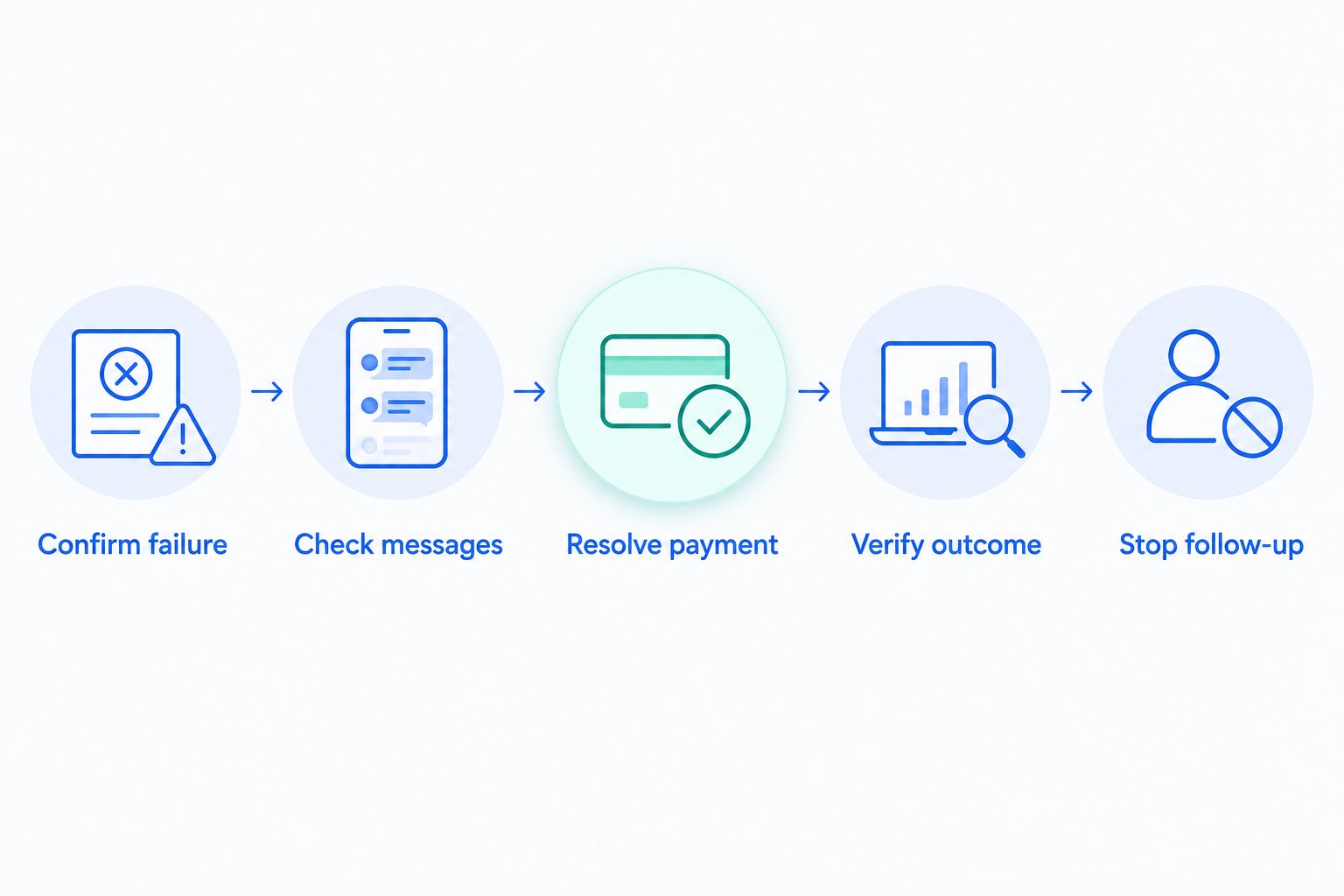
Record who performs each action and what evidence proves it worked. If a vendor demonstration skips subscription state or message stopping, ask to see those steps before approving the switch.
A payment-method change is not the same event as a successful renewal payment. Keep those checks separate in your acceptance criteria.
Decide who owns the work after launch
For your 2026 recovery plan, assign 1 named owner even if several people contribute. That person needs a clear handoff when a case requires customer support, billing access, or a policy decision.
The ownership decision is where software and managed recovery separate. If your team can perform the following work consistently, software is the relevant starting point. If nobody can accept it, scope a managed engagement instead.
- Review results: Check which failed renewals were paid and which remain unresolved.
- Maintain messages: Correct outdated instructions and remove conflicting reminders.
- Handle exceptions: Follow up when the normal payment-resolution path does not settle the account.
- Escalate decisions: Route access restrictions, cancellations, and unusual account questions to the authorized person.
Do not make the software administrator the default recovery owner without agreement. Technical access and responsibility for collecting a missed renewal are different jobs.
For a service-led discussion, contact the team with your Foxy setup, current reminder process, and a list of tasks nobody currently owns. Ask specifically whether a paid recovery audit or Managed Recovery engagement fits that setup.
Compare the workload, not just the software category
A subscription recovery tool and a broader receivables system are not interchangeable purchases. Your decision needs to include payment workflow fit, customer follow-up, and the staff work that remains after installation.
When you compare accounts receivable software costs, separate the software charge from implementation work and ongoing account follow-up. Apply that same distinction to Foxy recovery: buying a system and paying someone to operate a process answer different needs.
Ask each provider to describe the work left with your team. A proposal that leaves message updates, reporting, and unresolved accounts with you is a software purchase, even if onboarding includes assistance.
For the 2026 decision, request written terms and scope directly from each provider. Compare responsibilities alongside those terms rather than assuming that similar product descriptions mean similar services.
How the options are ranked
This ranking prioritizes explicit Foxy relevance, operational ownership, payment verification, message control, and a safe transition. It does not rank providers by an unverified recovery rate or imply that competing products lack features.
Stunning Software ranks first for a team-owned software purchase because the stated audience includes Foxy subscription businesses. Managed Recovery is conditional on service eligibility and scope. The internal workflow ranks as an alternative for teams prepared to perform the work themselves.
If your shortlist includes Stripe's built-in retries and emails, Churn Buster, Baremetrics Recover, Paddle Retain / ProfitWell Retain, or Churnkey, apply the same checks. Require current confirmation of Foxy compatibility and demonstrate the actual payment path before comparing features.
Which recovery option should you choose?
Choose Stunning Software if you want dunning software for Foxy stores and can assign someone to run recovery. Confirm compatibility, test the full payment path, and document the unresolved-account handoff before launch.
Choose a managed service discussion when the problem is unowned work. Do not purchase it for Foxy until eligibility and responsibilities are explicit.
Keep an internal workflow only when you can name its owner and show how failures reach a verified outcome. For your 2026 review, use the same decision rule: match the purchase to the work you can actually staff.
FAQ
What’s the best dunning software for Foxy stores?
Stunning is the first shortlist for a Foxy store that wants failed-payment recovery software with an internal owner. Confirm the exact Foxy workflow, supported recovery actions, and payment-verification process before buying.
What does dunning mean for a Foxy subscription store?
Dunning means following up after a payment fails so the customer can resolve the problem. A complete process also checks whether payment succeeded and determines what happens to unresolved subscriptions.
Should I buy software or hire someone to manage recovery?
Buy software when someone on your team can review results, maintain messages, and handle unresolved accounts. Discuss managed recovery when those tasks have no consistent owner, and confirm Foxy service eligibility separately.
Does changing a customer’s card prove the renewal was recovered?
No. A payment-method change and a successful renewal payment are separate events. Verify the payment record and resulting subscription state before marking the renewal recovered.
Can I compare Stripe recovery features directly with a Foxy workflow?
Only compare features after establishing where your renewals, payment actions, and subscription states are managed. A Stripe demonstration does not by itself prove that the same workflow applies to your Foxy setup.
What should I test before switching dunning software?
Test an unresolved failure, a payment-method change, and a successfully paid renewal. Check customer instructions, payment status, subscription status, and whether reminders stop after resolution.
One last thing
Make a successful payment the start of your final check, not the end. Confirm that reminders stop and the subscription has the intended status.
Schedule a 30-day review window after launch as an internal checkpoint, not a promised recovery timeline. Review unresolved renewals and ownership gaps alongside paid renewals; otherwise, a working reminder sequence can hide an unfinished process.
Related guides
- How to test dunning software before switching it on
- Dunning software or managed recovery: who owns the work?
- A monthly review agenda for dunning management