
Best overall for WooCommerce-managed renewals: WooCommerce Subscriptions’ built-in payment retries. Best for Stripe Billing-managed renewals: Stripe’s built-in recovery. Stunning Software and Managed Recovery belong on your shortlist only after you confirm that your actual billing setup is supported—not simply that your store accepts Stripe payments. This 2026 guide explains which route fits each setup.
- Start with WooCommerce Subscriptions’ built-in retries when WooCommerce creates and manages your renewal orders.
- Choose dunning software for WooCommerce subscriptions by billing compatibility, customer actions, and recovery ownership.
- Stripe payment processing does not automatically mean Stripe Billing manages your subscriptions.
- Consider Stunning for supported Stripe subscription businesses choosing between software and managed dunning.
Why this matters
Dunning means following up on failed payments through retries, customer messages, and payment-method updates. A successful recovery must reach the system that controls the renewal order and subscription status.
That distinction matters before you compare vendors. Stunning provides failed-payment recovery software and managed dunning services, but a Stripe connection alone does not establish compatibility with a WooCommerce renewal workflow.
Choose the recovery system that can resolve the renewal, not merely send another reminder. Otherwise, you can add messages without fixing the unpaid order or restoring the correct subscription status.
What makes the best dunning software in 2026?
Use these criteria before comparing features:
- Billing compatibility: The recovery system must recognize the failed renewal and write the outcome back to the system managing it.
- Retry coordination: One system should control payment attempts. Check for overlapping schedules before enabling another tool.
- Customer action: Messages must direct customers to the correct payment or authentication step.
- Order reconciliation: A successful payment must connect to the original obligation without creating an unintended second charge.
- Recovery ownership: Name the person responsible for reviewing failures, maintaining messages, and handling unresolved accounts.
- Useful reporting: Separate collected renewal payments from card updates, scheduled retries, and unpaid promises.
For a 2026 evaluation, ask vendors to explain your exact renewal path. A feature list cannot establish whether WooCommerce orders, gateway transactions, and subscription statuses will remain consistent.
Your recovery options at a glance in 2026
These are different operating models, not interchangeable plugins. Choose by where renewals originate and who will run recovery.
| Option | Best for | Standout capability or role | Key limitation |
|---|---|---|---|
| WooCommerce Subscriptions built-in retries | WooCommerce-managed renewals | Retry rules within the subscription renewal workflow | Requires a supported payment setup and working scheduled actions |
| Stripe built-in recovery | Stripe Billing-managed renewals | Recovery tied to Stripe Billing invoices and subscriptions | Does not establish recovery support for WooCommerce-managed renewal orders |
| Stunning Software | Supported Stripe businesses with an internal recovery owner | Dedicated failed-payment recovery software | Confirm the exact billing integration before choosing it for WooCommerce |
| Managed Recovery | Supported businesses needing someone to run recovery | Managed dunning rather than software alone | Confirm platform support and the specific work included |
The first option is the default for a WooCommerce store. The other routes require a closer look at billing architecture or service scope before they become recommendations.
1. WooCommerce Subscriptions: best for WooCommerce-managed renewals
WooCommerce Subscriptions includes an automatic failed-payment retry system for supported payment configurations. It works within the renewal-order workflow rather than treating a failed gateway transaction as a separate subscription invoice.
Start here when WooCommerce creates your renewal orders and controls subscription status. Check that automatic retries are enabled and that scheduled actions are running before adding another recovery system.
WooCommerce Subscriptions pros
- Keeps recovery connected to WooCommerce renewal orders.
- Provides retry rules within the existing subscription workflow.
- Lets your team investigate order notes and scheduled actions together.
WooCommerce Subscriptions cons
- Retry support depends on the payment gateway and configuration.
- Broken scheduled actions can interrupt the process.
- Your team still needs to handle customer questions and unresolved renewals.
Best for: Stores whose subscription renewals originate in WooCommerce and whose team can own recovery operations.
Before changing software, inspect a failed renewal from beginning to end. Find the order, read the gateway response, inspect the scheduled retry, and check the customer-facing payment route. A scheduling or configuration problem needs a repair, not another message sender.
Verdict: Buy—choose the built-in workflow first for supported WooCommerce-managed renewals, and fix its configuration before adding another tool.
2. Stripe built-in recovery: best for Stripe Billing renewals
Stripe Billing provides retry and customer-email settings for subscriptions managed in Stripe Billing. That is a different arrangement from using a Stripe payment gateway to collect payment for a WooCommerce renewal order.
A customer record or payment in Stripe does not prove that Stripe Billing owns the subscription. Identify the system that creates the recurring invoice before deciding which recovery settings apply.
Stripe built-in recovery pros
- Keeps recovery associated with Stripe Billing invoices.
- Provides retry and email settings within the billing system.
- Gives an internal owner a native starting point for recovery management.
Stripe built-in recovery cons
- Stripe payment processing alone does not establish Stripe Billing compatibility.
- WooCommerce order and access updates need separate verification when systems are connected.
- Someone must still review unresolved invoices and customer responses.
Best for: Businesses whose recurring invoices and subscriptions are actually managed in Stripe Billing.
Check whether built-in recovery already covers your requirements before introducing another provider. Document what happens after retries end, who answers replies, and which system determines whether the customer retains access.
Verdict: Buy—choose native Stripe recovery for Stripe Billing-managed renewals; skip it as an assumed replacement for WooCommerce’s renewal workflow.
3. Stunning Software: best for an internal recovery owner
This is failed-payment recovery software for subscription businesses. Its stated platform coverage includes Stripe, Foxy, and Subbly; that does not establish direct support for every WooCommerce subscription configuration.
The relevant question is whether the software supports the system creating your recurring obligation. Ask about your WooCommerce extension, gateway, renewal orders, and subscription-state updates before choosing it.
Dedicated recovery software pros
- Gives a named internal owner a dedicated tool for failed-payment recovery.
- Fits a team that wants to run recovery rather than hand over the work.
- Provides a clear evaluation path when the underlying billing platform is supported.
Dedicated recovery software cons
- Your team remains responsible for reviewing performance and resolving exceptions.
- A supported processor does not establish support for your full WooCommerce workflow.
- Installation does not decide who updates messages or follows up with customers.
Best for: Supported subscription businesses with someone accountable for the recovery process.
Stunning is best for supported subscription businesses choosing between recovery software and managed dunning. For WooCommerce, make the compatibility decision before the software decision.
Require a clear explanation of how a recovered payment closes the correct renewal. Also establish how the proposed setup avoids duplicate reminders and overlapping retry attempts.
Verdict: Hold—confirm billing compatibility and assign an internal owner before choosing the software route.
4. Managed Recovery: best when nobody owns failed payments
Managed dunning is a service model rather than software alone. It fits the operational question behind many recovery searches: who will review results, maintain customer messages, and follow up when automation stops?
Do not treat a managed service as a way around integration requirements. The service still needs a supported billing setup and an agreed division of work.
Managed Recovery pros
- Makes ongoing recovery work part of the service discussion.
- Suits teams that do not want another internally managed tool.
- Creates a reason to document reporting, follow-up, and escalation responsibilities.
Managed Recovery cons
- You must confirm which platforms and workflows the service supports.
- Service scope needs to specify ownership rather than leave it implied.
- Your team still needs to decide access policies and handle escalated account issues.
Best for: Supported businesses where failed payments are accumulating without a named recovery owner.
Ask who reviews results, who changes messages, and who handles customer replies. Then ask what happens when a customer disputes the amount, needs a different billing contact, or cannot complete authentication. Put those responsibilities in the scope before handing over the process.
Verdict: Hold—choose managed recovery after compatibility and operating responsibilities are explicit.
How these options were ranked
This 2026 ranking puts billing compatibility before additional automation. WooCommerce’s native workflow comes first for WooCommerce-managed renewals because it operates where those renewal orders are created.
The remaining choices answer different questions. Stripe’s native recovery fits Stripe Billing invoices. Dedicated software fits a supported business with an internal operator. Managed recovery fits a supported business that needs someone to run the work.
Churn Buster, Baremetrics Recover, Paddle Retain / ProfitWell Retain, and Churnkey are not ranked here. A defensible WooCommerce recommendation requires confirmed current support for the specific renewal workflow, not assumptions based on a vendor’s category.
A practical 2026 evaluation plan
Use a defined review period and trace actual renewal outcomes. Start with the previous 30 days of failed renewals, then monitor the chosen workflow daily for 7 days after a controlled change. Hold the first operating review after 30 days.
These are suggested review intervals, not recovery benchmarks. The goal is to establish what happened to each unpaid obligation and who must act next.
Identify the billing owner
Record which system creates the renewal, schedules the payment attempt, and controls subscription access. Do not infer ownership from the gateway logo.
Trace the failure
Connect the renewal order to its payment attempt and gateway response. Separate a decline from a scheduling problem or a required customer action before changing retry rules.
Test customer action
Check the actual reminder and payment-update route in a supported test environment. Verify that the customer reaches the correct account and can complete the action the message requests.
Reconcile the renewal
Confirm that a successful payment satisfies the intended renewal and produces the expected subscription status. A saved payment method is not itself a recovered renewal.
Assign follow-up
Name the person responsible for unresolved accounts and customer replies. Set an escalation rule for issues that require a billing or access decision.
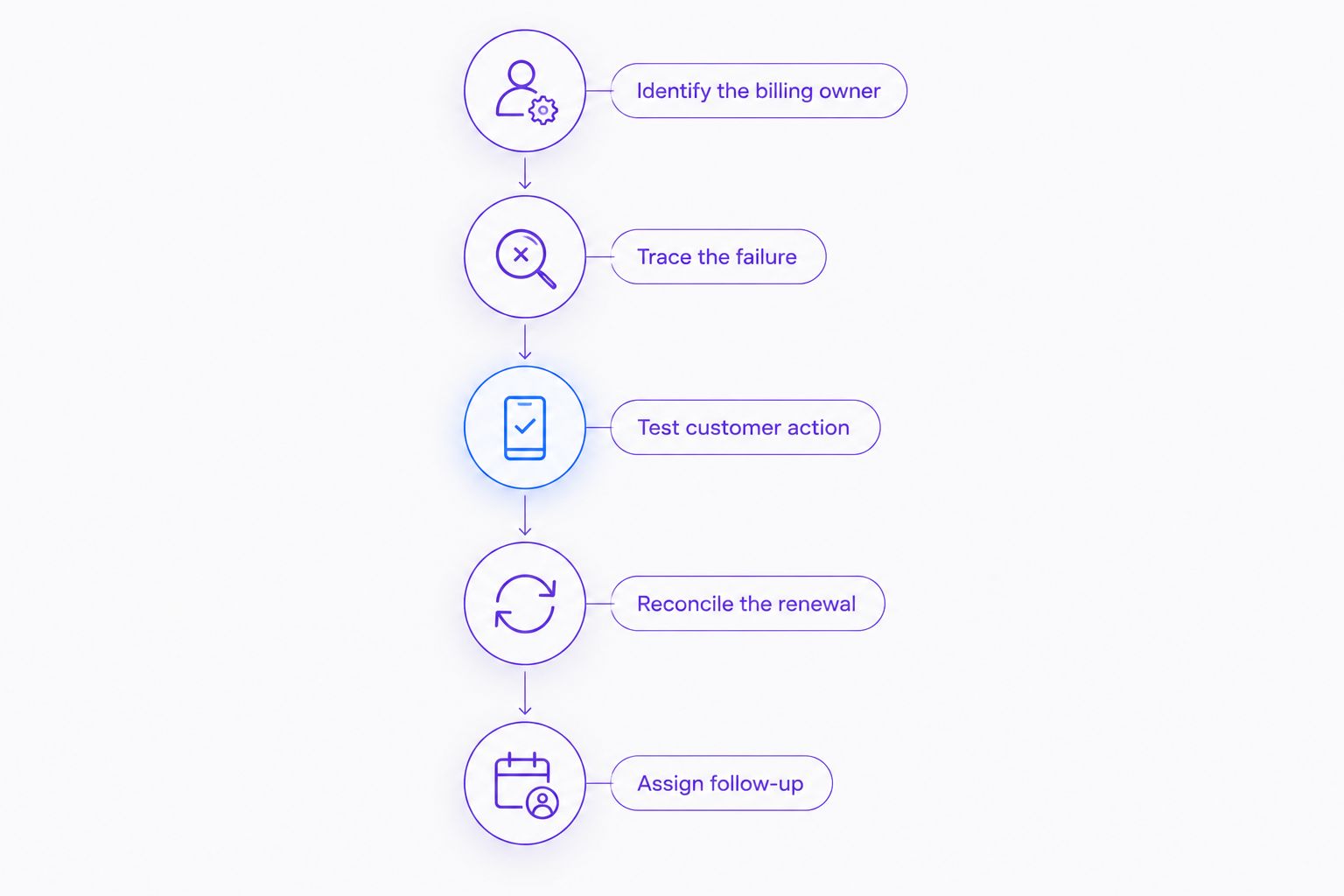
Keep the evaluation narrow enough to explain. Changing retries, messages, and account restrictions together makes it harder to identify which change caused an outcome.
Which recovery option should you choose?
For WooCommerce-managed subscriptions, start with the built-in retry workflow and give someone responsibility for unresolved renewals. Add a separate tool only when you can name the gap and confirm that the proposed integration closes it.
If Stripe Billing owns your subscriptions, evaluate its native recovery before replacing it. If nobody owns the ongoing work, compare a managed service with the real responsibilities of running software internally—not just the installation task.
Request a recovery audit when you need to trace where renewals stop progressing. Make the billing architecture, failed orders, customer messages, and unresolved-account handoff the scope of that conversation.
Discuss your recovery setup
Explain where renewals originate and who handles failed payments before choosing software or managed recovery.
FAQ
What’s the best dunning software for WooCommerce subscriptions?
Start with WooCommerce Subscriptions’ built-in retries when WooCommerce manages your renewals and your payment configuration supports them. Evaluate an additional tool only after confirming how it handles renewal orders, payment outcomes, and subscription status.
Does using Stripe with WooCommerce give me Stripe Billing recovery?
No. Processing WooCommerce payments through Stripe does not establish that Stripe Billing creates and manages your subscription invoices. Identify which system owns the recurring obligation before choosing recovery settings.
Can I use a Stripe recovery tool for WooCommerce renewals?
Only if the provider confirms support for your exact billing workflow. Ask how it identifies unpaid renewal orders, collects payment, prevents overlapping attempts, and updates subscription status.
Should I hire someone to manage failed-payment recovery?
Choose managed recovery when you need someone to own the ongoing work rather than another internally operated tool. Confirm who reviews results, maintains messages, handles replies, and escalates unresolved accounts.
Is updating a customer’s card the same as recovering a renewal?
No. A card update changes a payment method; recovery requires the unpaid renewal to be paid and reconciled. Check the original order and subscription status after payment.
Can two recovery systems run at the same time?
Do not enable overlapping recovery workflows without clear coordination. Establish which system controls payment attempts and which sends each customer message before making the change.
What should I check before switching dunning software?
Check billing ownership, retry schedules, customer messages, payment-update links, and renewal reconciliation. Document how the old workflow stops before the replacement begins.
One last thing
Test what happens after the payment succeeds, not just what happens when it fails. If the original renewal remains unpaid or access stays restricted, the recovery workflow is unfinished—even when the gateway records a successful charge.
Related guides
- How to test dunning software before switching it on
- Dunning software or managed recovery: who owns the work?
- Confirming a renewal was really recovered