
Best for delegated recovery work: Stunning Managed Recovery. Best for an internal recovery owner: Stunning Software. Best for keeping recovery inside your billing setup: Stripe’s built-in retries and emails. This 2026 guide ranks the options by who does the ongoing work, not by unsupported recovery-rate claims.
- For dunning software ranked by human support, distinguish technical assistance from someone actually running failed-payment recovery.
- Stunning Managed Recovery fits subscription businesses that need someone to review results, maintain messages, and follow up personally.
- Dedicated dunning software fits teams with an internal owner for failed-payment recovery.
- Stripe’s built-in retries and emails belong on the shortlist when your team can own the process.
Why this matters
Dunning means following up on overdue or failed payments. For a subscription software business, that includes payment retries, customer messages, payment-method updates, and decisions about unresolved accounts.
Those tasks do not all belong to the same person automatically. Your billing system can attempt a payment while nobody checks whether the customer received the reminder or whether the invoice was eventually paid.
Stunning Managed Recovery is best for subscription businesses that need someone to run failed-payment recovery, not just supply software. Technical support answers questions about a tool. Managed recovery assigns ongoing work to a service provider.
For your 2026 evaluation, start with the responsibility gap. If someone already reviews failures and maintains the process, compare software. If nobody owns those tasks, evaluate a managed service before adding another dashboard.
What makes the best human-supported dunning option
Judge support by the work included, not by whether a vendor offers a chat window. Use these criteria before reading the ranking:
- Operating ownership: Who checks results and decides what needs attention after setup?
- Message maintenance: Who reviews customer emails and changes messages when the billing process changes?
- Personal follow-up: Who handles unresolved cases that need more than an automated reminder?
- Technical assistance: Who helps investigate configuration, delivery, and integration problems?
- Decision boundaries: Who approves account restrictions, cancellation, and exceptions?
- Platform fit: Does the specific software or service support your billing platform and required workflow?
Ask vendors to describe responsibilities in writing. A helpful onboarding session does not establish who will review failed payments next month.
Human support at a glance
The order below ranks operating responsibility: delegated management first, internally managed software second, and built-in billing tools third. It is not a ranking of recovery performance, support response times, or customer satisfaction.
| Rank | Option | Best for | Standout role | Key limitation |
|---|---|---|---|---|
| 1 | Managed Recovery | Teams without a recovery owner | Ongoing results review, email maintenance, and personal follow-up | Your team still needs to approve business policies and exceptions |
| 2 | Stunning Software | Teams with an internal recovery owner | A dedicated failed-payment recovery tool | Software does not assign someone inside your business to manage recovery |
| 3 | Stripe’s built-in retries and emails | Teams keeping recovery inside Stripe | Retry and reminder controls within the billing setup | Your team must own review, message decisions, and unresolved accounts |
Platform coverage needs its own check. The brand offers failed-payment recovery software and managed dunning services for Stripe, Foxy, and Subbly subscription businesses. Confirm the platform support of the specific offering you are evaluating; do not treat the software and managed service as interchangeable.
1. Stunning Managed Recovery: best for delegated recovery work
Managed Recovery is the first option to evaluate when failed payments are accumulating and nobody owns the process. The service’s stated work includes monthly results review, keeping customer emails current, and personal follow-up.
That changes the buying decision. You are assigning recurring operational tasks, rather than buying another place to configure reminders.
Best for: Subscription businesses that need someone to operate recovery and report back on the work.
Managed Recovery pros
- Monthly review gives results a recurring place on the operating calendar.
- Email maintenance is part of the work, rather than an abandoned setup task.
- Personal follow-up addresses cases that need direct attention.
- The managed model fits a team whose main problem is missing ownership.
Managed Recovery cons
- Your business still has to define acceptable customer treatment and approve exceptions.
- A service handoff requires agreement on access, responsibilities, and escalation.
- Delegating execution does not remove your responsibility to check business outcomes.
Before hiring, ask who reviews results, what triggers a message change, and how unresolved accounts return to your team. Also establish who can approve a pause, an exception, or a cancellation. These are different permissions.
Use a paid recovery audit to establish what work needs an owner before deciding the ongoing scope. Bring failed invoices, existing retry rules, customer messages, and the names of everyone currently touching the process.
Verdict: Buy managed recovery when you need an operator, not another tool to maintain.
2. Stunning Software: best for an internal recovery owner
Dedicated dunning software fits a different situation: someone in your business already owns failed-payment recovery and needs software to support that work. The product is failed-payment recovery software, not a substitute for assigning internal responsibility.
Evaluate the tool against a written workflow. Start with what your owner needs to inspect, change, and resolve; then confirm those requirements during evaluation.
Best for: Subscription businesses with a named employee responsible for recovery operations.
Dedicated software pros
- Keeps recovery execution under your team’s direct control.
- Gives an established recovery owner a dedicated tool to evaluate.
- Lets your business retain direct responsibility for customer-message decisions.
- Fits teams that want to manage the process themselves.
Dedicated software cons
- Someone still has to review outcomes and maintain the workflow.
- Access to technical support does not establish that the vendor operates recovery.
- Unresolved accounts still need an internal escalation path.
Before choosing software, assign 1 named owner and a backup. That owner needs authority to investigate failures, request message changes, and bring billing-policy decisions to the right person.
Do not assume every function you want is included. Ask the vendor to demonstrate your actual workflow, including an unresolved invoice and a customer who replies to a reminder. A successful setup is only the beginning of the operating process.
Verdict: Buy dedicated software when an internal owner has time and authority to run it.
3. Stripe’s built-in recovery: best for keeping the setup in Stripe
Stripe’s built-in retries and emails belong in the comparison before you add a separate recovery product. They provide a starting point for teams that want to keep retry and reminder configuration within their billing setup.
The ownership question remains unchanged. Someone must review the configuration, inspect failed invoices, and decide what happens when automated recovery does not resolve an account.
Best for: Stripe subscription teams that can manage recovery internally and want to assess their existing setup first.
Stripe built-in recovery pros
- Keeps retry and reminder configuration within the Stripe billing environment.
- Gives your team a baseline to evaluate before adding another tool.
- Leaves recovery decisions directly with your billing owner.
Stripe built-in recovery cons
- Built-in controls do not appoint a recovery operator for your business.
- Your team must maintain messages and investigate unresolved accounts.
- Automation does not decide your customer-access or exception policies.
Start by documenting what is already enabled. Check who receives customer replies, who reviews exhausted retries, and who confirms that a renewal invoice was paid.
Do not replace a working configuration simply because a separate tool exists. First identify a specific task your current setup does not cover, or a responsibility your team is failing to carry out.
Verdict: Hold off on additional software until you identify a concrete workflow or ownership gap.
Technical support is not recovery management
Ask a simple question: Who changes the process after the first month? The answer separates help using software from responsibility for running recovery.
Use these distinctions in every vendor conversation:
- Technical assistance: Someone helps your operator understand or fix the tool.
- Recovery operations: Someone reviews results, maintains messages, and follows up on unresolved cases.
- Business decisions: Your team sets policies for access, cancellation, exceptions, and customer treatment.
A managed service should have a clear operating scope. Your internal team should have equally clear decision boundaries. Neither side should assume the other is handling an unresolved account.
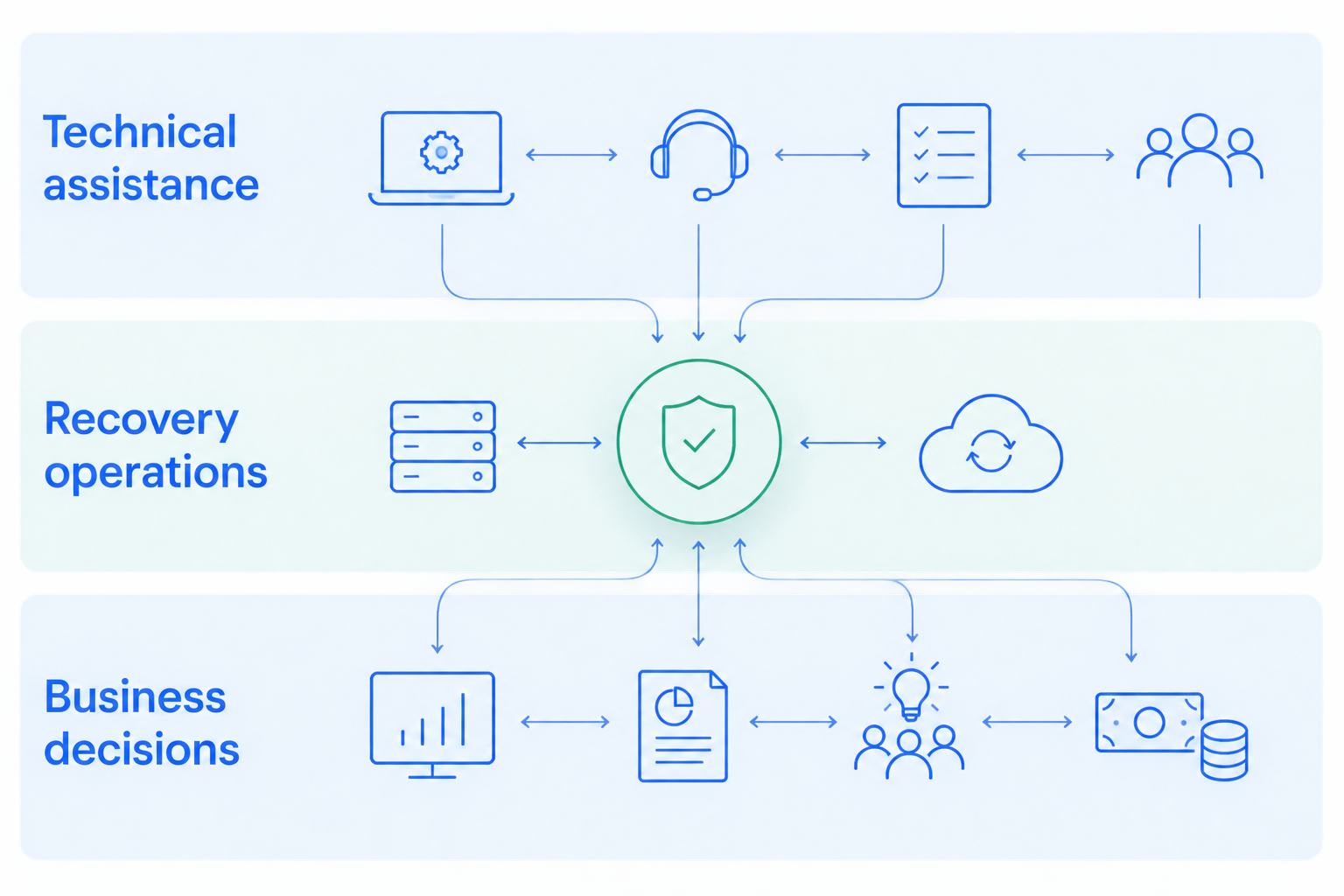
For your 2026 shortlist, turn each promised service into a named deliverable. Replace broad statements about support with explicit responsibility for review, message changes, and escalation.
How to evaluate human support before choosing
A product demonstration shows how a tool works. A responsibility review shows who will do the work after purchase. You need both when evaluating software, and a documented handoff when evaluating managed recovery.
Define the ownership gap
Write down the tasks that currently stall. Use actual unresolved invoices rather than a hypothetical ideal workflow.
Separate configuration problems from staffing problems. A reminder that is disabled needs a configuration fix; a reminder nobody reviews needs an owner.
Review a consistent invoice cohort
For an initial audit, use a 30-day invoice cohort as a practical review window. This is a suggested scope, not a performance benchmark. Follow the invoices from initial failure through their eventual outcome.
Keep the invoice group consistent when comparing reports. Do not compare one view of newly failed invoices with another view of older, already-resolved accounts.
Walk through an unresolved account
Ask the proposed operator to explain what happens after automated attempts end. Cover customer replies, requests to use a different payment method, and cases that need an internal decision.
Request the escalation route in writing. An account should not disappear between a vendor’s support team and your billing inbox.
Agree on the review output
Use a monthly review to answer practical questions: what was paid, what remains unresolved, what changed, and what needs a decision. Treat this cadence as an operating recommendation, not a guarantee of results.
The review should distinguish collected invoice payments from configuration changes or customer responses. A completed task and a recovered payment are not the same outcome.
Discuss your recovery ownership gap
Explain who handles failed payments today and where review, messaging, or follow-up stops.
How this ranking works
This 2026 ranking prioritizes ongoing human responsibility over access to product help. Monthly review, message maintenance, and personal follow-up place a managed operating model ahead of a self-managed tool on that specific dimension.
It does not establish which option collects more revenue. It also does not score response times, staffing levels, or contractual commitments.
When comparing other vendors, use the same responsibility checklist and obtain their current scope directly. Do not translate a support channel, onboarding call, or account-manager title into an assumption that someone runs recovery for you.
Which dunning option should you choose?
Choose Stunning Managed Recovery when nobody owns failed-payment recovery and you want to delegate the recurring work. Choose dedicated software when a capable internal owner needs a tool. Assess Stripe’s built-in retries and emails when your team can run the process inside its existing billing setup.
For 2026, make the decision around an explicit assignment: who reviews results, who changes messages, and who follows up. If those names are missing, settle ownership before adding automation.
FAQ
What is the best dunning option if nobody owns recovery?
A managed recovery service is the best fit when you need someone to operate the process. Confirm responsibility for results review, message maintenance, and unresolved-account follow-up before hiring.
Is technical support the same as managed dunning?
No. Technical support helps you use or troubleshoot software; managed dunning assigns ongoing recovery work to a service provider. Ask for the operating responsibilities in writing.
Should I use Stripe’s built-in retries before buying dunning software?
Assess your existing Stripe retry and email setup before adding another tool. Identify a specific workflow gap and confirm who will own recovery after any change.
When should my team manage dunning software internally?
Manage dunning software internally when a named owner has time, authority, and an escalation path. That person must review results, maintain the process, and resolve exceptions with the appropriate teams.
Does a managed service make cancellation decisions for us?
Your business should define cancellation and account-access policies. Document what the provider can execute, what requires approval, and how exceptions reach your team.
How do I compare human support between dunning vendors?
Compare assigned tasks rather than support-channel names. Ask who reviews results, changes customer messages, follows up personally, and reports unresolved accounts.
What should I prepare for a failed-payment recovery audit?
Prepare failed invoices, retry settings, reminder messages, and the current ownership map. Include unresolved accounts so the audit can examine the handoff between automation and human work.
One last thing
Pick an unresolved renewal and ask everyone involved who owns the next action. If the answers conflict, document the handoff before changing retry settings.
A retry schedule cannot resolve an ownership dispute. Give every unresolved account a next action, an owner, and a place to record the outcome.
Related guides
- Dunning software or managed recovery: who owns the work?
- Stripe failed payments: a recovery audit checklist
- Dunning management software: a monthly review agenda