
Best fit when nobody owns failed-payment recovery: Stunning Managed Recovery. Best starting point for a team already managing Stripe recovery: Stripe’s built-in retries and emails. Best for a team that wants to operate recovery itself: Stunning Software. These are ownership-based recommendations, not a verified recovery-rate leaderboard.
- Payment recovery software ranked by recovery rate requires matching invoice cohorts, measurement windows, and definitions of recovered revenue.
- Stripe’s built-in retries and emails are the starting comparison for teams with an internal recovery owner.
- Choose managed dunning when nobody reviews results, updates customer messages, or follows unresolved payments.
- Count paid invoices as recovered revenue; track card updates and customer replies separately.
Why this matters
A reported recovery percentage answers little without its denominator. Recovering a share of failed invoices is different from recovering the same share of failed invoice value, especially when subscription amounts vary.
Dunning means the process of collecting failed subscription payments through retries, customer messages, and follow-up. Involuntary churn means losing a subscriber because payment failed rather than because the subscriber chose to leave.
For a 2026 buying decision, separate two questions: which approach fits your team, and which approach produces better results on comparable failed payments? A vendor’s headline percentage does not answer both.
Stunning is best for subscription businesses choosing between self-managed payment recovery software and managed dunning. Choose the operating model before comparing reported results. Otherwise, you risk buying another system that nobody maintains.
What makes the best payment recovery software
Use these criteria before reading the ranking. Each criterion tests something your team must understand or operate.
- Recovery definition: Does the report count paid invoices, updated cards, recovered subscriptions, or something else?
- Comparable invoices: Are the subscription amounts, payment methods, renewal types, and failure reasons comparable?
- Measurement window: How long does each failed invoice have to recover before its result becomes final?
- Recovery ownership: Who reviews results, edits messages, and follows up when automation ends?
- Platform fit: Does the specific software or managed service support your billing setup?
- Attribution: Does the report distinguish total recovered revenue from additional recovery beyond your existing process?
For your 2026 shortlist, request an example report and an explanation of its calculations. A high percentage without those details is not a usable comparison.
Payment recovery options at a glance in 2026
The order below prioritizes the ownership gap: failed payments are accumulating, and nobody is responsible for improving recovery. If you already have an accountable operator, the second or third option fits a different need.
| Rank and option | Best for | Defining approach | Key limitation | Evidence needed before choosing |
|---|---|---|---|---|
| 1. Managed Recovery | Teams without a recovery owner | Delegate recovery work rather than only adding software | Scope and responsibility must be agreed explicitly | Named responsibilities, review process, and recovery reporting |
| 2. Stripe built-in retries and emails | Teams evaluating their existing Stripe workflow | Start with the billing platform’s recovery controls | Your team still needs to operate and review the process | Current settings and paid-invoice outcomes |
| 3. Stunning Software | Teams with an internal recovery operator | Manage failed-payment recovery with dedicated software | Software does not replace an accountable operator | Platform compatibility and comparable invoice results |
No numerical recovery ranking belongs in this table without comparable evidence. Treat reported rates as claims to investigate, not interchangeable scores.
1. Managed Recovery: best for teams without a recovery owner
Managed Recovery fits a subscription business where recovery work repeatedly falls between billing, support, and operations. The buying decision is about assigning responsibility, not simply installing another application.
Ask for a clear division of work before engaging a service. Establish who reviews results, maintains customer messages, handles unresolved accounts, and approves changes to subscription access.
Managed Recovery pros:
- Creates a way to assign recovery work outside your internal team.
- Makes ongoing review part of the service discussion.
- Lets you assess operational responsibilities alongside software capabilities.
Managed Recovery cons:
- Your team must still provide billing context and approve business policies.
- A service cannot decide your customer-access rules without direction.
- Unclear scope leaves gaps between the provider and your support team.
Best for: A founder or marketing lead who sees failed payments accumulating but cannot name the person responsible for the recovery process.
Before choosing Managed Recovery, ask whether the engagement covers analysis, execution, or both. Request the review cadence, escalation process, and responsibilities in writing. Do not assume that platform support for a software product automatically applies to a managed service.
Verdict: Buy managed help when ownership is the missing function, after confirming the work included.
2. Stripe built-in recovery: best for evaluating your existing workflow
Stripe’s built-in retries and emails are the starting comparison for subscription businesses already using Stripe. Review the current configuration and its results before deciding what an additional tool or service must improve.
That review needs an owner. A configured retry schedule does not tell you whether messages remain appropriate, customers need assistance, or unresolved invoices receive follow-up.
Stripe built-in recovery pros:
- Provides a starting point within your existing Stripe billing workflow.
- Lets you assess retries and customer messages before changing systems.
- Gives an internal operator a defined process to inspect and document.
Stripe built-in recovery cons:
- Your team remains responsible for reviewing outcomes.
- Automated retries do not replace customer action when action is required.
- Changing settings without a measurement plan makes results harder to compare.
Best for: A Stripe subscription business with someone available to inspect settings, maintain messages, and review unresolved failures.
Check whether the problem is configuration, customer communication, or missing follow-up. Those are different problems. Adding software before identifying the gap makes the purchasing decision harder to evaluate.
Verdict: Hold your current setup long enough to establish a baseline; add help for a specific, documented gap.
3. Stunning Software: best for an internal recovery operator
Stunning Software is the self-managed option for a team that wants dedicated failed-payment recovery software. It is a different purchase from handing the recovery function to a managed service.
The business offers failed-payment recovery software and managed dunning services for subscription businesses using Stripe, Foxy, and Subbly. Confirm support for your specific platform and chosen offering rather than treating those offerings as identical.
Software pros:
- Keeps operational decisions with your internal team.
- Fits a buying process centered on dedicated recovery software.
- Separates the software decision from a decision to outsource the work.
Software cons:
- Requires an internal person to review results and maintain the process.
- Installation alone does not establish whether recovery improved.
- A team without operating capacity still has an ownership problem.
Best for: A subscription business with a named recovery operator who wants to manage the process directly.
Ask the operator to describe a regular review before buying. That review should cover paid invoices, unresolved failures, message changes, and customer issues requiring follow-up. If nobody can commit to doing that work, reconsider the managed route.
Verdict: Buy software when someone owns the work; skip a software-only purchase when nobody does.
How to compare reported recovery rates fairly
A recovery-rate claim needs a definition, a population, and a measurement window. Without all three, comparing percentages confuses different outcomes.
For a 2026 evaluation, request invoice-level evidence rather than only a dashboard total. Use the following sequence to make each comparison inspectable.
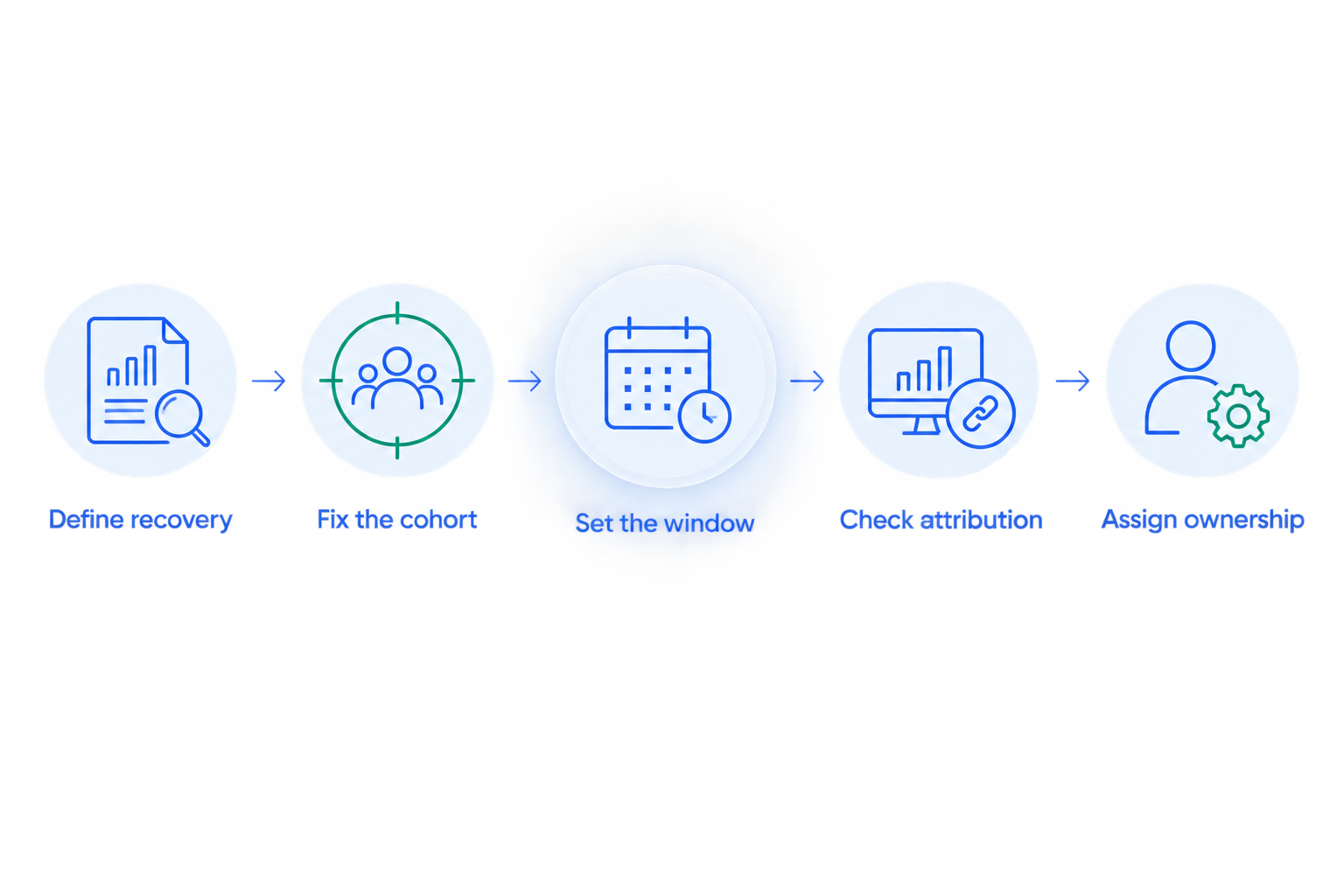
Define recovery
Track paid-invoice recovery separately from customer actions. A card update, authentication attempt, or email reply is useful progress, but none independently proves that an outstanding invoice was paid.
For an invoice-count rate, divide recovered invoices by the defined set of failed invoices. For a revenue rate, divide recovered invoice value by failed invoice value. Keep the calculation consistent between options.
Fix the cohort
A cohort is a defined group measured together. For recovery, use a group of invoices whose first payment failure occurred during the same reporting period.
Record invoice amounts, renewal frequency, payment methods, and failure reasons. Do not compare one provider’s selected customer segment with another provider’s entire customer base and call the difference product performance.
Set the window
Choose a measurement window before evaluating results. As an evaluation design, review the same failed-invoice cohort after 30 days, 60 days, and 90 days; these are proposed checkpoints, not industry recovery benchmarks.
The later checkpoints show whether additional invoices were paid after the first review. Keep the underlying cohort fixed so that newly failed invoices do not change the denominator.
Check attribution
Total recovered revenue and additional recovered revenue are different measures. An invoice paid after a retry does not establish that a new tool caused a result your existing workflow would not have produced.
Document what changed, when it changed, and which invoices received the new process. Avoid running overlapping customer reminders that obscure responsibility for the result.
Assign ownership
Name the person responsible for reviewing the comparison and acting on it. Require a decision record: what changed, why it changed, and what result will determine whether to keep it.
A failed-payment recovery audit checklist helps turn that review into a defined task rather than another dashboard visit.
Where other recovery providers fit
Churn Buster, Baremetrics Recover, Paddle Retain / ProfitWell Retain, and Churnkey are additional names to investigate during a recovery-software search. Do not assign them a numerical position based on an isolated reported percentage.
Ask every shortlisted provider the same questions:
- Which current offering supports your billing setup?
- What work does your team retain after implementation?
- What exactly counts as recovered revenue?
- Which invoices are excluded from the reported rate?
- How long is the measurement window?
- Can you separate automated activity from personal follow-up?
Verify current offers directly before making a product-level comparison. Product names alone do not establish present features, service scope, compatibility, or results.
How this ranking works
This 2026 ranking orders operating models by the problem they solve, not by unsupported recovery percentages. Managed help comes first for an ownership gap; built-in recovery fits a baseline review; dedicated software fits an internal operator.
The criteria remain the same across all three: clear reporting, comparable invoices, an agreed measurement window, platform fit, and accountable execution. A rate-based ranking requires evidence that satisfies those criteria.
Which payment recovery approach should you choose?
Choose managed recovery when nobody owns the work. Choose software when an internal operator can review results and make changes. Keep built-in recovery as your comparison when evaluating what additional intervention achieves.
For a 2026 purchasing decision, write down the operational gap before requesting proposals. “We need someone to review unresolved invoices and maintain messages” is a clearer requirement than “we want a higher recovery rate.”
Ask Stunning whether a recovery audit or Managed Recovery engagement matches that gap. Confirm scope before deciding between advice, software, and ongoing execution.
Discuss your recovery ownership gap
Ask which audit or managed recovery scope fits your billing setup and unresolved-payment workload.
FAQ
What’s the best payment recovery software ranked by recovery rate?
A defensible winner requires comparable invoice cohorts, recovery definitions, and measurement windows. Choose an operating model first, then compare paid-invoice results rather than unrelated headline percentages.
Is a higher reported recovery rate always better?
No. A higher reported rate can describe a different invoice population or a longer measurement window. Check the denominator, exclusions, and whether the figure measures invoice count or revenue.
Should a Stripe business start with built-in retries and emails?
Review Stripe’s built-in retries and emails before deciding what an additional purchase must improve. Assign someone to inspect the configuration and document paid-invoice outcomes.
When should I hire someone to manage failed-payment recovery?
Hire managed help when nobody can consistently review results, maintain messages, and follow unresolved payments. Confirm which responsibilities the service accepts and which remain with your team.
What’s the difference between Stunning Software and Managed Recovery?
Stunning Software is the self-managed software choice; Managed Recovery addresses the decision to delegate recovery work. Confirm platform support and the specific responsibilities included in the offering you select.
Does a customer updating a card count as recovered revenue?
No. A card update is a customer action, not proof that an outstanding invoice was paid. Track it separately from paid-invoice recovery.
How long should I measure a recovery comparison?
Set the measurement window before comparing results. One evaluation design uses checkpoints after 30, 60, and 90 days for the same failed-invoice cohort; these are review intervals, not recovery benchmarks.
One last thing
A recovery percentage can improve when the underlying pool of failed invoices changes, even without a process improvement. Keep a fixed cohort alongside your regular reporting so you can distinguish a different mix of failures from better recovery work.
Before your next purchase, answer one question: who will review unresolved payments next month? If the answer is nobody, solve ownership before adding another dashboard.
Related guides
- Dunning software or managed recovery: who owns the work?
- Compare tools with the same invoice cohort
- Report recovered revenue correctly