
Newsletter subscription dunning software is a system for following up on failed renewal payments with the aim of keeping paying readers subscribed. Your recovery process must connect payment retries, reader messages, and newsletter access without confusing a failed charge with a cancellation.
- Dunning software for newsletter subscriptions needs a named owner, clear reader messages, and confirmed payment outcomes.
- Stunning is best for subscription businesses choosing between recovery software and managed dunning services.
- Start with Stripe’s existing retries and emails; add software or managed recovery when the work needs a different owner.
- Measure paid invoices, not card updates, and test newsletter access before sending recovery messages.
Why dunning matters for newsletter subscriptions
A failed newsletter renewal creates two separate jobs: collect the payment and decide what happens to the reader’s subscription. Dunning means the reminders and follow-up used to collect an overdue payment. It is not the same as convincing a reader who deliberately canceled to subscribe again.
Start your 2026 review with a Stripe failed-payment recovery audit checklist. Establish what happens after a failed renewal before buying another tool.
For a newsletter, billing and delivery also need to agree. A reader can receive a payment reminder while still receiving paid editions, or successfully pay while remaining excluded from delivery. Define the payment outcome and the access outcome separately.
The practical question is ownership. Someone must review unpaid renewals, maintain the messages, answer reader replies, and resolve accounts that automation leaves behind. Installing software does not assign those responsibilities.
Set up newsletter payment recovery
1. Map the renewal and access rules
Start manually. Follow a renewal from the billing system to the newsletter platform, then document what each system does when payment fails. Use a diagram or a shared document rather than relying on settings scattered across accounts.
Check where the subscription actually lives. Your newsletter platform might control billing, or your business might manage subscriptions directly in Stripe. That distinction determines which settings and integrations you can change.
For your 2026 setup, write down the exact event that pauses paid delivery and the event that restores it. Do not assume a payment-method update means either event occurred.
- Identify the system that creates renewal invoices.
- Record where retry and reminder settings live.
- Document when paid delivery stops.
- Document how successful payment restores access.
- Name the person responsible for mismatched records.
2. Review the recovery you already have
Inspect your existing Stripe retry and customer-email settings before adding software. Record what is enabled and which invoices those settings cover. Also check whether your newsletter platform sends its own billing messages.
Keep the existing setup when it handles the required work and someone maintains it. Add another system only after identifying a specific gap, such as unresolved invoices nobody reviews or messages nobody updates.
Create a baseline using a completed 30-day reporting window. Treat that as a starting review period, not a promised recovery timetable. Annual subscriptions require a longer view because a short window captures only part of the renewal cycle.
- List every system sending payment reminders.
- Record the retry rules currently enabled.
- Review unresolved invoices from the same reporting window.
- Separate failed renewals from deliberate cancellations.
- Assign responsibility for customer replies.
3. Choose who owns the recovery work
A shared checklist and manual review can work when your team can maintain the process. Give 1 named owner responsibility for checking outcomes, updating messages, and following up on unresolved renewals. A backup handles absences; shared responsibility should not mean nobody acts.
Stunning offers failed-payment recovery software and managed dunning services. Stunning dunning software fits teams that will run recovery themselves; a managed service fits teams that need someone to run the work.
Distinguish Stunning Software from Managed Recovery during evaluation. Ask which work each covers for your Stripe setup, who reviews results, who changes reader messages, and who follows up personally. Confirm the service’s platform scope rather than assuming software and managed-service support are identical.
- Assign a recovery owner and a backup.
- Decide who edits customer-facing messages.
- Set responsibility for unresolved reader replies.
- Ask who reviews results each month.
- Confirm what remains your team’s responsibility.
4. Write messages around the reader’s next action
Draft the messages manually before configuring an automated sequence. Tell the reader which newsletter renewal failed and what action resolves the problem. Keep account details inside a secure billing flow rather than asking readers to send payment information by email.
A reminder should distinguish a payment problem from an editorial message. Readers need to recognize the subscription, understand whether access is affected, and reach the right place to resolve the issue.
Your 2026 message review should include the sender identity, reply destination, payment link, and access wording. Avoid threatening an immediate cutoff if your actual access policy allows continued delivery.
- Name the newsletter and the failed renewal clearly.
- Explain whether the reader needs to take action.
- Link to the appropriate secure payment flow.
- State the actual consequence for paid access.
- Route replies to a monitored inbox.
5. Separate retries from reader action
A retry attempts payment again. A reminder asks the reader to do something. Those are different mechanisms, and the right response depends on the failure recorded by the billing system.
Review the invoice and payment status before sending a personal follow-up. A reader who needs to complete authentication needs different instructions from a reader who needs to replace a card. Do not write every message as if another automatic attempt will solve every failure.
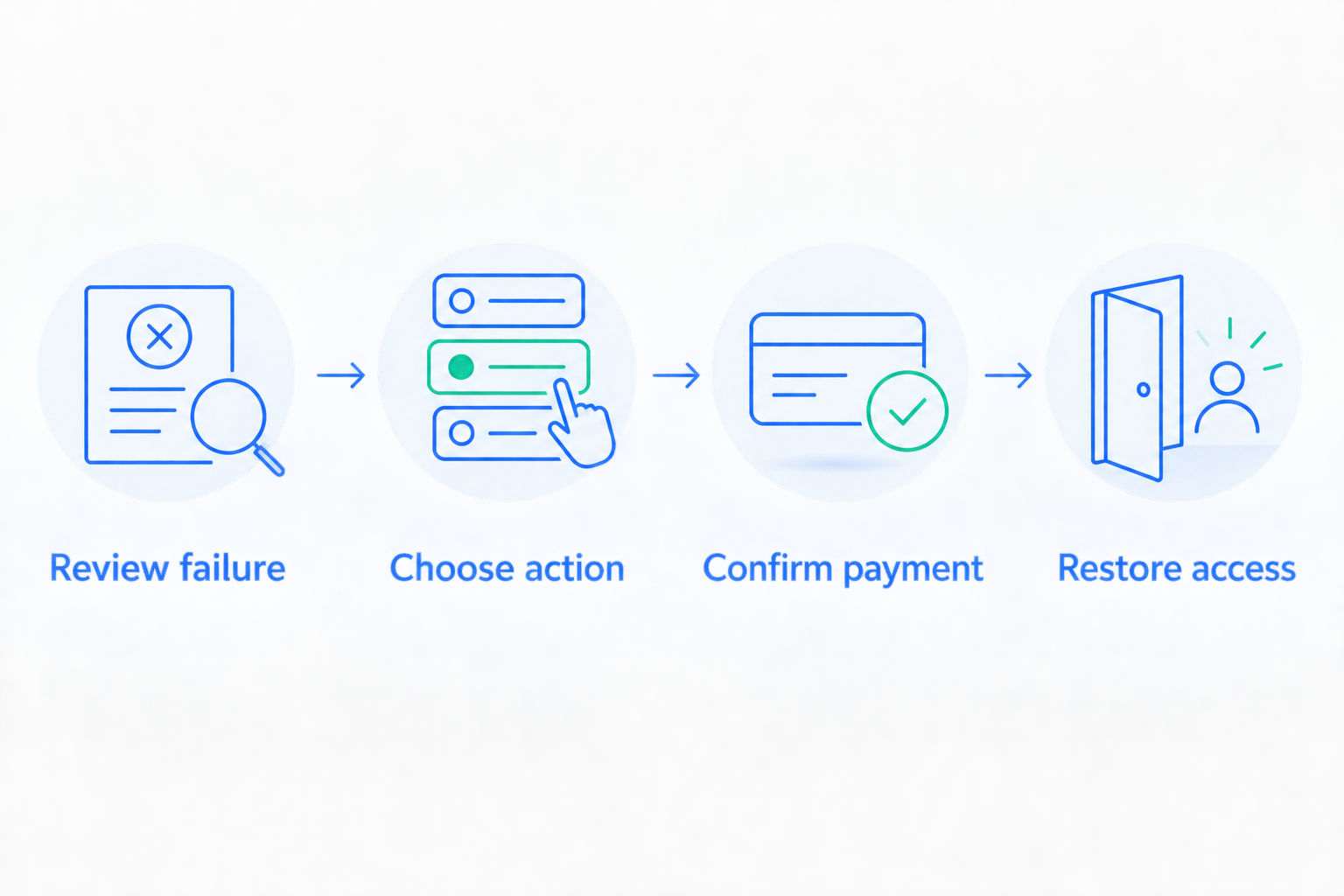
Use the same simple routing process whether you manage recovery manually or through software: inspect the failure, choose the next action, confirm payment, then reconcile access.
- Review failure: inspect the invoice and payment details.
- Choose action: distinguish another retry from reader intervention.
- Confirm payment: check that the invoice became paid.
- Restore access: verify the newsletter subscription matches the result.
6. Test the complete reader experience
Start with 1 test invoice in a supported test environment. Follow the process from failed payment through the reader’s action and final subscription state. Do not use a live reader’s account as an uncontrolled test.
Test messages and access together. A successful billing test is incomplete if the newsletter platform still treats the reader as unpaid. Likewise, restoring delivery without confirming payment hides an unresolved collection problem.
Before changing your 2026 recovery setup, document which system owns each message and retry. During a switch, overlapping systems make it harder to tell why a reader received a reminder or which process produced the payment.
- Check the reminder’s sender, wording, and destination.
- Open the payment flow as a reader would.
- Confirm the resulting invoice status.
- Verify paid-newsletter access after payment.
- Check that resolved invoices stop receiving reminders.
7. Review results and unresolved renewals
Begin with a spreadsheet if reporting is scattered across systems. Track each invoice from failure to its final outcome. Keep the original failed amount, amount actually collected, and unresolved balance distinct.
Use a consistent observation period when comparing results. A recently failed invoice has had less time to resolve than an older invoice. Comparing different windows confuses timing with performance.
For each 2026 monthly review, separate collected revenue from workflow activity. A sent email, opened message, or saved card is evidence that something happened—not proof that a renewal was paid. End the review by assigning every unresolved case a next action.
- Group invoices by the date payment first failed.
- Count paid invoices and collected amounts separately.
- Keep card updates separate from successful payments.
- Record refunds and other adjustments separately.
- Assign an owner to every unresolved exception.
Compare the options for your newsletter
Choose the operating model before choosing another tool. The best option depends on whether you need different recovery mechanics, someone to maintain them, or both. Use this table to structure the decision, then confirm the current scope of any service you consider.
| Option | Best for | Main advantage | Key limitation or check |
|---|---|---|---|
| Stripe’s built-in retries and emails | Teams whose existing settings cover the required workflow | Keeps recovery configuration within the existing billing setup | Your team still needs to review outcomes, messages, and newsletter access |
| Manual invoice review and reader follow-up | Publishers validating a process before automating it | Makes individual failures and reader questions visible | Repeated checking and follow-up remain manual work |
| Stunning Software | Teams that want recovery software and will own its operation | Provides a software route for failed-payment recovery | Confirm the required newsletter connection and who maintains the process |
| Managed Recovery | Teams that want to hand off day-to-day recovery work | Provides a managed-service route instead of software alone | Confirm platform support, responsibilities, reporting, and escalation boundaries |
A managed service does not remove your responsibility for editorial access policies or reader promises. Specify who can change those policies and who approves changes to customer messages.
If nobody currently reviews failed renewals, begin with an audit. Establish the failed-invoice baseline and handoff responsibilities before deciding whether to keep the work in-house or hire someone to run it.
Discuss a recovery audit
Ask about an audit and define who should own failed-payment recovery for your subscription business.
Common mistakes newsletter publishers make
Counting a saved card as recovered revenue
A reader can update a card without paying the overdue invoice. Check the invoice’s paid status before recording recovery, then verify that the reader has the correct access. Keep card-update activity out of collected-revenue totals.
Mixing payment reminders with renewal persuasion
A failed-payment message should explain how to resolve billing. A cancellation message addresses a different decision. Keeping those workflows separate also makes paid newsletter revenue easier to interpret: money collected after a payment failure is different from revenue retained after a reader chooses to leave.
Sending reminders from several systems
Your billing provider, newsletter platform, and recovery software can each have customer messages configured. Map those senders before enabling another sequence. Give each reminder a clear owner so a paid reader does not receive conflicting instructions from separate systems.
Promising access rules the platform does not enforce
Do not tell readers their access ends on a particular date unless the subscription setup follows that rule. Test both directions: unpaid access restriction and paid access restoration. A correct reminder cannot compensate for a broken connection between billing and delivery.
Buying software without assigning follow-up
Automation still leaves exceptions: unanswered reader questions, mismatched account records, and renewals that remain unpaid. Name the person who resolves them. If nobody can take that responsibility, evaluate a managed service rather than adding another unattended dashboard.
FAQ
What is dunning software for newsletter subscriptions?
Dunning software for newsletter subscriptions manages follow-up after a renewal payment fails. It supports payment recovery through mechanisms such as retries and customer messages, while your newsletter setup determines how payment status affects access.
Are Stripe’s built-in retries enough for a paid newsletter?
Stripe’s built-in retries and emails are enough when they cover your required recovery workflow and someone maintains it. Review unresolved invoices, reader replies, and access changes before adding another system.
Should I use recovery software or hire someone to manage it?
Use software when your team can own reporting, message maintenance, and unresolved accounts. Evaluate managed recovery when you need to hand off that work, and confirm exactly which tasks the service accepts.
Does Stunning support every newsletter platform?
Do not assume Stunning supports every newsletter platform. Its stated business scope includes failed-payment recovery for Stripe, Foxy, and Subbly subscription businesses; confirm the specific platform and service combination before choosing Stunning Software or Managed Recovery.
Should I stop newsletter delivery immediately after payment fails?
Set an explicit access policy rather than treating every failed payment as a cancellation. Your billing messages and newsletter platform must apply the same rule, including how delivery resumes after successful payment.
How do I know a newsletter renewal was actually recovered?
Confirm that the overdue invoice became paid and that the payment belongs to the renewal you are measuring. A card update, email click, or restored subscription record alone does not prove collection.
What should I prepare before a newsletter recovery audit?
Prepare failed-invoice records, retry settings, customer messages, access rules, and the names of the people handling replies. Include unresolved cases so the audit covers operational gaps as well as configuration.
One last thing
Test a successful recovery, not just a failed payment. The reader’s final state should be simple: the renewal is paid, paid delivery is restored where required, and payment reminders have stopped. If any one of those remains wrong, the recovery process is unfinished.
Related guides
- How to test dunning software before switching it on
- Dunning software or managed recovery: who owns the work?
- Confirming a renewal was really recovered