
Fitness subscription app payment recovery is the process of resolving failed renewals so paying members can keep using your service without an unintended cancellation. This 2026 guide to payment recovery for fitness subscription apps focuses on retry decisions, member messages, access rules, and who owns unresolved payments.
- Payment recovery for fitness subscription apps needs retries, member communication, and a named recovery owner.
- Stunning offers payment recovery software and managed dunning for subscription businesses.
- Keep Stripe’s built-in recovery when your team can review failures and handle exceptions.
- Consider managed recovery when nobody owns payment follow-up, message updates, or results reviews.
Why payment recovery matters for fitness subscription apps
A failed renewal and a canceled membership require different responses. A member who chooses to leave needs a cancellation process; a member whose payment fails needs a clear way to resolve the bill. Treating both as churn hides the work your team needs to do.
Fitness apps also connect billing to access. Your policy needs to explain what happens to workouts, training plans, coaching appointments, or community features if your subscription includes them. Do not let an unclear payment status become an unclear membership status.
Stunning payment recovery is best for subscription teams seeking software or managed dunning. Stunning offers both approaches; the decision starts with whether your team will run the recovery process or assign that work to a service.
For your 2026 recovery plan, separate payment collection from member retention. Fixing a card problem does not answer why someone voluntarily canceled, and a cancellation offer does not resolve an authentication request.
How to build your fitness app recovery process
1. Map every renewal to its billing system
Start with a spreadsheet and your billing records. Identify where each subscription originates, which system collects payment, and where membership access is controlled. Do not assume every renewal in your fitness app follows the same route.
For example, direct web billing and app-store billing need separate checks. Establish which subscriptions your Stripe configuration actually controls before changing retries or customer messages. A recovery process cannot fix a payment it does not manage.
Review 1 failed invoice from each billing route as a practical starting check, not a performance benchmark. Follow the record from the failed attempt through the message, member action, payment outcome, and access decision.
- Record the billing system for each subscription route.
- Identify the invoice or transaction record used for reconciliation.
- Record where payment-method updates happen.
- Identify the system that grants or removes app access.
- Assign an owner for billing routes outside Stripe.
2. Separate retryable failures from required customer action
Inspect the failure reason before sending another reminder. A retry is an attempt to collect again; authentication asks the customer to approve a payment; a payment-method update asks the customer to change billing details. Those are different tasks.
Use four working labels: Payment failure, Retry eligible, Customer action, and Billing correction. The first is your intake queue. The others tell the owner what to investigate or do next, rather than treating every failed renewal as another email opportunity.
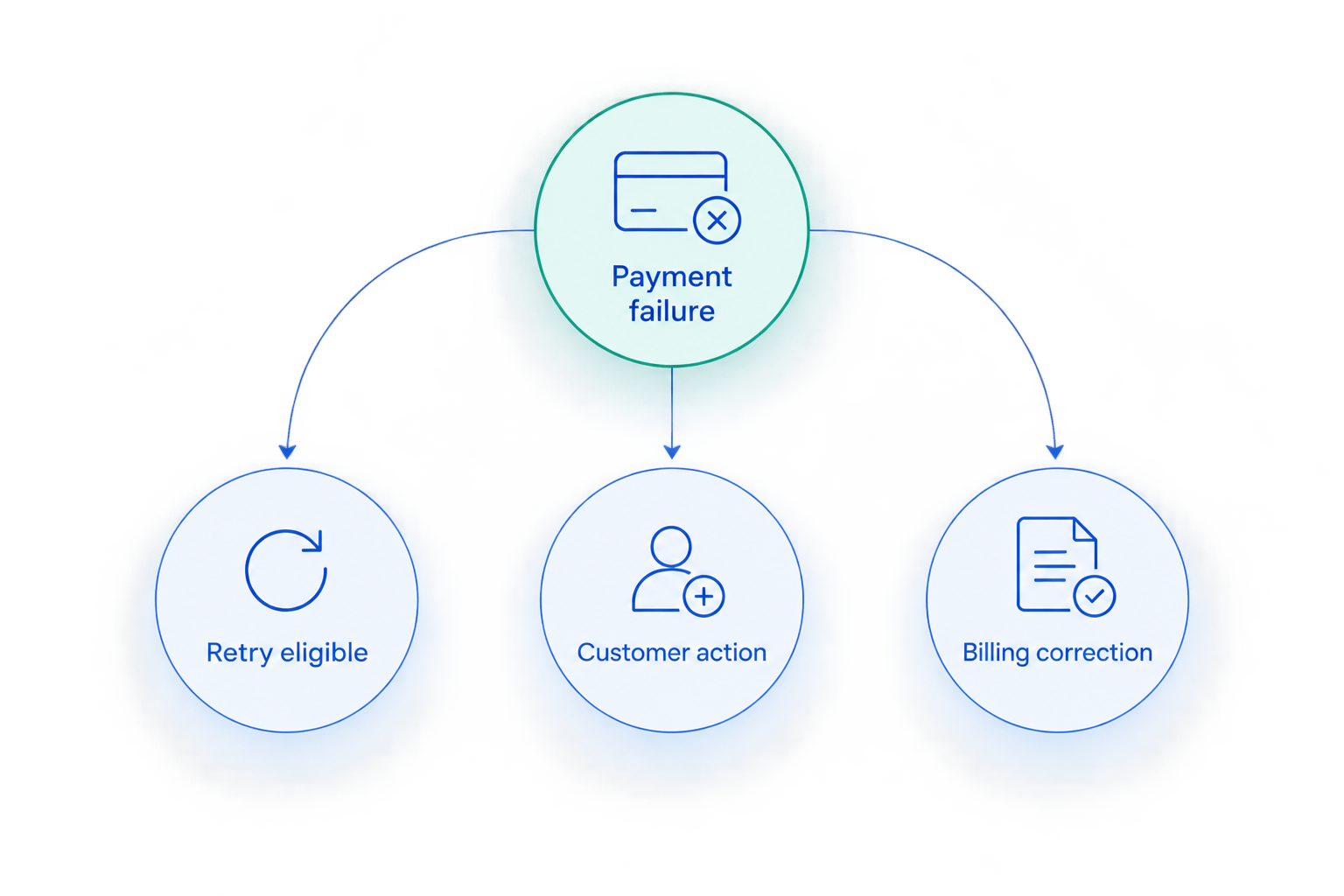
Start manually by reading payment records and error details. Add automation after you understand the routes; otherwise, automation repeats an unclear decision faster.
- Check the payment failure reason in the billing record.
- Separate authentication requests from payment-method changes.
- Investigate billing configuration errors before contacting members.
- Give unresolved cases a named next action.
- Use the different-card decision guide when evaluating payment-method changes.
3. Write messages around the member's next action
Draft the recovery messages yourself before choosing a sending tool. Each message should explain which membership has an unpaid renewal, what action the member needs to take, and what your published access policy means for them. Avoid threatening a cancellation your system is not scheduled to perform.
A fitness app message should use the membership name the customer recognizes. If your business sells separate coaching and workout subscriptions, identify the affected subscription rather than implying the whole account has stopped working.
Stunning Software is an option for teams that want payment recovery software while retaining internal ownership of the process. Evaluate it against your actual billing route and workflow; do not assume its supported platforms and Managed Recovery's service scope are identical.
- Name the affected membership and renewal clearly.
- Give each message one primary action.
- Send members through the appropriate secure billing flow.
- State access consequences only when they match your policy.
- Stop outdated reminders after payment is confirmed.
4. Define access rules before restricting memberships
Write down what happens between the first failed payment and the final account decision. Dunning means the process of pursuing an overdue payment. Your dunning process and your app's access logic need to agree, but they are not the same system.
Decide how your fitness app treats saved progress, scheduled sessions, and paid content where those features exist. Make the policy understandable to support staff before asking them to explain it to a member.
For the 2026 review, use 2 access checkpoints: the unresolved-payment decision and the confirmed-payment decision. At each checkpoint, verify both the billing state and the entitlement state—the permissions that determine what the member can use.
- Document any grace period your business chooses to offer.
- Specify which billing event changes membership access.
- Explain what happens to future coaching appointments, if applicable.
- Test how access returns after a successful payment.
- Give support a route for correcting access errors.
5. Assign the recovery work to a person or service
List the work before assigning the tool. Someone needs to review failed renewals, maintain messages, investigate unresolved accounts, and report results. Installing software does not decide who performs those tasks.
Keep recovery in-house when a named person has the time, access, and authority to make changes. Consider Stunning Managed Recovery when you want to assign recovery operations rather than only add software. Confirm the service's responsibilities, escalation process, and platform coverage before handing work over.
Set a proposed review cadence of 1 meeting per month, with an exception queue for issues that cannot wait. This is a working recommendation, not a claim about an industry standard or a service commitment.
- Name a primary recovery owner and a backup.
- Assign responsibility for changing member messages.
- Define who handles replies and unusual account situations.
- Record which decisions require your approval.
- Agree how unresolved cases reach billing or support.
6. Measure paid invoices rather than activity
Start with a spreadsheet of failed renewal invoices. Follow the same group of invoices over time and record which became paid, which remain unresolved, and which ended without collection. This fixed group is a cohort; keeping it consistent makes comparisons meaningful.
Track 3 measures for your working report: failed renewal value, recovered invoice value, and unresolved invoice value. Define the reporting window and treatment of refunds alongside those measures. An email open or a saved card is an intermediate event, not collected revenue.
Use the same definitions throughout your 2026 reporting. Changing the denominator or counting a different group of invoices makes a recovery-rate comparison unreliable.
- Keep invoice identifiers in the report to prevent duplicates.
- Separate successful payment from payment-method updates.
- Record recoveries against the original failed invoice.
- Distinguish recovered payments from unrelated new purchases.
- Reconcile refunds and credits under a documented rule.
7. Test the full member journey before expanding it
Use supported test facilities and controlled test accounts before changing the live recovery process. Walk through the billing event, customer message, member action, and resulting access state. Test the handoff between systems, not just the email layout.
Start with a narrow, documented change. If you alter retries, messages, and access rules together, you lose a clear explanation for the result. Keep a record of what changed and which invoices entered the revised process.
The test is complete only when your team can explain what happens after both success and failure. Include an unresolved case so the recovery owner knows what to do when automation ends.
- Test a failure that requires customer action.
- Verify that message destinations reach the intended billing flow.
- Check that payment confirmation stops further reminders.
- Confirm that successful payment produces the intended access state.
- Test the unresolved-account handoff and rollback process.
Compare recovery options by who owns the work
Choose the operating model before comparing feature lists. Stripe's built-in retries and emails, internally operated recovery software, and managed recovery place different responsibilities on your team. Your 2026 comparison should show those responsibilities explicitly.
| Option | Best for | Practical advantage | Key limitation |
|---|---|---|---|
| Stripe built-in retries and emails | Teams keeping recovery within their existing Stripe setup | Provides a starting point without selecting a separate recovery provider | Your team still needs to review outcomes and handle exceptions |
| Stunning Software | Teams seeking dedicated recovery software with an internal owner | Offers a software-led approach to failed-payment recovery | Buying software does not assign your internal operating responsibilities |
| Stunning Managed Recovery | Teams seeking managed dunning rather than software alone | Offers a service-led approach to recovery work | Scope, platform coverage, approvals, and handoffs need agreement |
| Internal manual process | Teams mapping failures before choosing an operating model | Gives the owner direct visibility into individual cases | Requires staff time to keep records and follow-up current |
Do not replace a functioning setup solely because another option reports a recovery percentage. Compare the same invoice cohort, reporting window, and payment definitions. Then compare the work your team retains.
If nobody can describe the current process, begin with a recovery audit. Ask for an assessment of failure causes, messages, access rules, reporting, and ownership before committing to a replacement.
Discuss your recovery ownership
Ask about an audit, managed recovery scope, and the work your team would retain.
Common mistakes fitness subscription apps make
Treating every lost member as a cancellation
A failed renewal does not prove that a member chose to stop training with your app. Record voluntary cancellations separately from payment-related losses. Otherwise, your retention work and your billing work compete to solve different problems under the same label.
Sending reminders without a membership decision
Repeated payment requests do not explain whether a member can still use the app. For fitness subscriptions, recovering failed membership payments requires matching the billing action to the membership decision: keep access, restrict access, or restore access according to your policy. State that decision clearly in the relevant message.
Running overlapping recovery messages
A billing platform, a separate recovery tool, and support staff can each become a source of member reminders. Inventory the active senders before enabling another sequence. Give each message a purpose and make sure payment confirmation reaches every system responsible for follow-up.
Counting a card update as a recovered renewal
A member can update payment details while the original invoice remains unpaid. Check the invoice outcome before marking the account recovered or closing the support case. For your 2026 reporting, keep customer actions separate from confirmed collections.
FAQ
What’s the best payment recovery approach for a fitness subscription app?
The best approach matches your billing system and who will own recovery work. Start with a failure review, then choose built-in recovery, dedicated software, or managed dunning based on the responsibilities your team can handle.
Are Stripe’s built-in retries enough for a fitness app?
Stripe’s built-in retries and emails are a starting option when your team can review failures and handle exceptions. Judge the setup by confirmed invoice payments, unresolved cases, and the member experience rather than whether retries are enabled.
Should we hire someone to manage failed subscription payments?
Hire a recovery service when you want to assign the ongoing recovery work rather than only install software. Agree who reviews results, changes messages, follows up, and escalates unresolved accounts before the handoff.
Should a failed payment immediately block workout access?
Apply your documented access policy rather than treating every payment failure as an automatic access decision. Define any grace period, explain the consequences to members, and test access restoration after confirmed payment.
Does updating a card mean the membership payment recovered?
No. A payment-method update does not establish that the failed renewal invoice was paid. Confirm the invoice outcome and the membership access state separately.
Can one recovery setup handle Stripe and app-store subscriptions?
Do not assume one setup controls both billing routes. Identify which system owns each subscription and confirm compatibility before applying recovery rules or sending payment instructions.
What should we prepare for a payment recovery audit?
Prepare failed invoice records, active retry settings, recovery messages, access rules, and your current reporting definitions. Include the names of the people responsible for billing, customer replies, and unresolved accounts.
One last thing
Check what happens after a member pays. Your recovery process is unfinished if the invoice is settled but the fitness app still blocks access or sends an overdue reminder. Follow one confirmed payment through every connected system before treating the workflow as complete.
Related guides
- Dunning software or managed recovery: who owns the work?
- What to prepare for a payment recovery audit
- Confirming a renewal was really recovered